The TanukiTrade GEX Live WebApp turns raw options-chain data into
minute-refreshed Gamma Exposure, Expected Move, and market structure you can analyze throughout the trading session —
on 250+ U.S. symbols . Below is our entire journey: every milestone, on one living timeline.
Two sides of the same coin
The TanukiTrade universe is the same on
TradingView and in the GEX Live WebApp —
same symbols, same GEX engine, one PRO membership. We just deliver it two ways.
On TradingView
Your chart. Our levels. Automatically.
6 PRO indicators painted on the chart you already trade
GEX, HVL, walls, IV and expected move — in your layout
Zero tab-switching. The universe comes to TradingView.
+250 more, incl. /GC → GLD, XAUUSD → GLD & BTCUSD → IBIT · View full list
30
Releases and counting
Continuous upgrades are included. One PRO membership keeps getting more valuable.
See it in action
Inside the GEX Live WebApp
Real screenshots from the live product — gamma structure, GEX Replay history, classification zones, level analysis
and the daily Market Prep, all refreshing minute-by-minute for PRO members.
One subscription unlocks the full GEX Live WebApp and the TradingView PRO indicator suite.
No add-ons, no tiers, no upsells — just the whole toolkit.
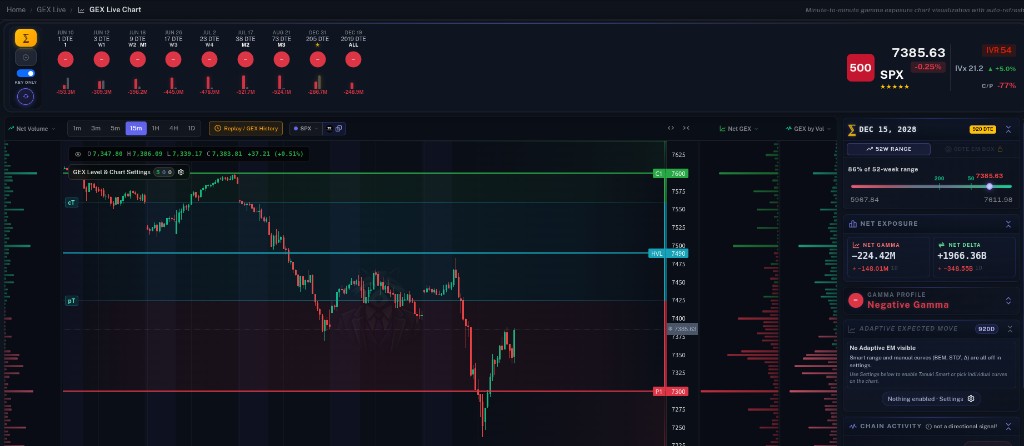
GEX Live Chart
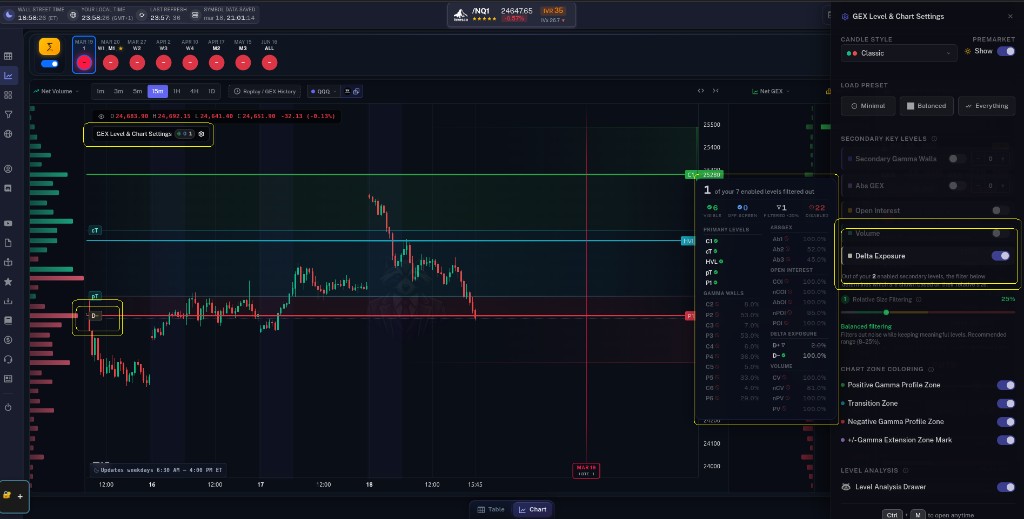
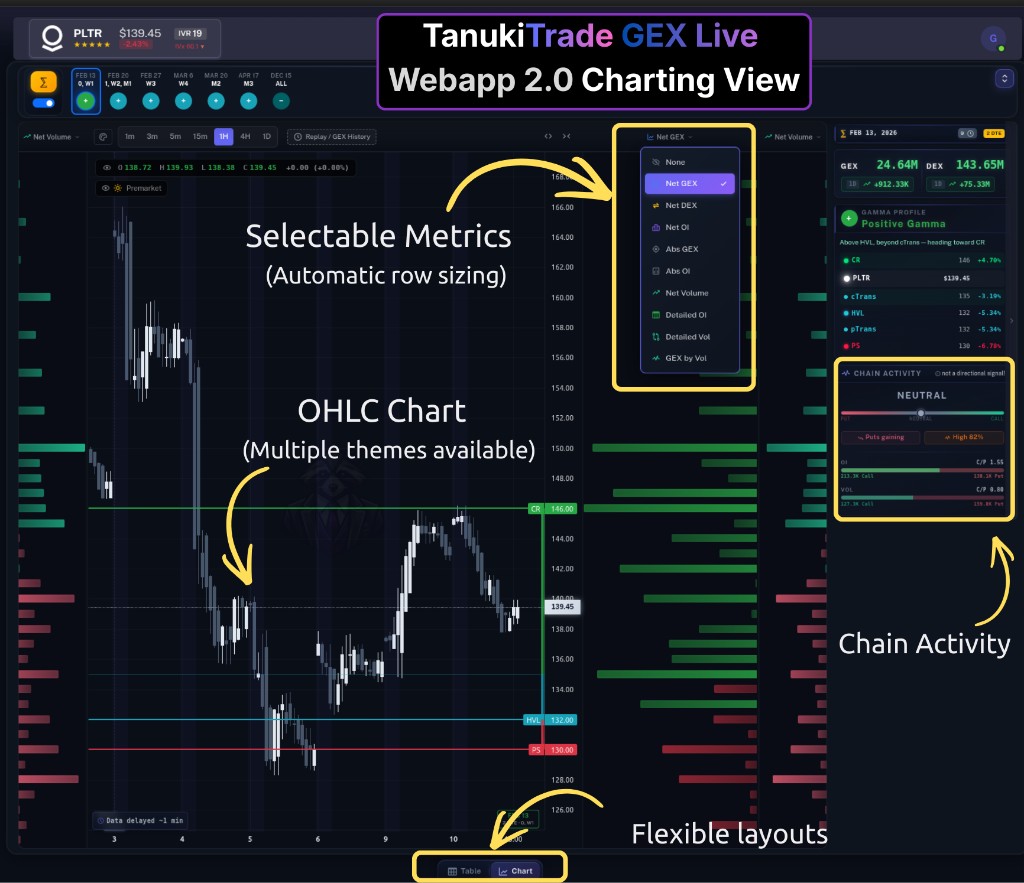
Real, auto-updated Gamma Exposure painted on a live chart — NETGEX, Gamma Flip (HVL), Call/Put gamma walls, key levels and expiry bubbles, so you can see where options exposure is concentrated and how gamma structure develops around key price levels.
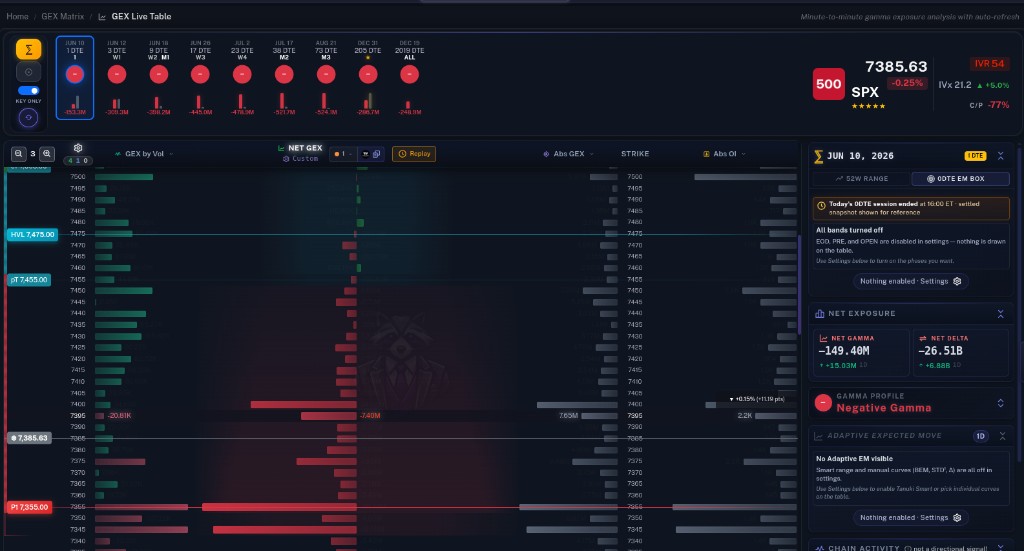
GEX Live Table
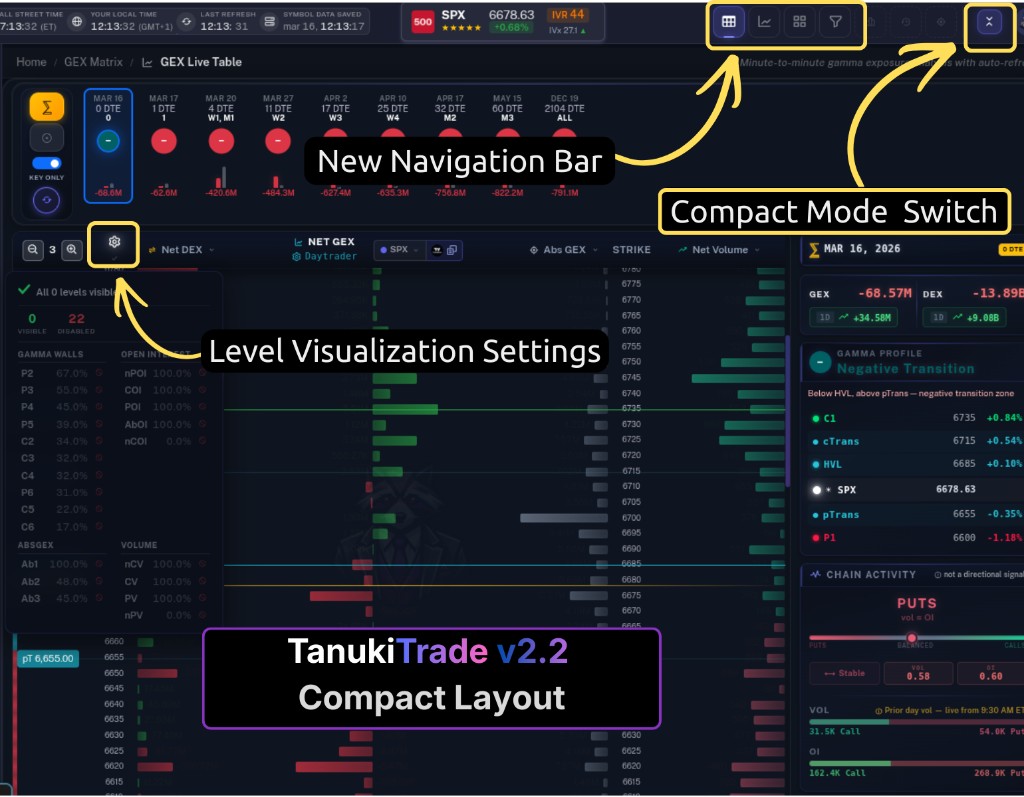
The whole board at a glance. Scan gamma structure, walls and flips across symbols in one dense, fast table built for serious pre-market and intraday review.
Expected Move & Adaptive EM
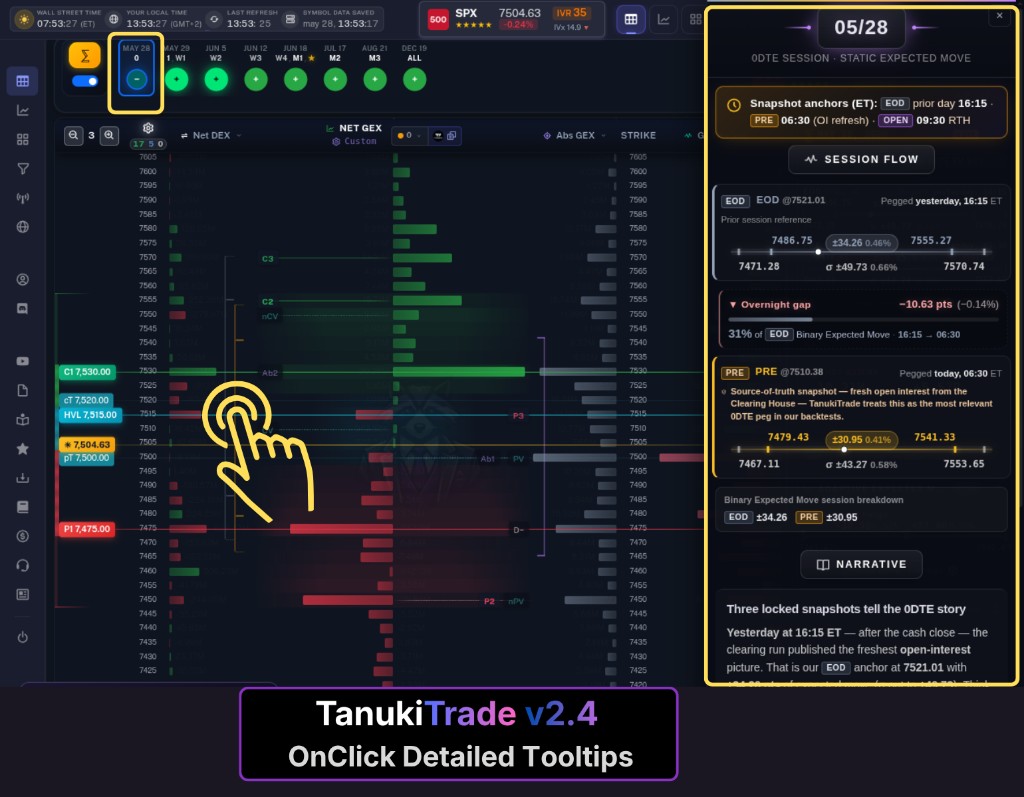
A pegged 0DTE Expected Move box plus Tanuki Smart adaptive EM curves projected from spot across expiries — overnight gap, session flow and 0DTE narrative in one drawer.
GEX Replay / History
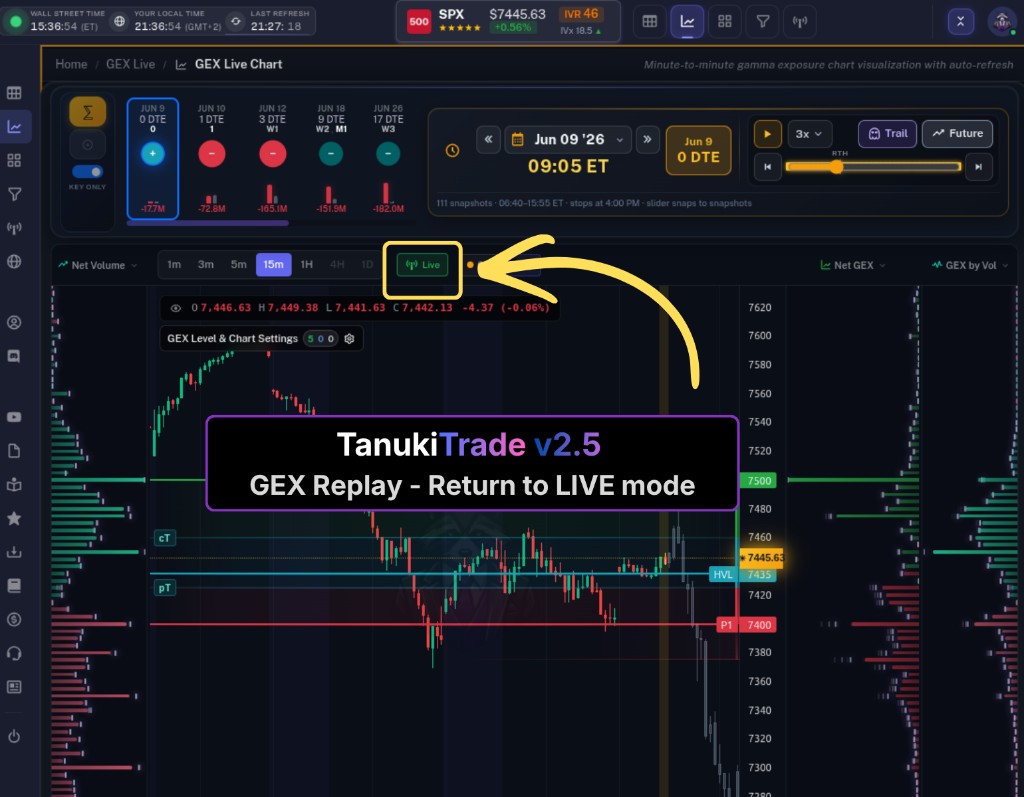
A DVR for the options structure. Pick a past trading day, scrub through saved moments and watch how gamma walls, HVL and price actually evolved — then jump back to live.
Options Screener & Metrics
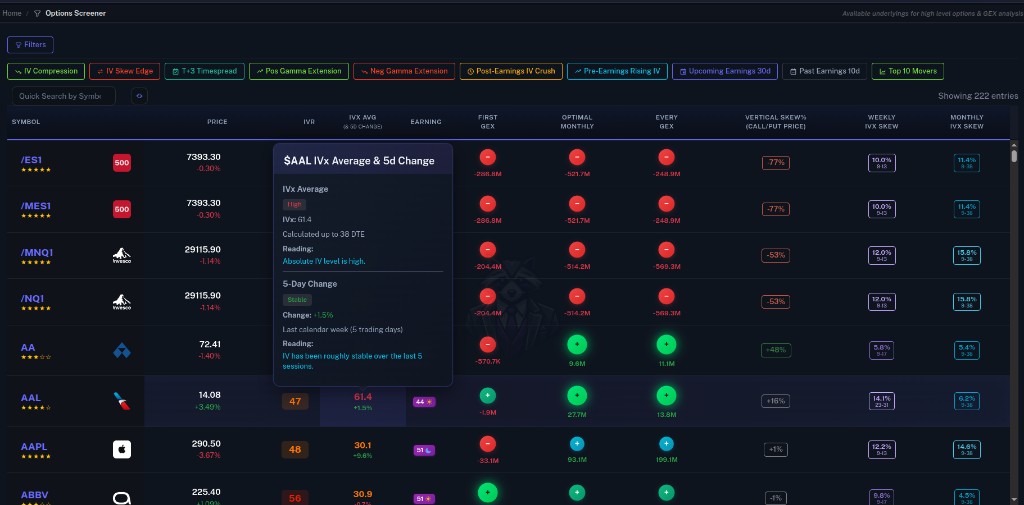
Real IVRank, IVx, Δ-distances, expected-move and skew across the universe — screen the market for the exact structure your strategy needs.
6 PRO Indicators + Community
The Auto-GEX, Overlay, Oscillator, Screener, 0DTE Expected Move Box and GEX History PRO indicators on TradingView, plus a Discord community for daily GEX context and educational discussion.
The TanukiTrade Journey
Every release. One living timeline.
From the very first PRO indicators on TradingView to real-time GEX, Expected Move and Replay —
this is how much the platform has grown, and how fast it keeps moving. PRO members get all of it.
2026
v2.8Feature
August 30, 2026
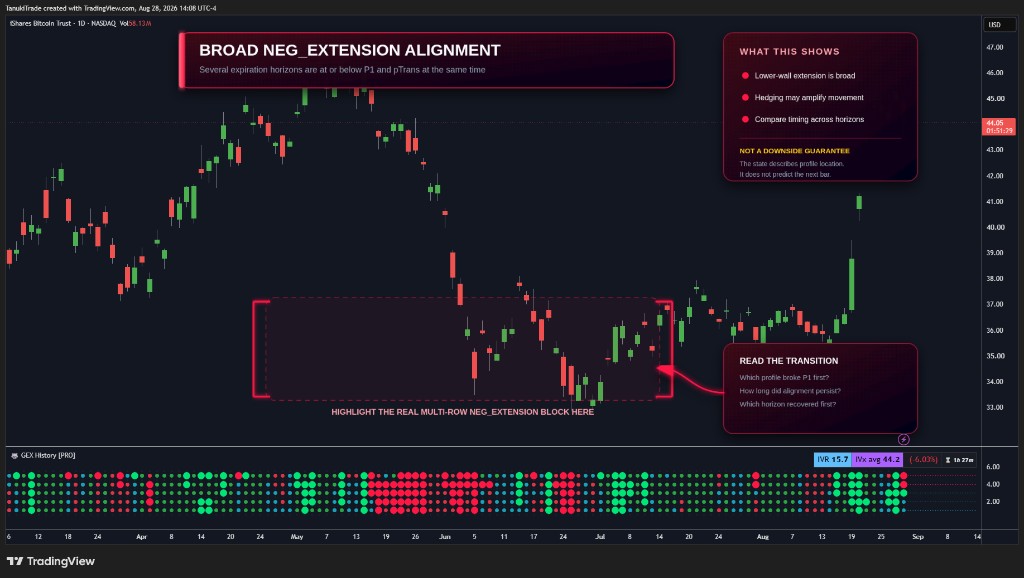
TradingView — GEX History: Multi-Expiry Gamma State Timeline
New TradingView pane for swing traders: five expiry horizons as a historical gamma-state timeline so you can read duration, sequence, and breadth without flipping GEX Profile settings. Complements GEX Profile PRO — Profile stays the detailed selected-expiry map; History is the multi-expiry regime journal. TradingView indicator only (not a WebApp release).
New Features
Five horizons in one pane — 0 (first expiry / 0DTE when it exists), W1, M1, M2, and ALL, aligned to the chart candles.Six gamma states — POS / NEG, their transition bands around HVL, and extension beyond C1 / P1. Color and circle size encode the regime.Duration, sequence, breadth — how long a state held, which horizon flipped first, and how many horizons agree.Same 5× daily TradingView refresh as the rest of the PRO stack. GEX is regime context, not a directional signal — confirm with momentum.
Improvements
Works on daily and below (weekly is too high). Use History for the path; keep GEX Profile PRO for the expiry you are trading.
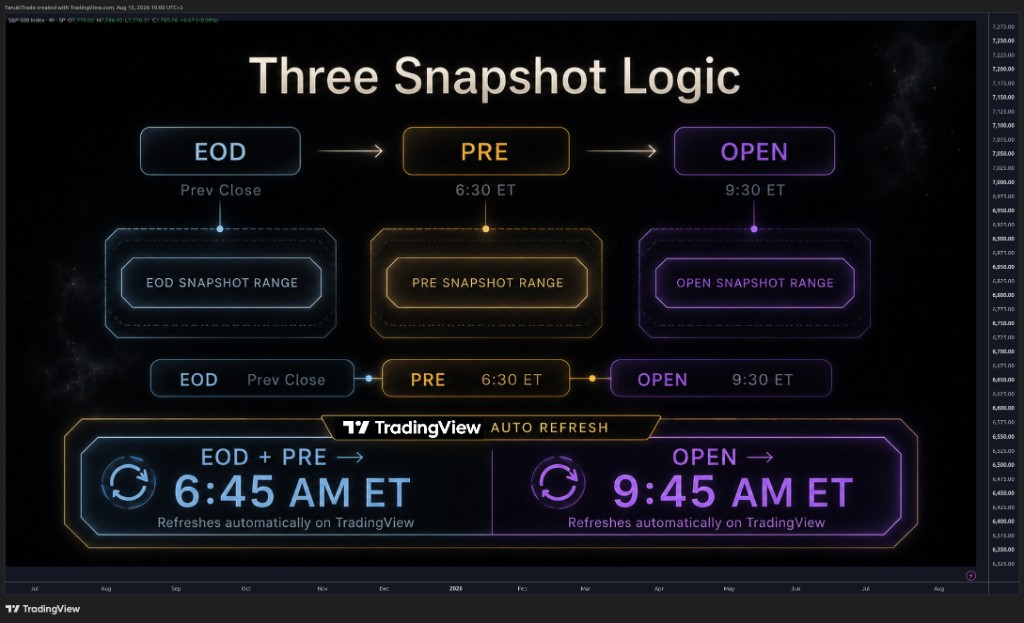
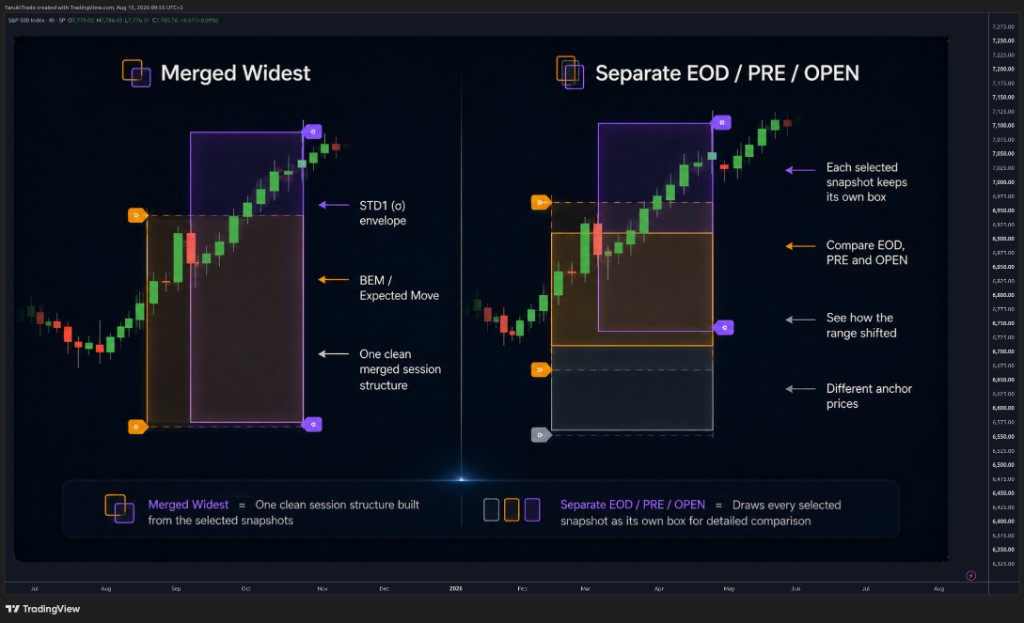
New TradingView indicator for 0DTE and futures intraday traders: a static options-implied daily range from EOD, PRE, and OPEN snapshots, plus a wider STD1 envelope and a built-in closing-range backtest. Not a live curve — the published boxes stay fixed for the session. TradingView indicator only (not a WebApp release).
New Features
Three session snapshots — EOD (prior close), PRE (6:30 AM ET), and OPEN (9:30 AM ET). Compare them separately or merge into one widest session box.BEM + STD1 — inner Binary Expected Move (ATM straddle + OTM strangles) and outer 1σ envelope from implied volatility.Closing-range backtest — % of completed sessions that closed inside BEM and STD1. Isolate EOD / PRE / OPEN in Separate mode.250+ U.S. symbols plus mapped /ES, /NQ, /RTY, /YM, /GC, BTCUSD, XAUUSD. Draws only on 0DTE days, on timeframes of 1 hour or lower.
Improvements
Automatic TradingView delivery — no manual refresh. EOD + PRE land ~6:45–6:50 AM ET; OPEN around 9:45 AM ET. Heartbeats may continue; published ranges do not move intraday.
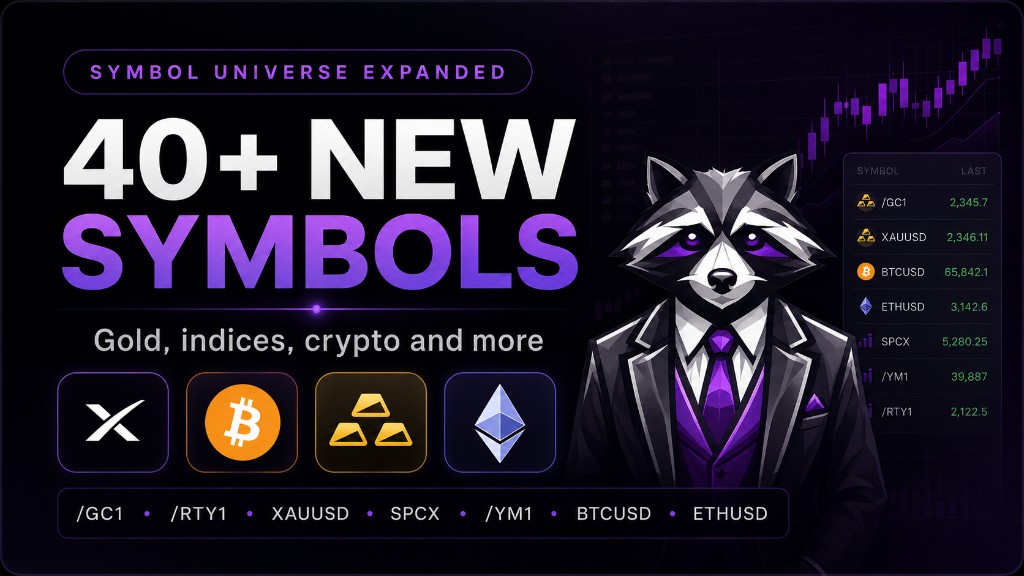
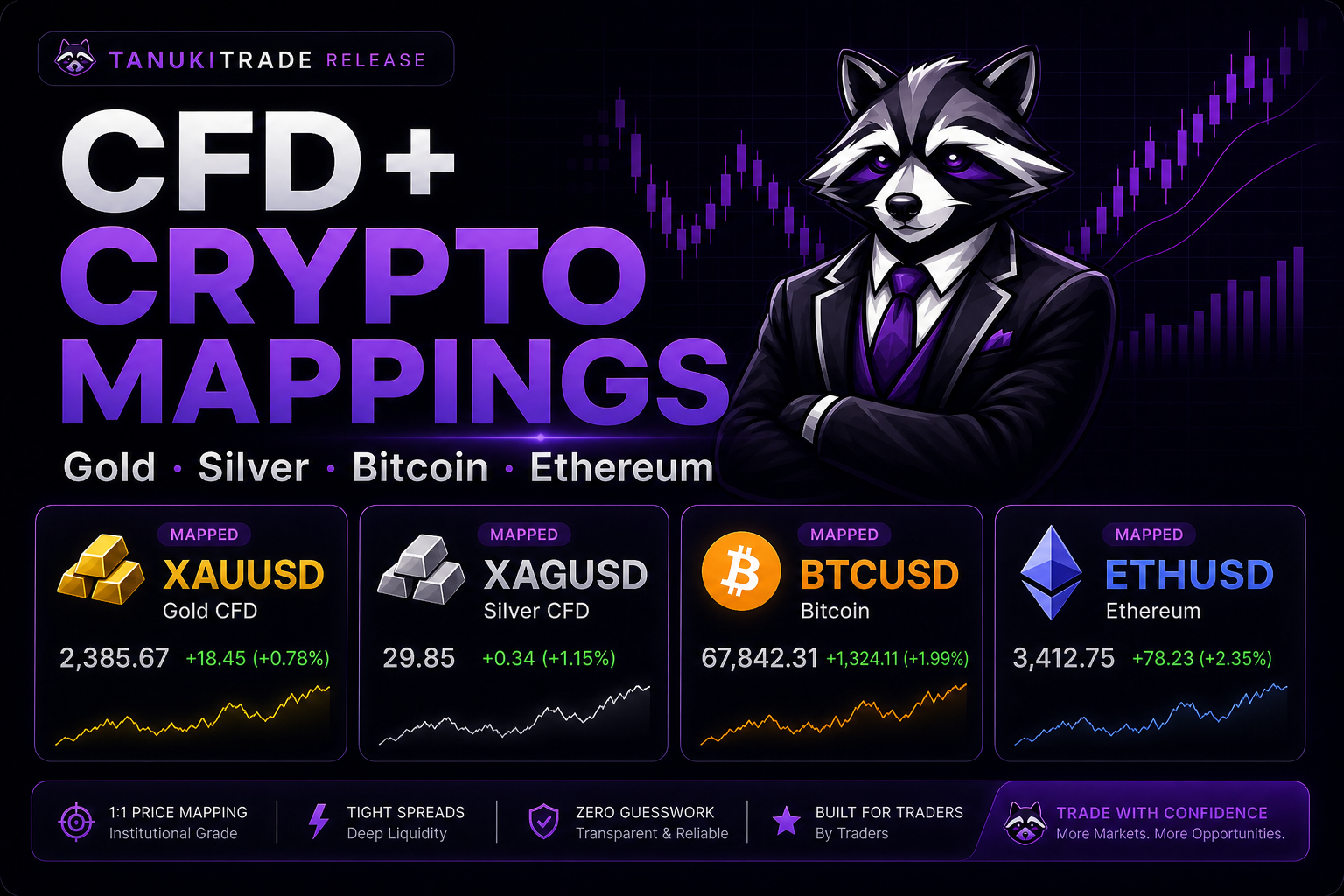
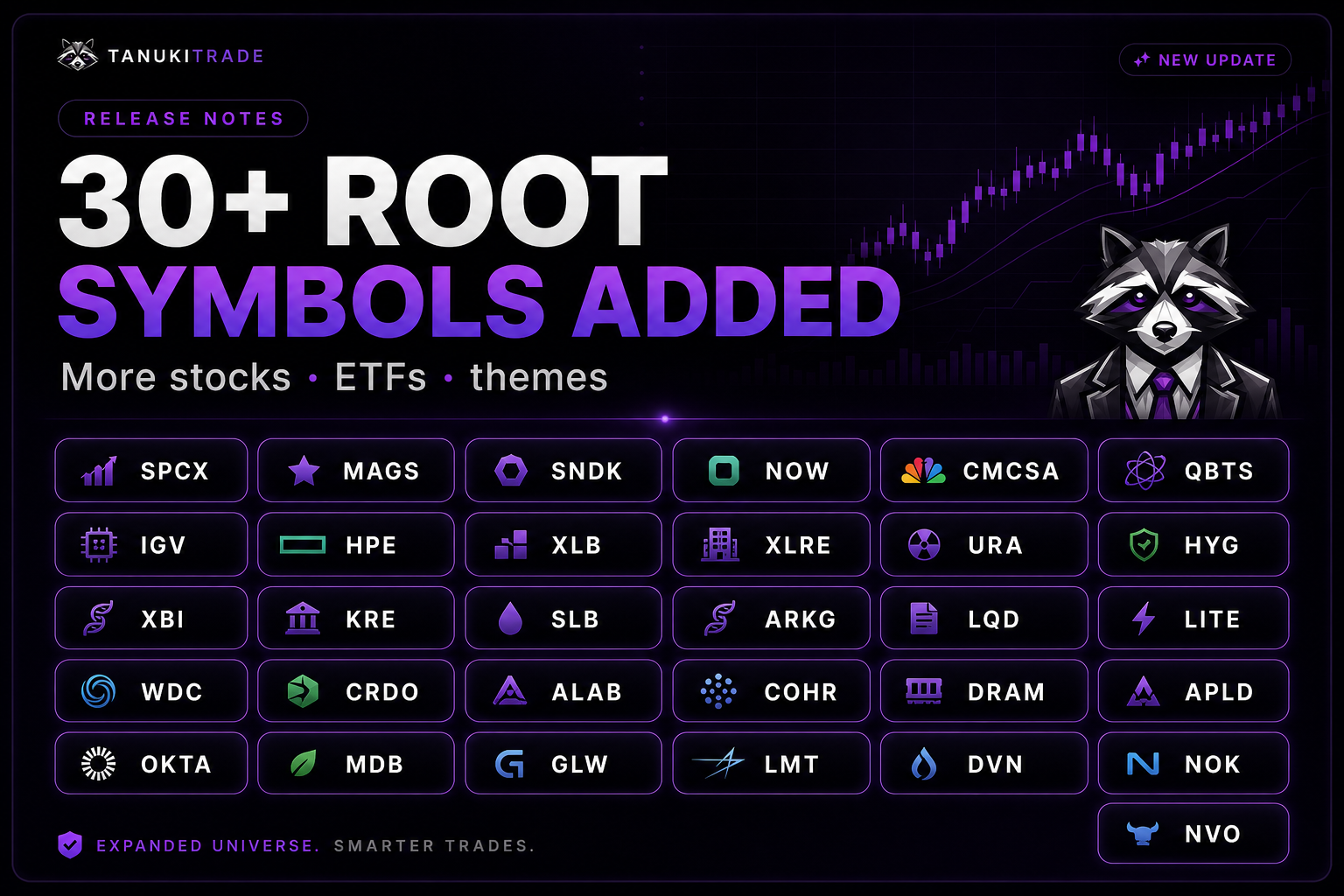
/GC, XAU, BTC, /RTY, /YM, SPCX, ETH & 40+ New Root Symbols Now Supported
Major cross-platform update: TanukiTrade now brings expanded futures, metals, CFD, crypto, and 30+ new root-symbol coverage into both the WebApp and the TradingView indicators. The TradingView stack gained broader gamma mapping, while Options Screener now exposes compact multi-expiry GEX Profile states so you can scan volatility, skew, expected move, and gamma regime in one workflow.
New Features
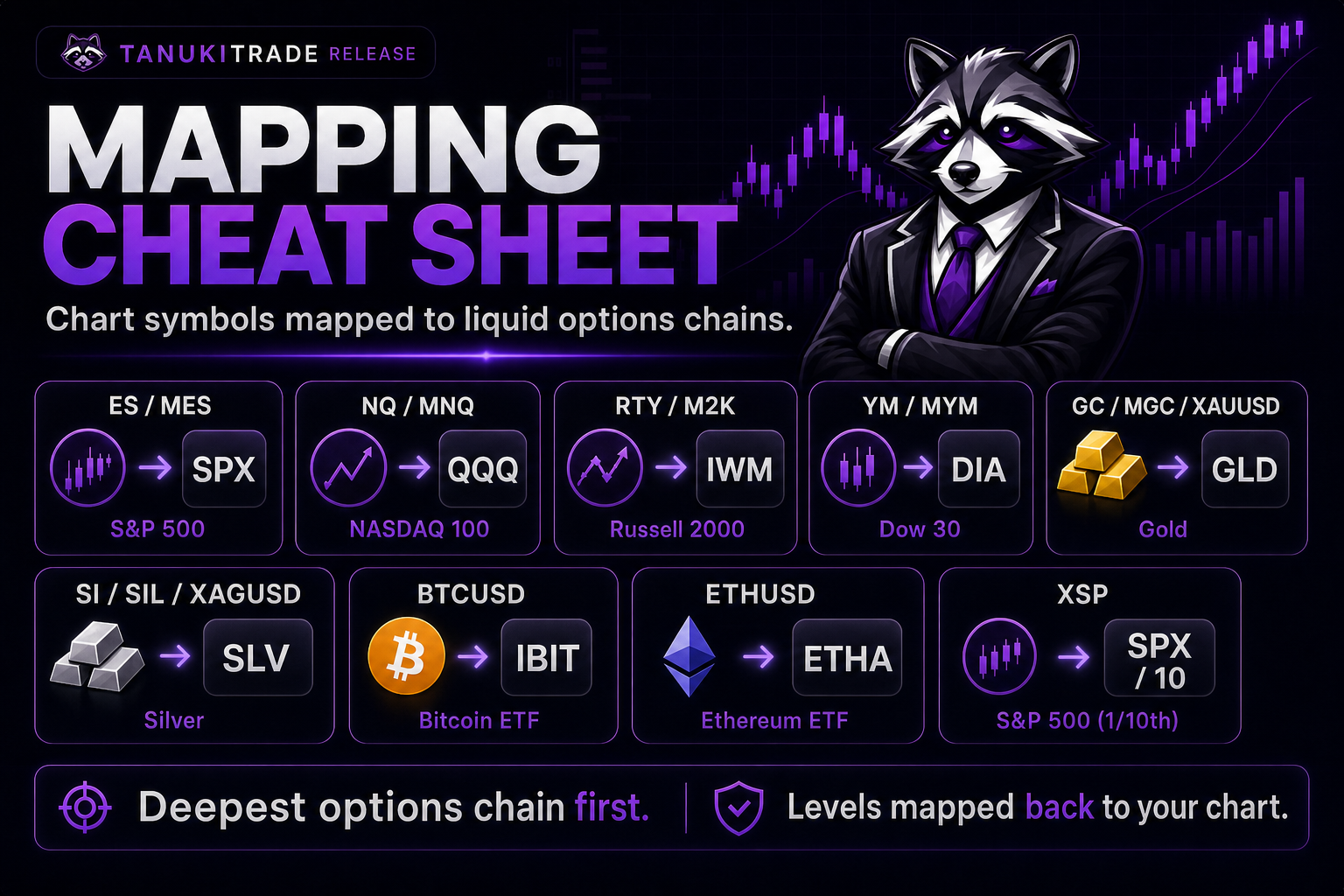
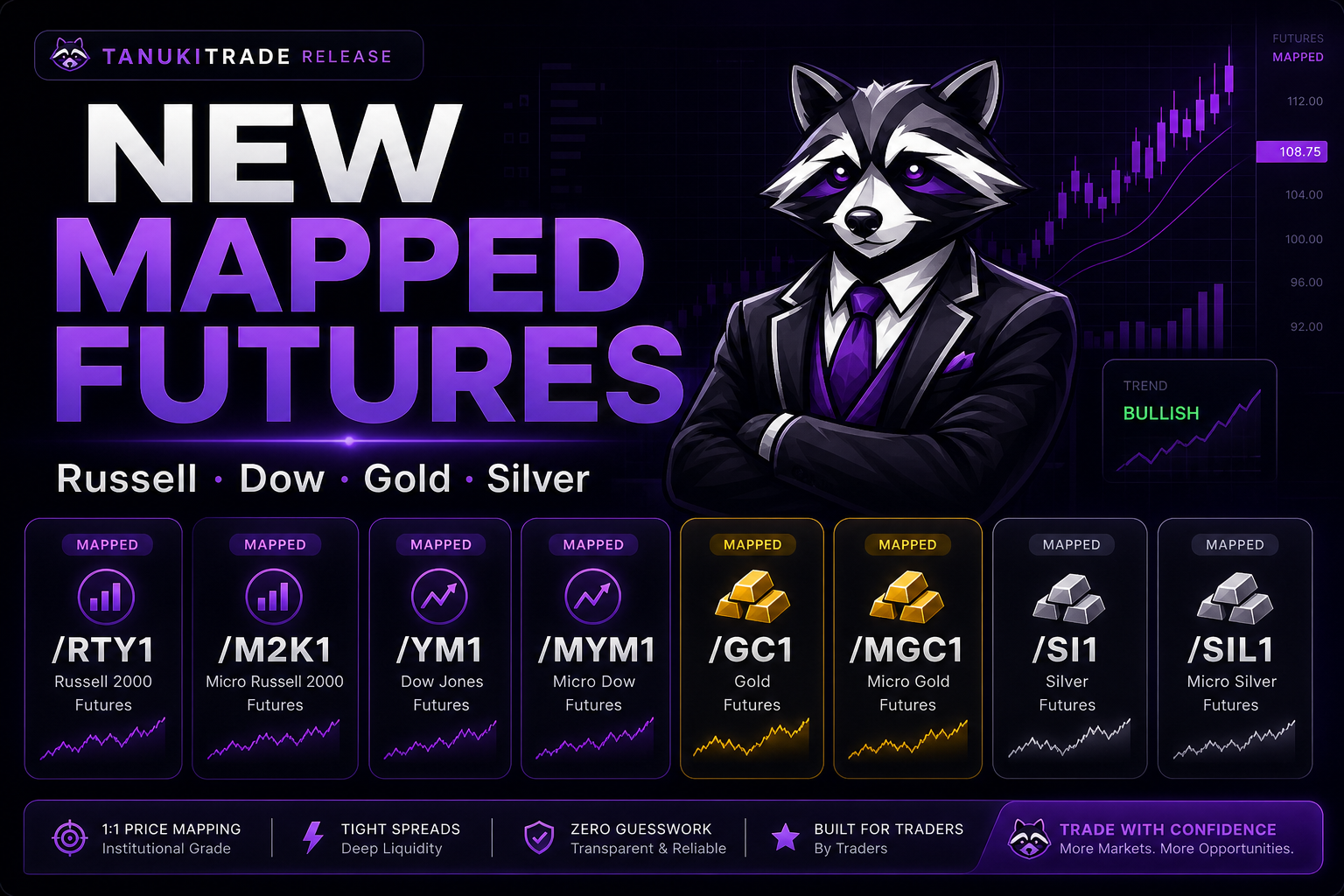
New mapped futures — RTY/M2K and YM/MYM are now part of the mapped futures universe, alongside the expanded metals futures coverage for GC/MGC and SI/SIL. Levels are derived from the cleanest mapped underlying options chain and translated back into the display symbol's price space.Mapped Crypto and CFD now live — BTCUSD, ETHUSD, XAUUSD, and XAGUSD are now treated as mapped display symbols: the chart/user-facing symbol stays familiar, while the options structure comes from the liquid ETF option chain behind it.Mapping policy cheat sheet — ES/MES use SPX, NQ/MNQ use QQQ, RTY/M2K use IWM, YM/MYM use DIA, GC/MGC/XAUUSD use GLD, SI/SIL/XAGUSD use SLV, BTCUSD uses IBIT, ETHUSD uses ETHA, and XSP uses SPX at 1/10th scale. The displayed chart symbol stays familiar; the options structure comes from the deepest mapped chain.TradingView gamma mapping expansion — mapped futures, metals, CFD-style spot proxies, crypto spot proxies, and XSP now render TanukiTrade options structure directly on the chart symbol you watch.Options Screener GEX Profile column — the TradingView screener now shows five compact gamma-regime states per symbol: First Expiry, W1, M1, M2, and ALL. Hover the cell to see the full state names, expiry buckets, mapped-underlying context, and snapshot freshness.WebApp symbol coverage expansion — the same new root-symbol universe is now available across TanukiTrade surfaces where supported, including SPCX, MAGS, SNDK, NOW, CMCSA, QBTS, IGV, HPE, XLB, XLRE, URA, HYG, XBI, KRE, SLB, ARKG, LQD, LITE, WDC, CRDO, ALAB, COHR, DRAM, APLD, OKTA, MDB, GLW, LMT, DVN, NOK, and NVO.Full TradingView watchlist — the always-current public symbol list is available here: https://www.tradingview.com/watchlists/156511666/
Improvements
Cleaner cross-surface language around mapped instruments: mapped symbols are not native futures-options-chain GEX; they are liquid underlying option-chain structure transformed into the active display symbol's price space.Micro futures are handled as display aliases of their parent futures families where applicable, keeping /MES with /ES, /MNQ with /NQ, /MGC with /GC, /SIL with /SI, /MYM with /YM, and /M2K with /RTY.The new Screener GEX Profile states make it easier to separate a high-IVR ticker in negative gamma from a high-IVR ticker in positive gamma before opening the chart.
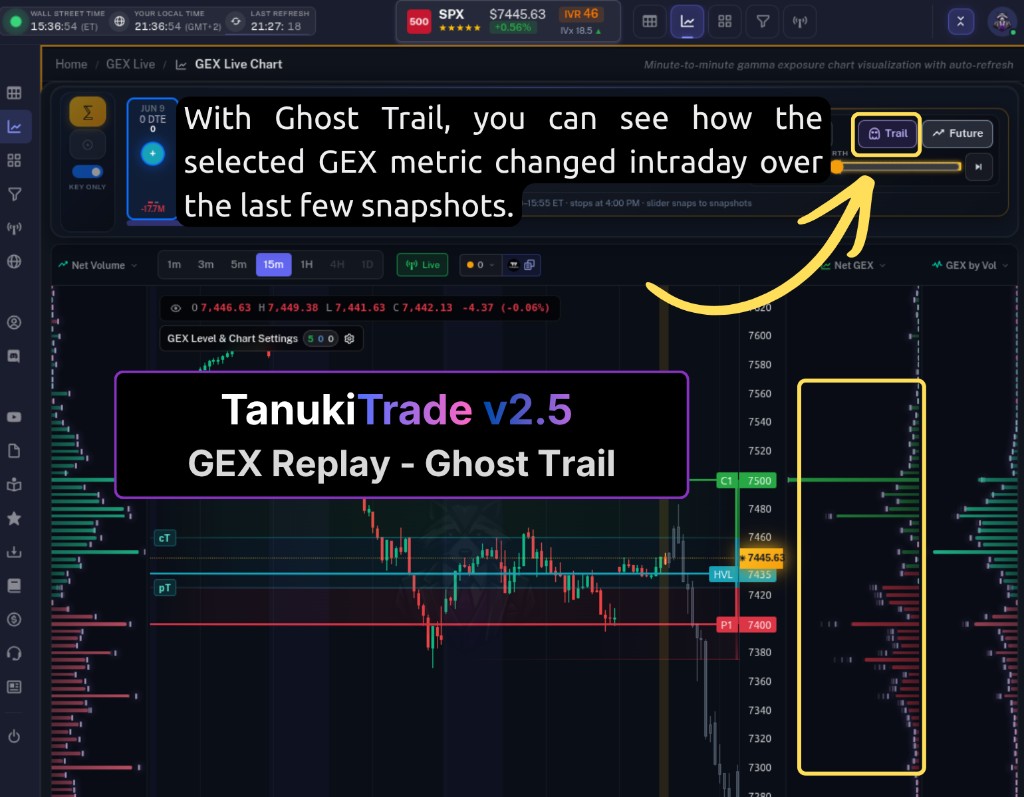
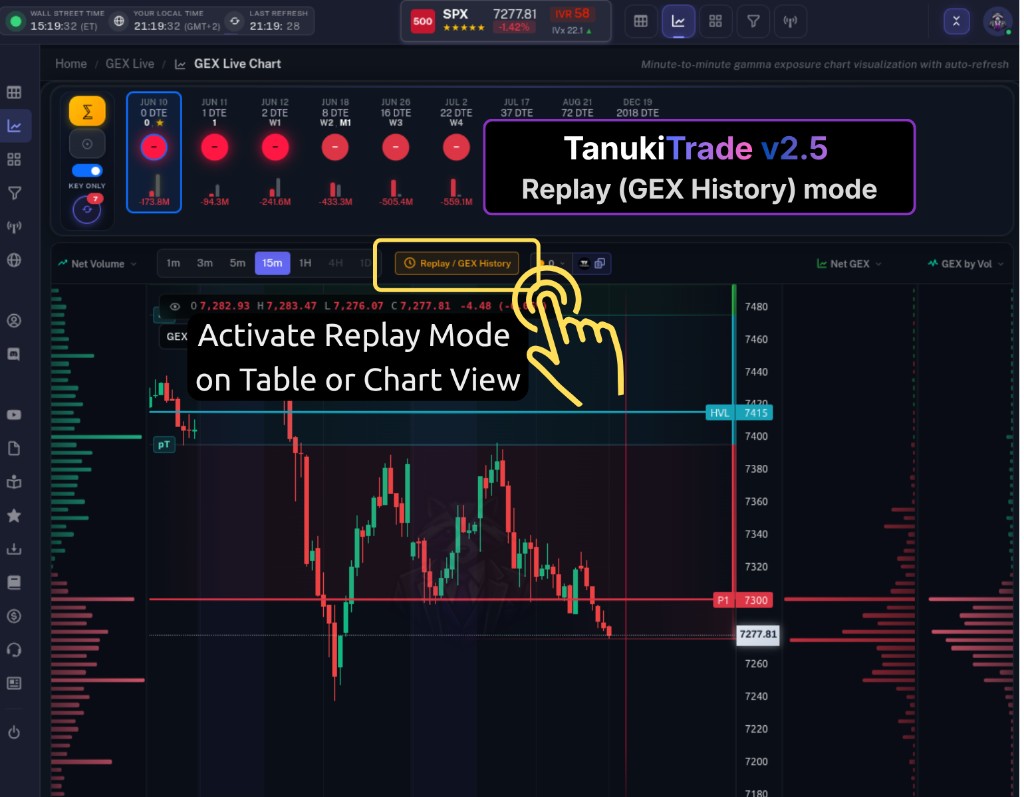
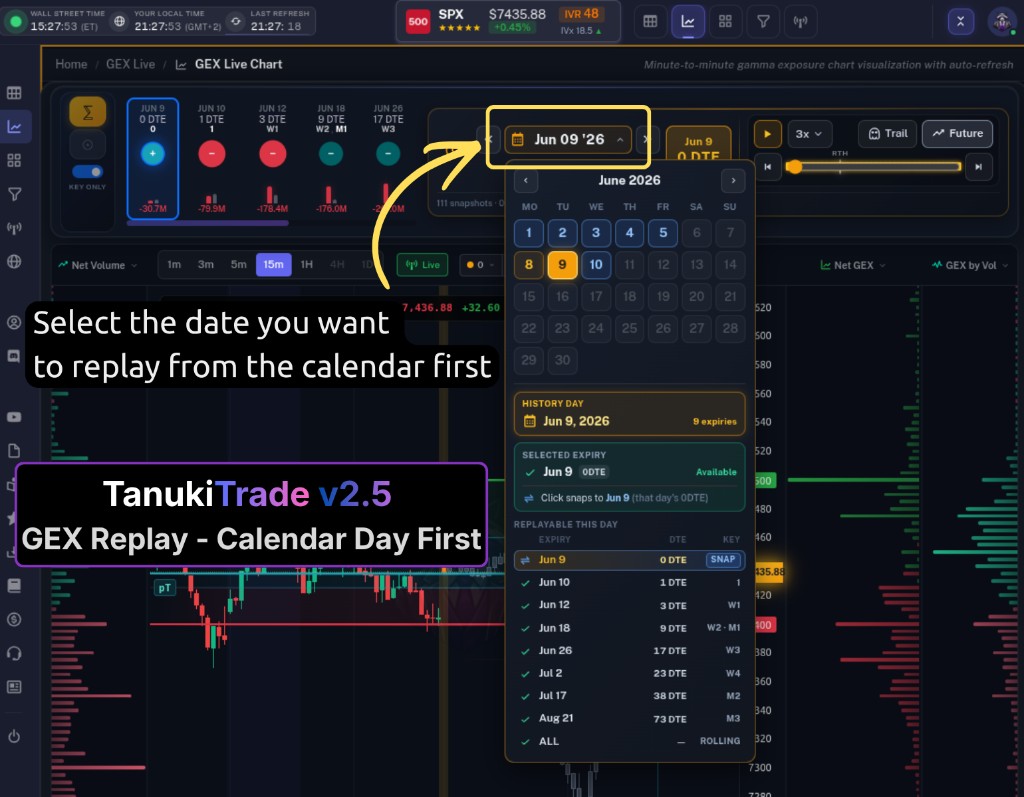
GEX Replay History is live on GEX Live Chart and Table — a DVR for the options structure. Pick a past trading day, scrub through the saved moments, and watch how gamma walls, HVL, key levels, expiry bubbles, and price candles actually looked when we recorded them. Open Replay / GEX History from the top controls (confirm once), study the session, then hit the green Live button to return to today. PRO feature; desktop-first for serious review.
New Features
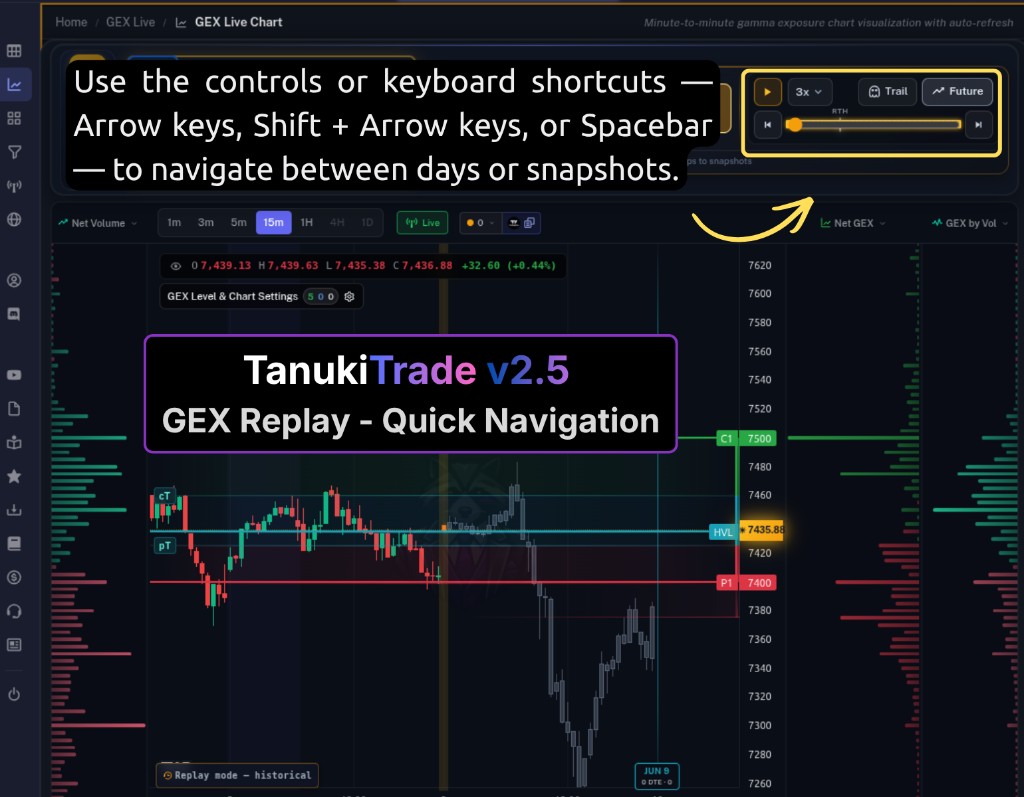
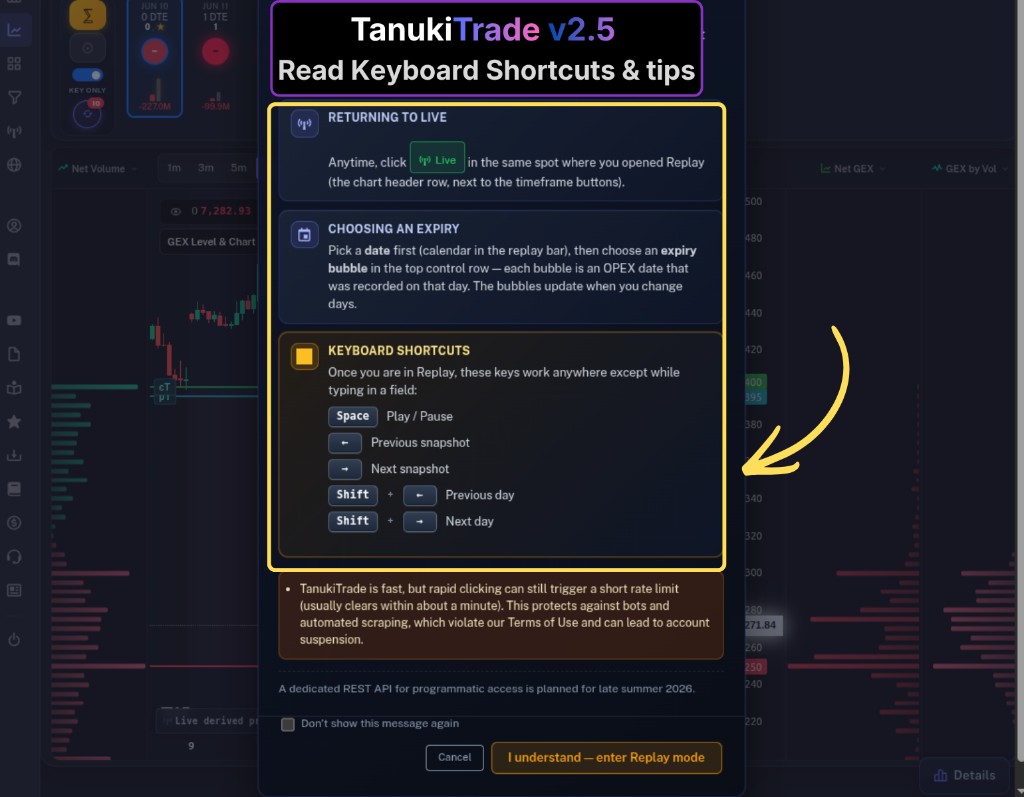
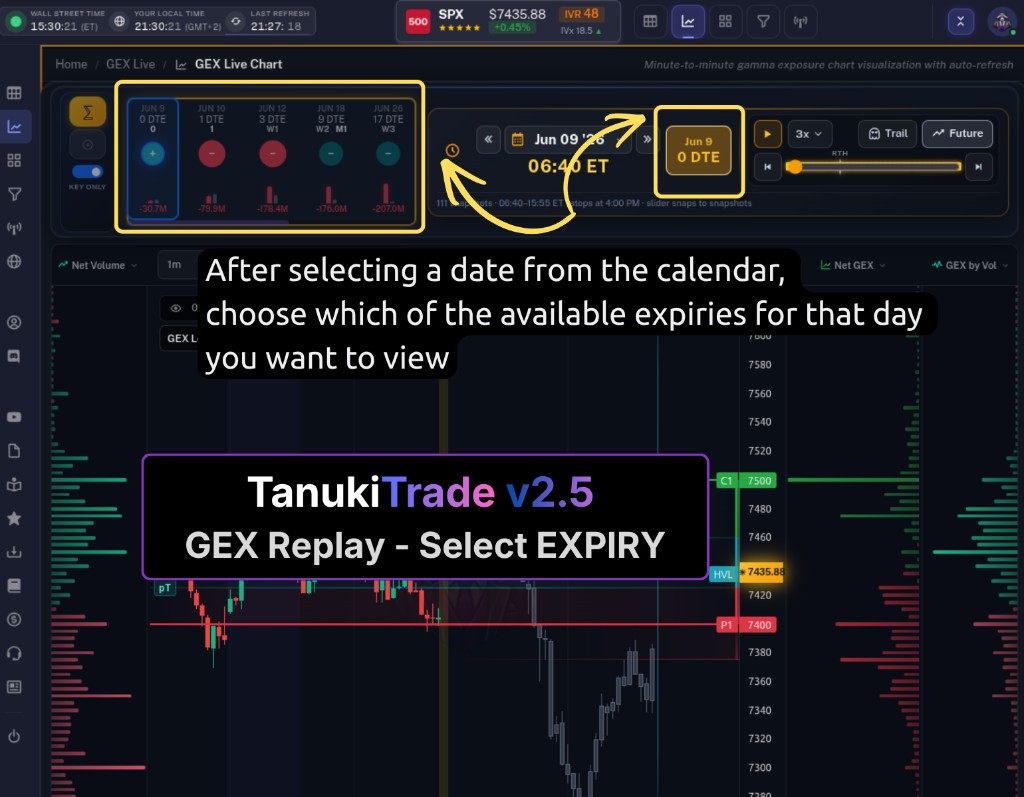
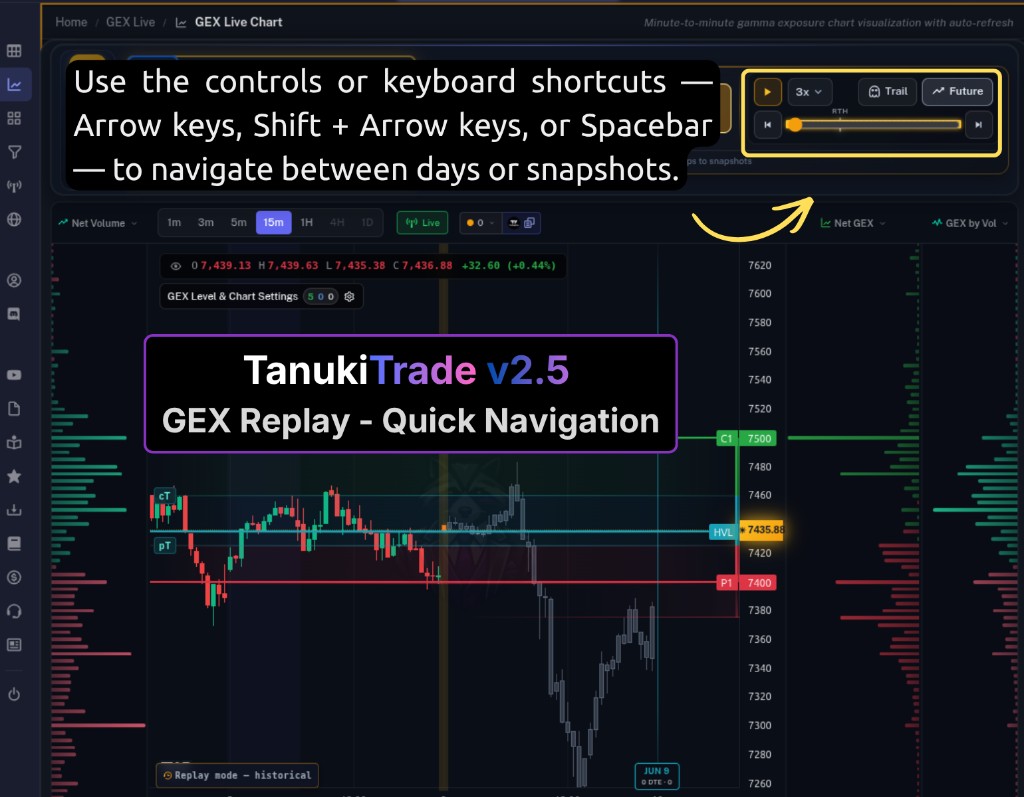
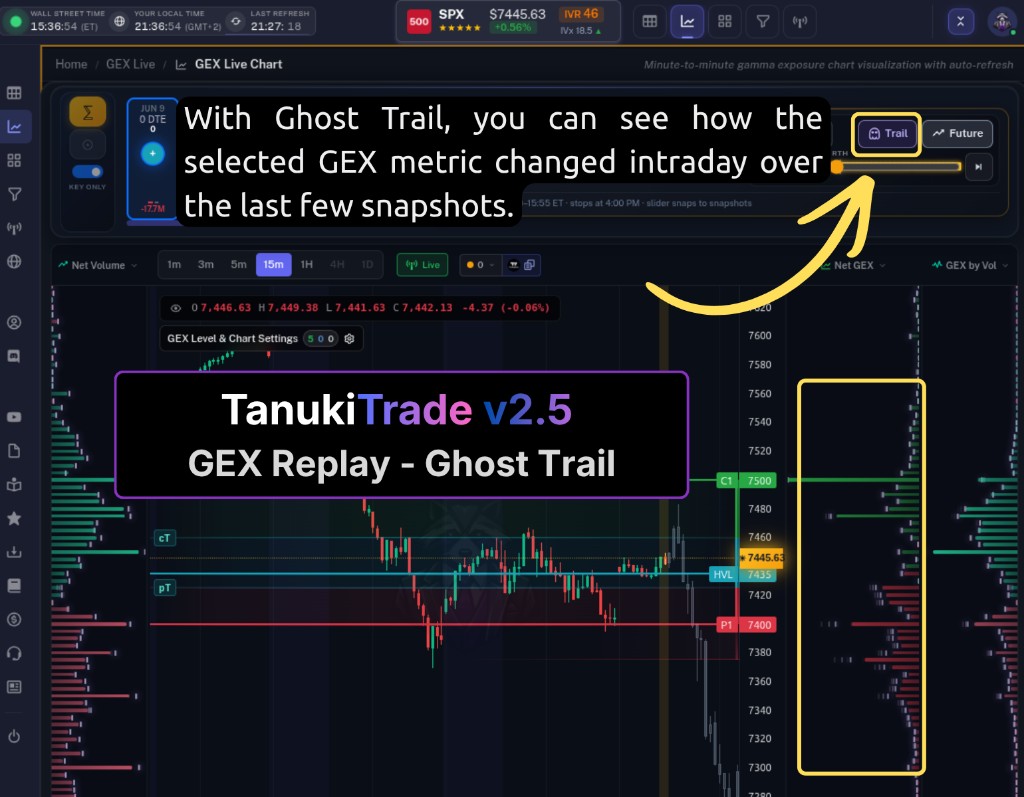
GEX Replay / History — click Replay / GEX History on GEX Live Chart (near timeframe + Copy Levels) or the compact Replay button on GEX Live Table. A short confirm reminds you that live spot and auto-refresh pause while you review; an amber frame marks historical mode so you never confuse past and present. Scroll/pan in Live never drops you into Replay by accident.Day-first workflow — choose the trading day you want to relive (calendar or day-step shortcuts). Replay then shows exactly which expiries / roles existed on that day in the bubble strip and calendar tooltip — not one giant fixed expiry list across all history. Natural flow: pick the day → see what was on the board → watch it evolve.Playback bar — date chip, time slider (snaps to real recorded moments), ◀/▶ step, Play/Pause, and 1x / 2x / 3x speed. Each stop is a genuine snapshot from ~6:40 AM through ~3:55 PM ET. Manual scrubbing or calendar clicks pause autoplay so the chart is not moving while you read.Trail (👻) — ghost trail on Chart and Table: faint shadows of the last few moments' gamma/profile positions so you can see a wall grow, shrink, or migrate through the session without stepping frame-by-frame.Future (chart only) — optional grey preview candles for the rest of the session after the moment you are studying, so you can see where price went next without leaving Replay.OPEX peg + role inheritance — Replay starts from the expiry you had open in Live and follows that contract across days. When you jump days or the exact expiry is missing, it keeps your role intent (0DTE stays 0DTE, M2 stays M2…) or snaps to the closest available key expiry, with a small toast when the match changes — never a silent switch.Replay calendar — orange = history for the expiry/role you are watching; blue = symbol has history that day on a different role (click to snap via inheritance); grey = nothing saved. Hover any day for a tooltip of available expiries and moment counts.Return to Live — green Live button (quick confirm): amber frame off, live spot + auto-refresh resume, normal symbol controls back, and your Cumulative/Standalone + Key Only preferences restored to what you had before Replay locked them for a clean cumulative picture.Share a replay moment — the URL captures symbol, expiry, and time; another PRO member opening it lands on the same historical view after the same confirm. Click Live before refresh if you want to stay in today's data.
Improvements
Symbol switching in Replay — Ctrl+K (Spotlight), the header symbol button, and global symbol search all work without exiting Replay first. Replay keeps your moment and expiry intent where possible, then snaps to the closest available history for the new ticker.Keyboard shortcuts — Space Play/Pause, ← / → step one moment, Shift + ← / Shift + → step one trading day. Same Ctrl+K spotlight as Live.Sampling depth — recent days are dense (~5 min stops in the last two weeks); older history thins gradually (down to ~4 points/day past six months). Monthly roles (M1–M3) and ALL go back furthest; 0DTE and weeklies roll on a shorter window — grey calendar days mean that slice was not saved.Replay is a study tool, not a signal engine — review how structure behaved around price, compare 0DTE vs weekly/monthly context, and ask better post-session questions. GEX does not predict direction; Replay makes that visible in hindsight.
v2.4Feature
May 28, 2026
Expected Move Box & Adaptive EM Curves on GEX Live
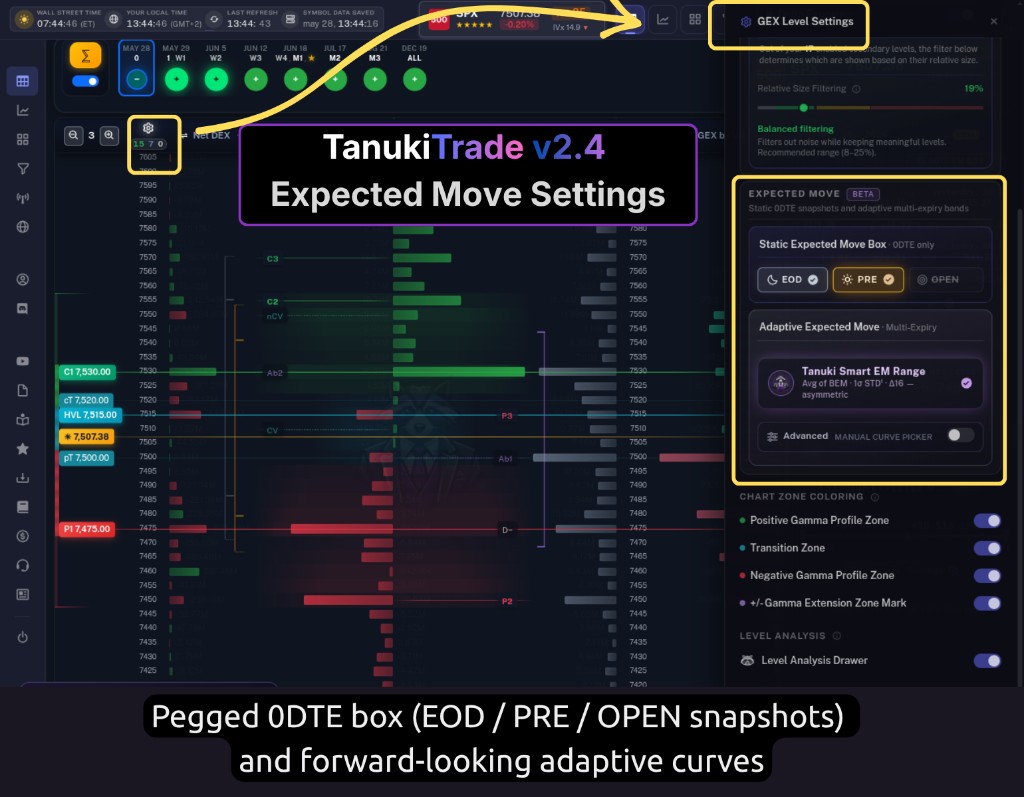
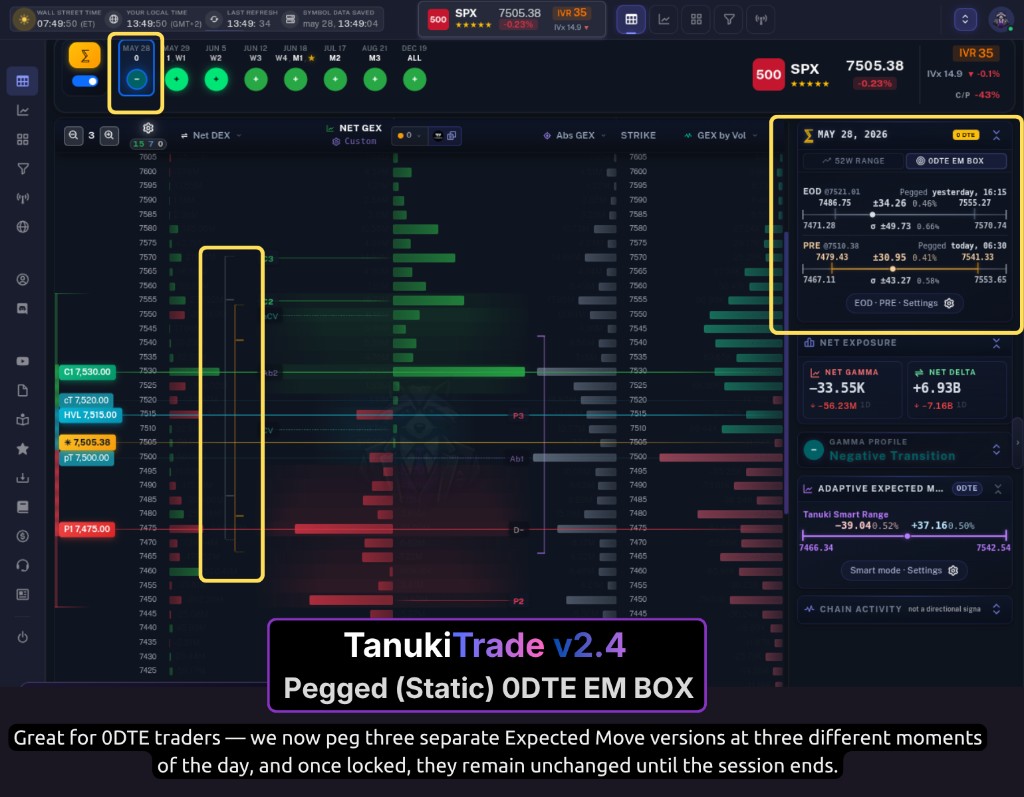
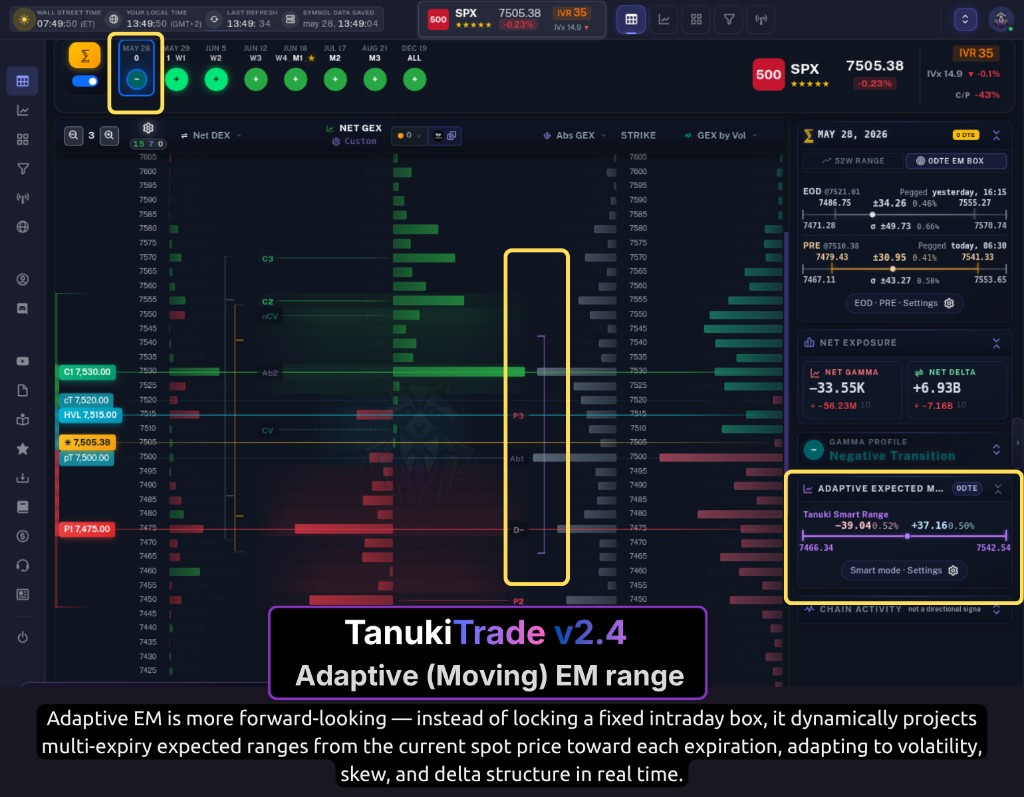
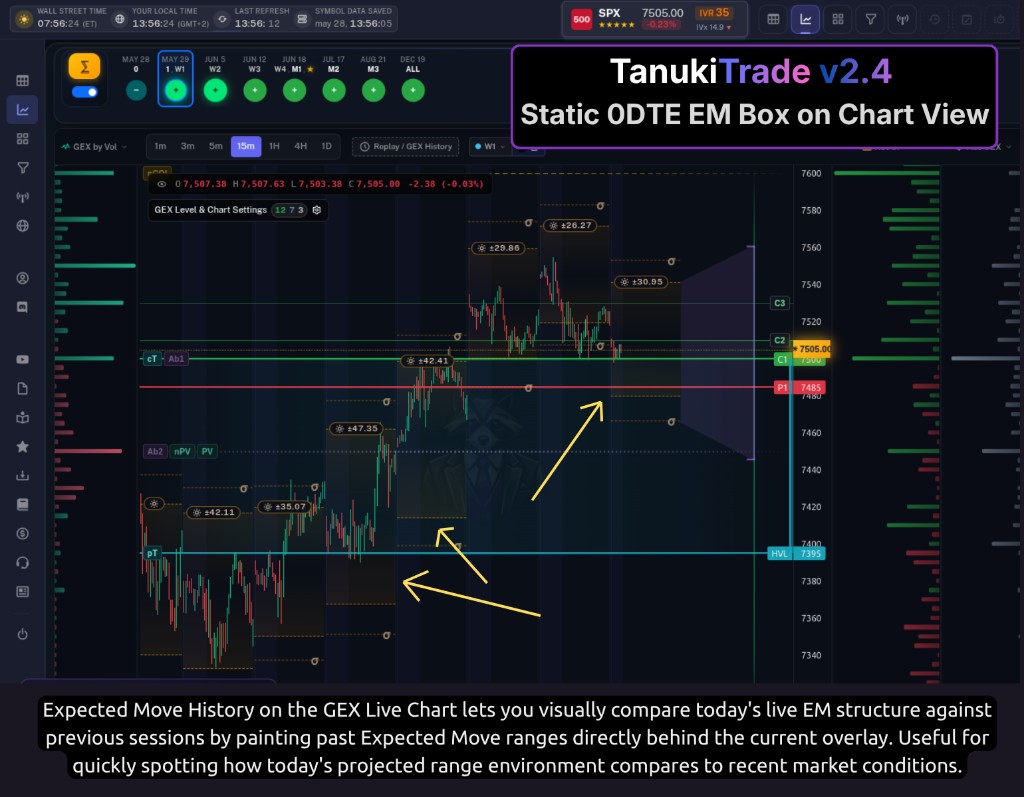
Two new Expected Move layers are live on GEX Live Chart and Table: a pegged 0DTE box (EOD / PRE / OPEN snapshots) and forward-looking adaptive curves from today's spot across the term structure. Open the Chart / Level Settings drawer (Ctrl+M) to turn them on — settings sync between Chart and Table automatically.
New Features
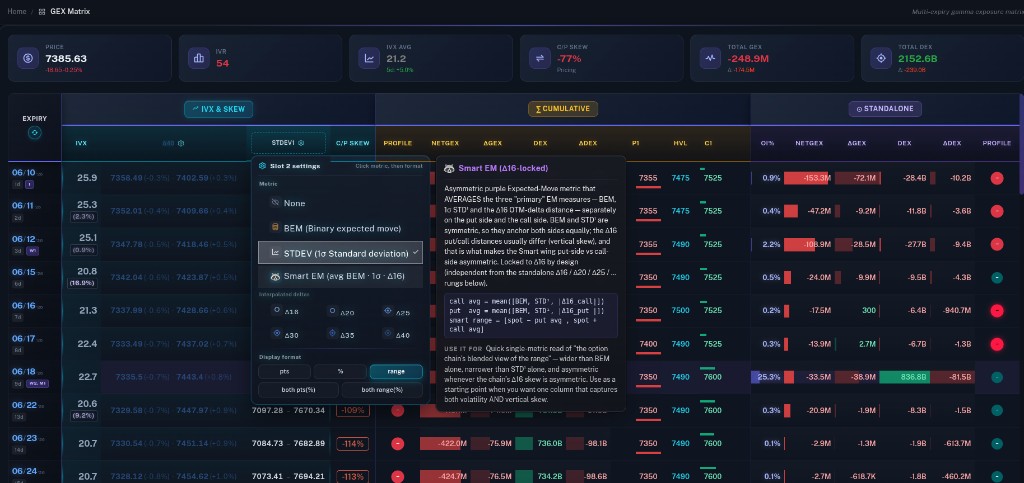
Expected Move Box (0DTE) — three independent snapshot chips in the drawer's Expected Move Box section: EOD anchors to yesterday's 16:00 ET close (the overnight baseline), PRE to the 06:30 ET premarket spot, and OPEN to the 09:30 ET cash open. Turn on one, two, or all three. Each paints a horizontal ± band on the GEX Live Chart over today's session and an overlay strip on the GEX Live Table when you're on today's expiry (0DTE). A thin σ envelope sits just outside each band; when price breaks the band but stays inside σ, that outer line is emphasised on the live chart so you can see the "1σ tail" zone at a glance. Toggle Values to show or hide the numeric edge labels and header pills.Expected Move Box drawer — click any box element (header pill, edge label, or σ line) on the chart or table to open the shared EM drawer: all available EOD / PRE / OPEN phase cards, the overnight gap bridge (EOD → PRE/OPEN), the cash-open shift bridge (PRE → OPEN when both exist), and an EM evolution summary for the day. Range context, not a directional call — but now you can quantify how much of the projected day-move the gap already consumed before the open.Adaptive Expected Move — the second drawer section paints forward multi-expiry ranges from today's spot toward each expiration's projected 16:00 ET close. Default mode is Tanuki Smart EM Range: one purple, asymmetric cloud that blends BEM + 1σ STD¹ + Δ16 independently on the put and call sides — volatility and vertical skew in a single curve, no chip-juggling. Flip Advanced on to reveal manual curve families: BEM (brown, binary/event-style move), Δ Delta (blue OTM-delta envelope with a six-rung ladder from 16Δ through 40Δ), and σ STD¹ (ivory classical 1σ cloud). Smart and the manual chips are mutually exclusive. The GEX Live Table mirrors the currently selected expiry as a tube + cap markers; the same Smart Δ16 read is also selectable in GEX Matrix IVx column slots.Expected Move History — a three-position control at the bottom of the Expected Move Box section: None (live only), Last (most recent trading day — also doubles as a table fallback before today's 06:30 ET premarket snapshot lands so the EM overlay is never blank in early-morning workflows), and 1M (~22 trading days of past EM bands painted behind the live overlay on the chart for visual backtesting).Drawer presets — Minimal / Balanced / Everything at the top of the Level Settings drawer now pre-wire Expected Move layouts: Minimal keeps the chart clean; Balanced turns on the PRE box, Smart EM Range, and 1M history; Everything loads all three native box chips plus all three manual curves and 1M history with Values labels shown.
Improvements
GEX Live sidebar — Expected Move card: when Adaptive EM is active, a compact card in the sidebar shows the selected expiry's curve values; click anywhere on the card to jump into the full EM drawer without hunting chart hit areas.Expected Move layers use the same option-chain data that powers your GEX profile — no extra subscription, no separate setup. Metric Explainer (introduced in v2.3) covers the EM metrics in the GEX Matrix column picker and curve-related dropdowns where hover help is available.
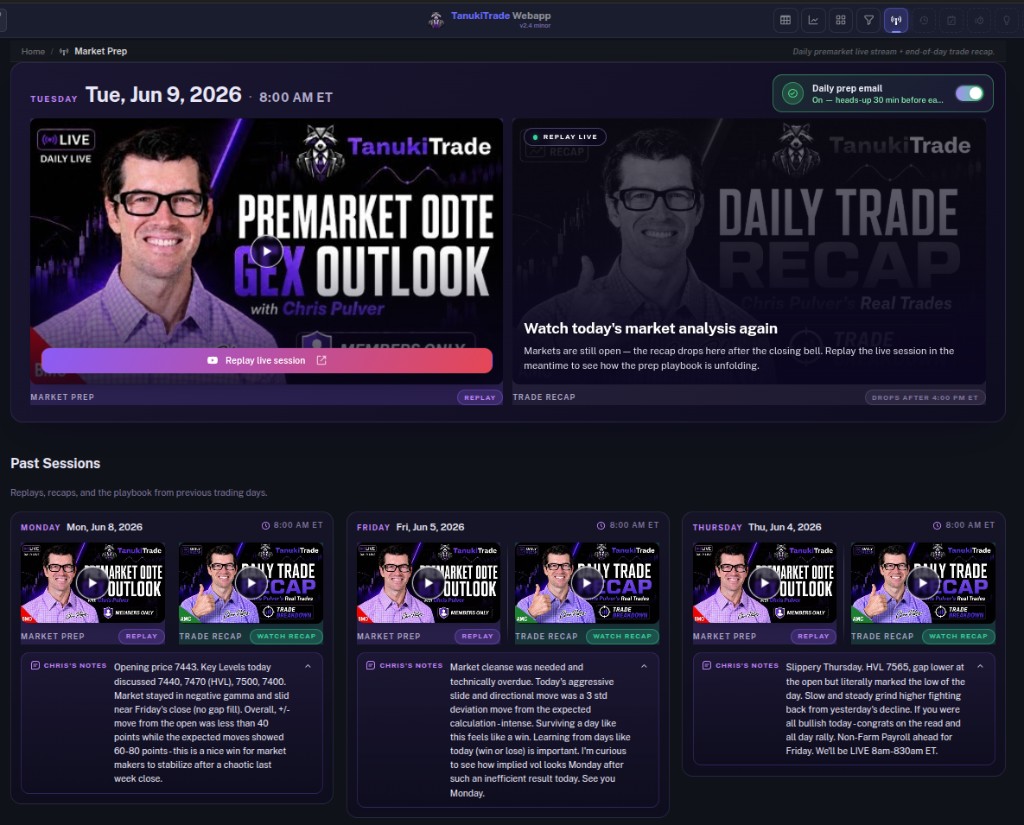
Chris Pulver joined TanukiTrade as Chief 0DTE Host — bringing 20+ years of live options and index trading to our daily Market Prep Live workflow. Every regular US session he frames dealer positioning and gamma structure before the open, then comes back after the close with the real trades and lessons. Same release also ships GEX Matrix Expected Move & Delta columns, expiry-bubble controls, and GEX Live sidebar polish on wide and compact screens.
New Features
Chief 0DTE Host — every regular US trading day Chris records a live Premarket 0DTE GEX Outlook (market structure, key levels, and session context) and an after-close Daily Trade Recap (real trade examples and a review of how price behaved around the market structure discussed before the open). PRO members watch both anytime from Market Prep Live in the member portal, grouped by trading day, with presenter notes on past sessions.Who is Chris — veteran technical & fundamental trader with 20+ years across options, stocks, ETFs, futures, and major indices. Widely followed for short-dated SPX/NDX 0DTE structures, asymmetric risk/reward structures, and defined-risk spread work; he has spent years running live education, commentary, and trade-room sessions (Chris Pulver Trading, ProsperityPub, lead-trader programs) before bringing that same open-process prep to TanukiTrade.Why it matters — members get a named practitioner walking through how he actually uses GEX walls, flip zones, and volatility context before the bell — not a generic market summary. The after-close recap closes the loop by reviewing what happened relative to the premarket market structure, how the trade examples developed, and what can be learned from the session.Prep notifications — optional email when the live premarket session starts; subscribe or unsubscribe from the Video Sessions page (top right). Missed the live window? Replay prep and recap from the archive grid.GEX Matrix — two new configurable columns: Add an Expected Move column and pick which EM read you want per expiry (the supported implied-move / band variants in the picker), and add a separate Delta distance column to see how strikes sit versus spot in delta space — both are independent choices so you can compare expiries without leaving the matrix.GEX Live — Metrics display / Always show values: optional preference that keeps concrete numbers visible on sidebar metrics that otherwise lean on color bars and gauges. We find it visually busy when everything is labeled at once, so it stays off by default — turn it on when you want digits at a glance and off when you prefer a cleaner panel.
Improvements
GEX Live Chart — expiry bubbles: scroll the bubble rail with the mouse wheel while hovered (in addition to drag/scroll gestures). The Every Expiry / total GEX summary bubble stays pinned as the last chip so the full-symbol strip stays anchored.GEX Live (Table & Chart) — large screens: the symbol selector now sits at the end of the expiry selector row so expiry chips and their values stay easier to scan without the symbol control crowding the strip.GEX Live sidebar — collapsible blocks: each sidebar section can be folded away so you can hide blocks that are not part of your workflow and give more vertical room to the metrics you actually watch.GEX Live sidebar — layout pass: tighter spacing, clearer section hierarchy, and readability tweaks across screen sizes so the panel stays compact without feeling cramped.
Bug Fixes
Mobile: scrolling glitches in tight layouts, better use of viewport height for data views, and tap / hit-target fixes so controls register reliably.
v2.3.1Polish
April 29, 2026
Options Screener — T+3 Filters & Preset Cleanup
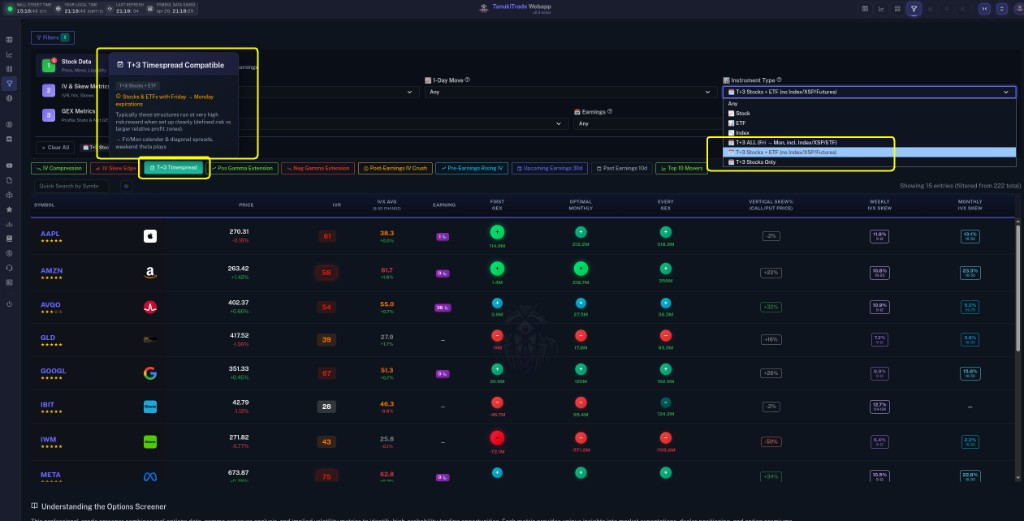
The Options Screener can now highlight underlyings that offer Monday expirations three calendar days after a Friday expiry (canonical Fri → Mon pairs), split by instrument bucket. Several quick presets were tightened or renamed for clearer pre- vs post-earnings intent.
New Features
T+3 capability flag (server + cache): Each symbol row now includes whether the underlying has at least one upcoming Monday expiration paired with the preceding Friday expiry in Net GEX data — the same computation powers both live API responses and the Redis-backed screener cache.Instrument Type — three T+3 buckets: In addition to Stock / ETF / Index, choose T+3 ALL (includes index/XSP-style names where applicable), T+3 Stocks + ETF (excludes INDEX and synthetic index lines like XSP), or T+3 Stocks Only (single-name equities only). Futures rows stay out of these buckets.Earnings filter — Past 10 days: New dropdown option beside Past 14 / Next windows so you can filter names that reported in the trailing ten sessions.Quick filter — Past Earnings 10d (grey preset): One-click applies the Past 10d earnings window.Quick filter — T+3 Timespread Compatible (turquoise preset): Targets T+3 Stocks + ETF — no minimum liquidity or $50 floor; popover explains Fri/Mon Calendar and Diagonal structures and their characteristic risk/reward profiles.Preset renames for clarity — Post-Earnings IV Crush (was Earnings IV Crush) and Pre-Earnings Rising IV (was Earnings Rising IV).
Improvements
Removed the older Weekly Timespread generic preset — T+3 Timespread replaces it as the dedicated weekend-spanning-timespread shortcut.
v2.3Feature
April 18, 2026
Metric Explainer & Ultra-Wide Layout
A new hover-driven Metric Explainer makes every GEX Live metric self-documenting, and ultra-wide monitor owners can now push the content to full screen width. Plus a "distance from spot" pill in the Level Analysis drawer and cleaner secondary-level badges on the chart.
New Features
Metric Explainer (GEX Live Table & Chart): Hover over any option inside a metric dropdown (strike table columns, chart profile columns, sidebar metric selector) and a side panel opens with a short definition, the underlying formula, and a practical interpretation note. Updates live as you move between options, hides automatically when you leave the menu. Desktop-only (hover-based, skipped on touch devices).Ultra-wide full-width toggle: A new expand/collapse button in the top header lets ultra-wide monitor users (≥2400px) push the content beyond the default 2400px cap to fill the full screen width. Your preference is remembered. On eligible pages, a small glassy hint pill also appears in the right gutter to invite you to expand — one click flashes the header button so you know where to re-cap later. The sidebar collapse handle is automatically suppressed on ultra-wide viewports, so you never end up with a permanently hidden sidebar on a big screen.
Improvements
Level Analysis drawer: distance-from-spot pill — The drawer that opens when you click a strike label (on the chart or table) now shows a pill with how many points and percent the strike sits above or below the current spot. The pill sits ABOVE the strike chip when the strike is below spot, and BELOW it when the strike is above spot — so the header itself reads like a tiny map of strike vs. spot. Arrow direction and color reinforce the relationship at a glance.Secondary level badges (Ab1–3, nCOI/POI/COI/POI, D+/D−) on the GEX Live Chart: backgrounds are now fully opaque so chart lines no longer bleed through, while the label text stays subtly muted to reflect their lower priority. Hovering the row restores full clarity. Primary levels (HVL, C1/P1, cT/pT, C2–P6) are unchanged.
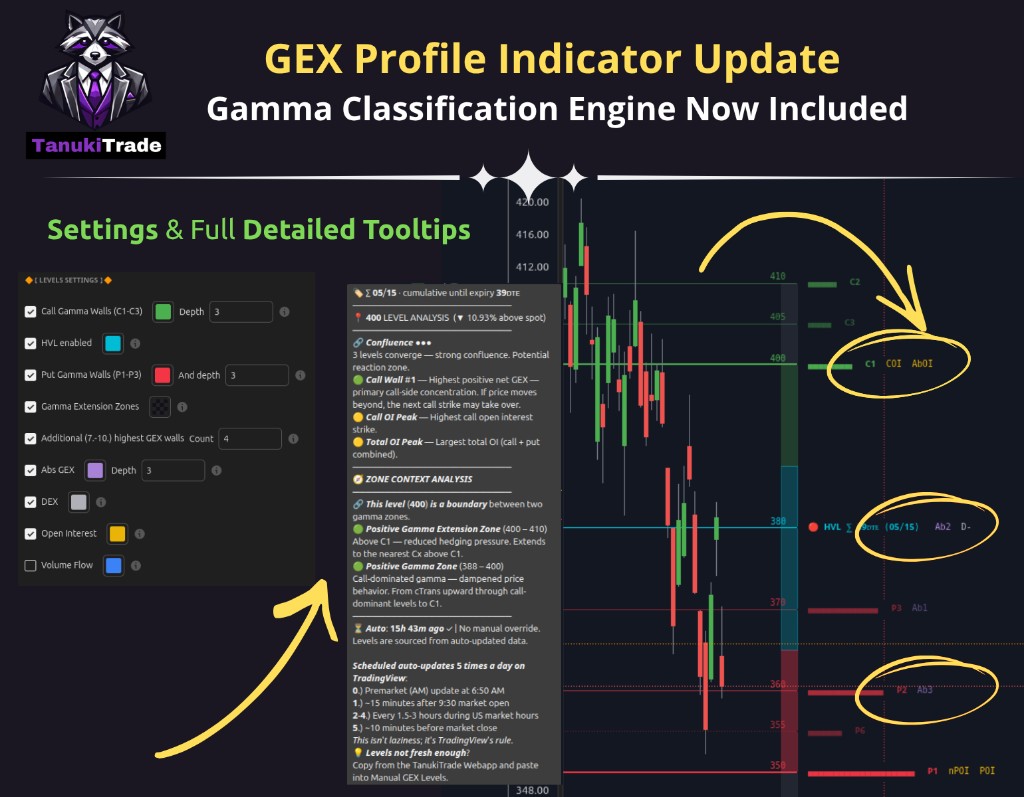
TradingView — GEX Profile PRO v3: Gamma Classification Engine
GEX Profile PRO v3 on TradingView turns the indicator from a wall-finder into a full market-structure map — gamma, delta, open interest, and session volume on one chart, with structured tooltips and reorganized settings. TradingView indicator only (not a WebApp release). Upgrading from v2: remove the old script from your chart, refresh TradingView if needed, and add v3 fresh — re-select saved layout options once because some setting strings changed.
New Features
Three-state HVL regime — colored circle next to HVL: blue = transition zone (between pTrans and cTrans), green = positive gamma above HVL, red = negative gamma below pTrans. Replaces the old two-state above/below square so the transition regime is visible without hovering.Secondary level layers — optional second strike layer across four families, each with its own toggle and color: Abs GEX (Ab1–Ab3), DEX (D+, D−), Open Interest (nCOI, nPOI, COI, POI, AbOI), and Volume Flow (nCV, nPV, CV, PV — off by default). Off-primary strikes draw dashed; overlapping prices report confluence in the tooltip.Extended walls, unified naming, richer tooltips — net-GEX ranks #4–#7 beyond C3/P3; Put Support / Call Resistance labels removed in favor of P1/C1 ecosystem naming; every level tooltip shows distance from spot (▲/▼ % and direction toward spot), zone context, and footer with auto-update age vs manual paste status.Gamma Extension Zones + settings cleanup — full zone stack always visible (negative extension, put-dominated, transition, call-dominated, positive extension); zone color lives under Design Settings → Gamma Extension Zone color. Settings split into Design, Levels, Display Fine-Tuning, and Manual Override (Pro). Tooltip sections (levels / zones / update info) can be toggled off individually.
Improvements
Manual Override paste (Pro) now applies secondary market-zone markers too — full structure override, not just primary walls.Expiry quick guide — day-trading / 0DTE: First Expiry (default); swing: First or Optimal Monthly; full hedge picture: Every Expiry. Noisy or irregular profile? try a further expiry or a cleaner underlying.
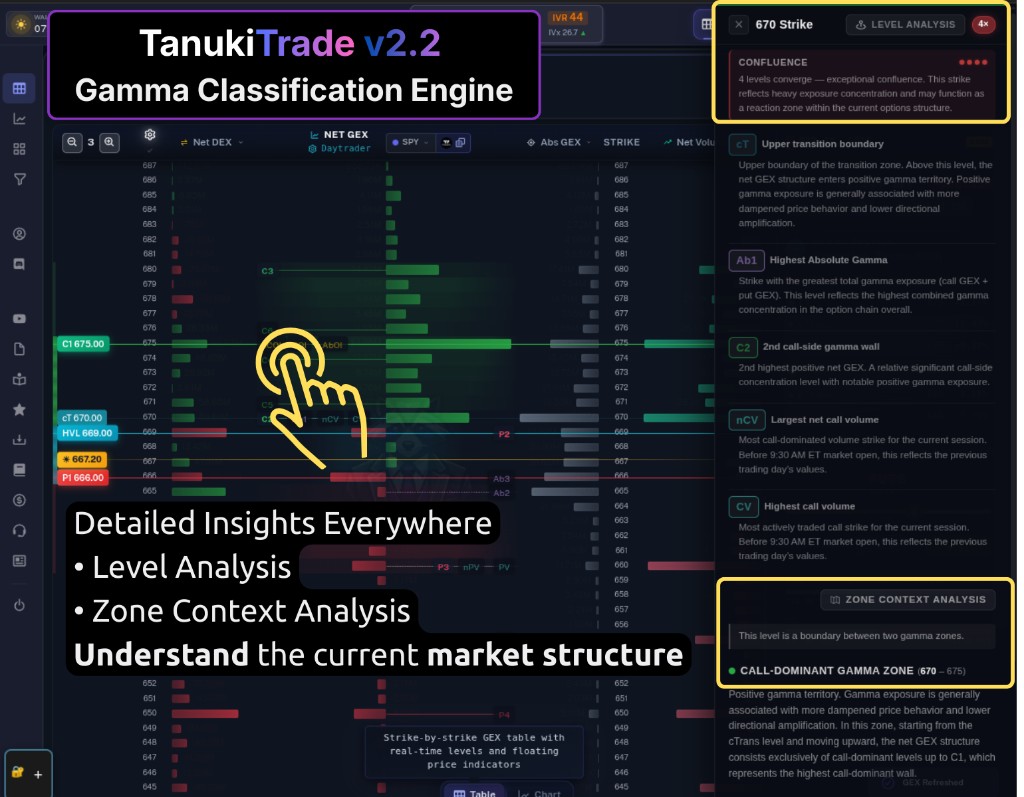
Classification engine now highlights ±DEX strikes, gamma zones are cleaner and better named, and several UX improvements make it easier to see what you're looking at and which expiry matters most.
New Features
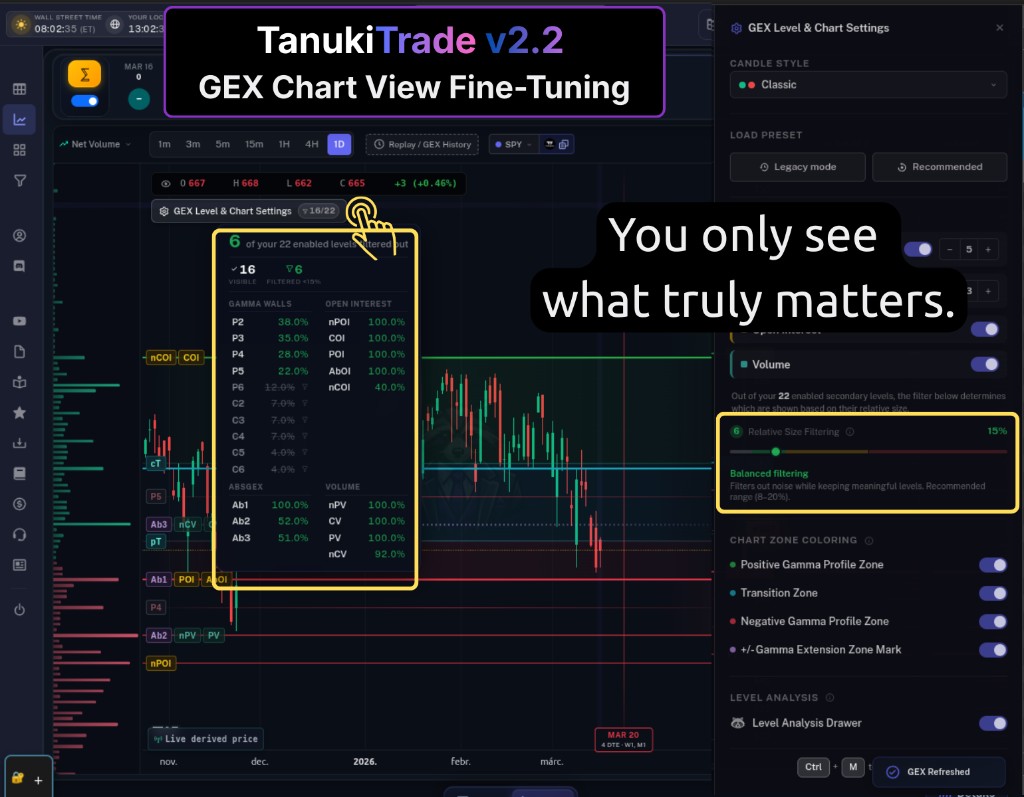
±DEX labels: The classification engine now marks the largest positive and largest negative delta exposure (DEX) strikes with white labels at system level — so you can spot the strongest DEX levels at a glance.Visible area stats: A new dynamic field shows how many levels you're actually seeing vs. how many are enabled. Hover to see the breakdown. Open settings anytime with Ctrl+M or right-click on the GEX Live table or chart view.Compact view mode toggle: In compact view, clicking the cumulative icon switches to standalone mode and vice versa — one click to flip between the two views.
Improvements
Gamma zone naming: The two main gamma groups are now called Positive Gamma Zone and Negative Gamma Zone (instead of Call Dominant / Put Dominant). Zone descriptions now lead with "Call Dominated Gamma territory" and "Put Dominated Gamma territory" for clarity.Gamma classification cleanup: Removed zones that were identical to single levels — those are now shown as levels only, not redundant zones.Futures contract rollout: The system now uses a 1-day delay for futures contract rollout — when confirmed volume exceeds the next month by end of day (not just premarket), the front month rolls correctly.Gamma extension zones: The outer boundary of each extension zone is now marked with a small fading wing line in both the table and chart views — the line fades inward from the left edge. The marker pulses gently so it's easy to spot at a glance.GEX bubble star: The expiry with the largest standalone net GEX impact is now marked with a star in both chart and table views — so you can spot the strongest standalone expiry even when viewing cumulative.Rate limiting: Fine-tuned rate limiting thresholds and made error messages clearer and easier to understand when limits are reached.Economics & News page (beta): A new dedicated page below Options Screener in the sidebar — economic calendar, top market stories, and a market overview widget, all powered by TradingView. Stay on top of event-driven context without leaving the app.
Bug Fixes
Premarket candles: For ETFs and stocks, late-reported trades no longer count in OHLCV and no longer cause phantom wicks on premarket candles.
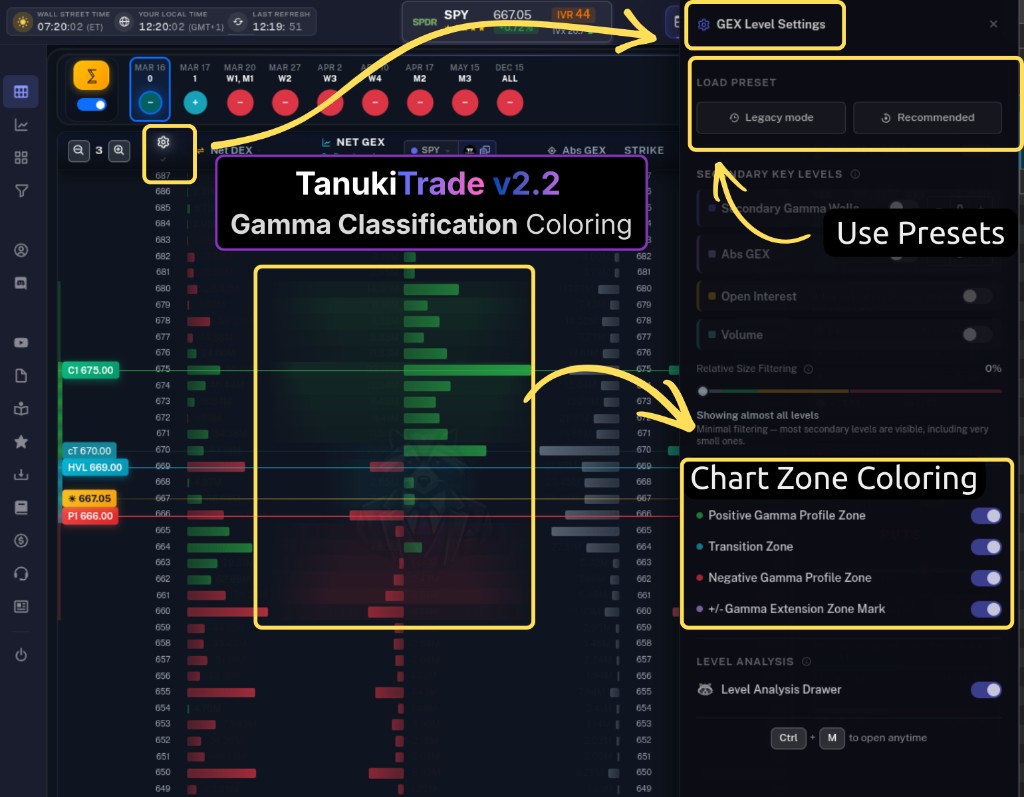
New compact app layout (Tanuki Shell) for faster navigation — fixed header with one-click view tiles, slim icon sidebar, and optional compact view. Plus key levels (HVL, C1–P6, chart zones, GEX Level & Chart Settings) from the Gamma Classification Engine, unified across GEX Live, chart, and Options Screener.
New Features
New compact layout (Tanuki Shell): Fixed header and slim sidebar replace the old menu so you can navigate faster. The header includes one-click tiles for GEX Live Table, GEX Live Chart, GEX Matrix, and Options Screener; market context (Wall Street time, local time, last refresh) stays visible; symbol selector stays in the center on data views. The sidebar is a narrow icon rail (56px) that expands on hover to show full labels — WebApp, Account, and Resources in one place. Optional compact-view toggle hides the breadcrumb for more screen space. On mobile, the sidebar becomes a slide-out menu with the same structure.Gamma Classification Engine (beta): One system now computes all key levels — HVL, call/put walls C1–P6, transition boundaries (cT/pT), absolute GEX (Ab1–Ab3), and top OI/volume strikes. These levels drive chart annotations, GEX Live level lines, and Options Screener bubbles so you get the same data-driven levels everywhere. In-app explanatory text describes each level and zone (e.g. what HVL means, why C1/P1 matter, what transition vs extension zones imply) so you can learn the system without leaving the app.Chart zones when key levels are on: The GEX Live Chart shows colored zones — positive gamma (green), negative gamma (red), and transition (cyan) — based on where price sits relative to HVL and the walls. Extension zones above C1 and below P1 are marked so you can see at a glance the various gamma regimes in both the chart and table view.GEX Level & Chart Settings panel: A dedicated settings panel (gear icon next to the chart) groups Candle Style, Premarket, Chart Zones, Key Levels (with Min. Relative Size slider), and Level Analysis. Each section has short hint tooltips (e.g. what chart zones are, how many sub-levels to show, what the level analysis tooltip does). You can turn the detailed level analysis on or off and reset all chart settings in one place.Detailed Level Analysis tooltip: Click any level label on the chart to open a drawer that explains that level (name, short description, and full detail), the zone it sits in, and confluence with other levels — powered by the same classification engine descriptions used across the app.
Improvements
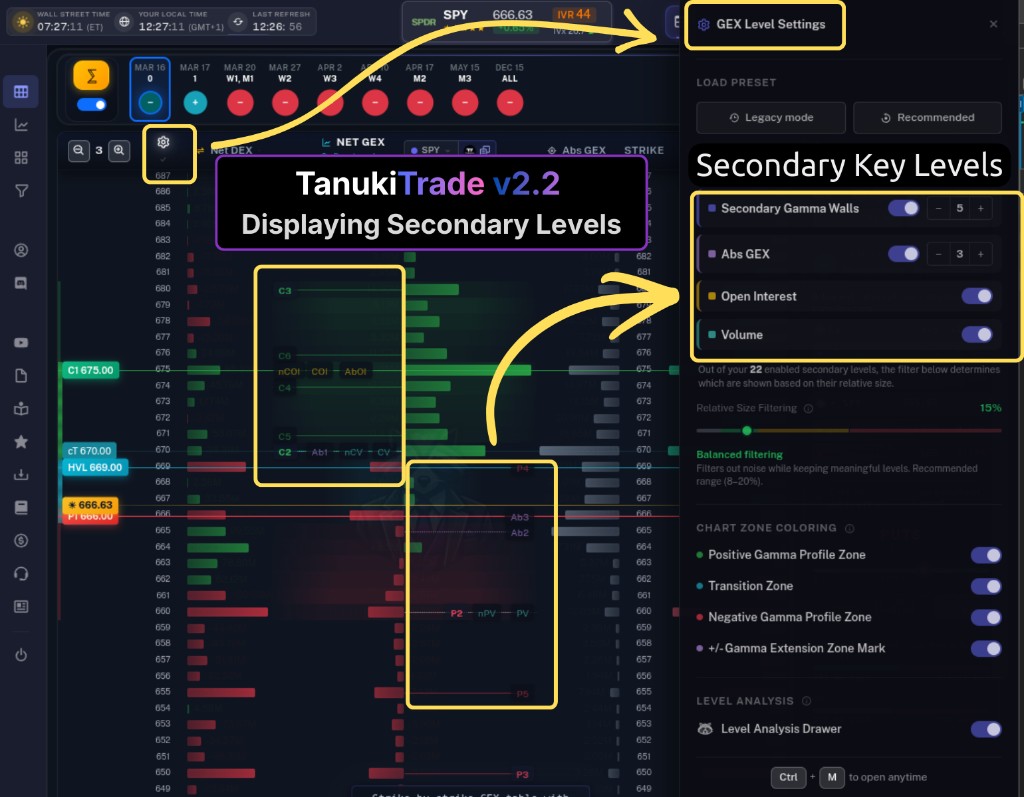
Unified C1/P1 labels everywhere: Highest Call Wall (C1) and Highest Put Wall (P1) use the same names in GEX Live table and chart level lines, expiry bubbles, Options Screener tooltips and help, and Discord bot output — one clear naming so you always know which gamma boundary you're looking at.GEX level merge logic: When HVL coincides with cTrans and/or pTrans, levels are merged into a single row (e.g. HVL = cpTrans when all three match; or HVL = pTrans / HVL = cTrans when only two match, with the other transition row hidden). Implemented in GEX Live, GEX Chart, and Options Screener bubble charts. Zone coloring uses the original parsed values so merged levels still color correctly.GEX Live table secondary levels: The strike table now shows the same configurable key levels as the chart — secondary gamma walls (C2–P6), Abs GEX (Ab1–Ab3), Open Interest, and Volume levels. Level Settings (gear next to the strike column, or Ctrl+M) lets you toggle each group and adjust sensitivity so the table and chart stay in sync.Faster loads, less data: Server responses for GEX Live and GEX Matrix were trimmed to only what the frontend uses — quicker response times and roughly half the network transfer; pages and data views load faster.
Bug Fixes
Fixed GEX Live Chart on timeframe change: When you switch timeframe (e.g. 5m → 15m), the chart no longer mixes candles from different timeframes. While new OHLC data loads, only the spot price updates; once loaded, the chart shows the correct candles for the selected timeframe.Gamma classification: stability and display fixes for level rendering and settings sync between table and chart.
v2.1.3Polish
March 6, 2026
GEX Table Polish & Live Price Background Refresh
Removed the colored status dots from the GEX Live table (no longer needed out of beta). Live prices now keep updating in the browser even when the tab is in the background. New candle types on the GEX Live Chart.
Improvements
GEX Live table: status dots removed for a cleaner layout; the view is no longer in beta, so the extra visual noise was dropped.Live prices: fixed so price updates continue to refresh even when the tab or window is in the background.GEX Live Chart: new candle type options added to the chart style picker.
v2.1.2Polish
March 5, 2026
GEX Live Visual Polish & Clarity
A set of visual and readability improvements across the GEX Live table and chart views — better bar proportions, clearer labels, and consistent gradient styling.
Improvements
Detailed Vol & Detailed OI bars now correctly reflect proportional values — a strike with 2× volume visually shows 2× bar width.Single-row metric labels reposition dynamically: large bars show the number at the base, small bars show it at the tip — no more clipped text.Text shadow on all metric labels for better readability against bar backgrounds.Bar gradients unified across table and chart views: the base of every bar is now the intense end, fading toward the tip."Live derived price" badge now shows an info tooltip explaining derived pricing; futures symbols get an additional note about CFD-based mapping.Pre-market VOL hint: a small info icon appears next to VOL in the Chain Activity panel before 9:30 AM ET, clarifying that volume shown is from the prior trading day.
v2.1.1Polish
March 4, 2026
Introducing live derived spot prices via WebSocket streaming — real-time price updates across GEX Live, Matrix, and the global symbol selector when enabled. Plus critical Safari copy fix and API improvements.
New Features
Live Derived Spot Prices: Real-time spot price streaming via WebSocket. When enabled, prices update instantly across the Global Symbol Selector, GEX Live table, GEX Live Chart, and GEX Matrix — no more stale REST snapshots overwriting live data. Users without streaming see ~1 min delayed data during market hours.
Improvements
Copy TV Levels in GEX Live Table: The same picker and copy button is now available in the Net GEX column header of the table view — positioned to the right of the Net GEX title and preset selector. Hidden on mobile, same as the preset.Data Status Badge: The chart's bottom-left badge now reflects your streaming status — "Live derived price" with pulsing green icon when WebSocket is active, "~1 min delayed spot price" when using REST data, and "Updates weekdays 6:30 AM – 4:00 PM ET" outside trading hours.
Bug Fixes
Fixed Copy to TradingView on Safari (iOS & macOS): Safari requires clipboard operations to run synchronously within the user gesture. The Copy GEX Levels button now uses the ClipboardItem + Promise<Blob> pattern, so the clipboard write starts immediately on click while data fetches in the background. Safari users should no longer see "Export Failed" or "request not allowed by user agent" errors.
v2.1Feature
February 23, 2026
Manual Override Mode — Real-Time GEX Levels for TradingView
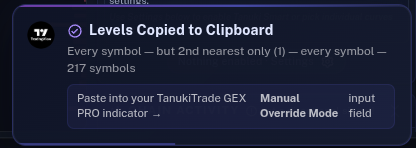
The long-awaited feature for intraday and 0DTE traders is here. Copy real-time GEX levels from the webapp and paste them directly into the TanukiTrade GEX PRO TradingView indicator — overriding the ~5× daily auto-update cycle. True control. Real freedom.
New Features
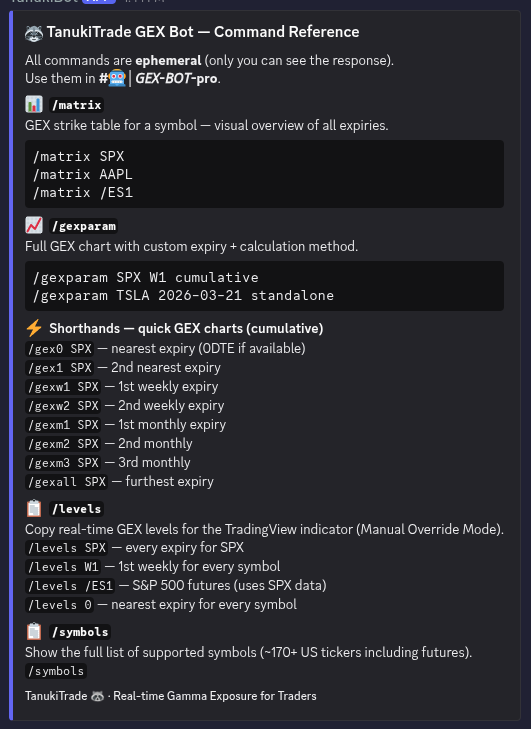
Manual Override Mode (TradingView Indicator): A new input field in the TanukiTrade GEX PRO indicator settings allows you to paste GEX levels copied from the webapp. If the pasted data is fresher than the auto-updated levels, it instantly overrides them for the matching symbol, expiry, and calculation method.One-Click Copy from Webapp: A new split-button next to the Replay/History controls on the GEX Live Chart view lets you copy levels with one click. Choose from a dropdown: copy every expiry for the current symbol, or copy a specific expiry key (W1, W2, M1, 0, ALL, etc.) for every supported symbol (~170+ tickers).Smart Matching & Visual Override Status on Chart: The HVL label in the TradingView indicator now shows a clear icon reflecting the override state — 📋✔ (override active and in use), 📋💤 (levels found but auto-update is newer), or 📋❌ (no match for current symbol + expiry). Hover over HVL for full details including when the data was copied and which setting was used.Discord Bot /levels Command: Use /levels SPX or /levels W1 in the Discord bot to receive a .txt file with GEX levels ready to paste into TradingView. Includes step-by-step instructions, summary statistics, and alias information. Works with both symbol names and expiry keys.Discord Bot /symbols Command: Use /symbols to see the full list of ~170+ supported symbols including futures.Discord Bot /help Command: A new /help endpoint lists all available commands with descriptions and examples.
Improvements
Smart Dropdown Memory: The levels dropdown remembers your last chosen option, so you don't have to re-select it each time.Discord Bot Error Messages Upgraded: All Discord bot error messages (/gex0, /gexw1, /matrix, /gexparam, /levels) now show branded, user-friendly embeds with examples, shorthand tips, and the full supported symbol list.Descriptive Export Headers: The first line of exported data now includes a human-readable description (e.g. "1st weekly expiry for every symbol (170 symbols)") alongside the timestamp, shown in the TradingView indicator tooltip on hover HVL.
Bug Fixes
Fixed clipboard fallback for environments where navigator.clipboard is unavailable (e.g. non-HTTPS contexts).Fixed symbol family tooltip showing the base symbol as its own alias (e.g. "QQQ (also QQQ, /MNQ1)" → "QQQ (also /NQ1, /MNQ1)").Fixed sticky tooltips: Tooltips no longer linger after clicking a button or moving the mouse away. On mobile/touch devices, tooltips now show on tap and auto-dismiss after 2.5 seconds.Fixed XSP candle data: XSP chart now correctly displays SPX prices divided by 10, matching the actual XSP price level.
v2.0Major
February 11, 2026
GEX Live Chart View & Sidebar Intelligence Overhaul
A landmark release introducing the all-new GEX Live Chart view with TradingView-powered interactive charts, a completely redesigned sidebar with smart Chain Activity metrics, and dozens of UX refinements across every component.
New Features
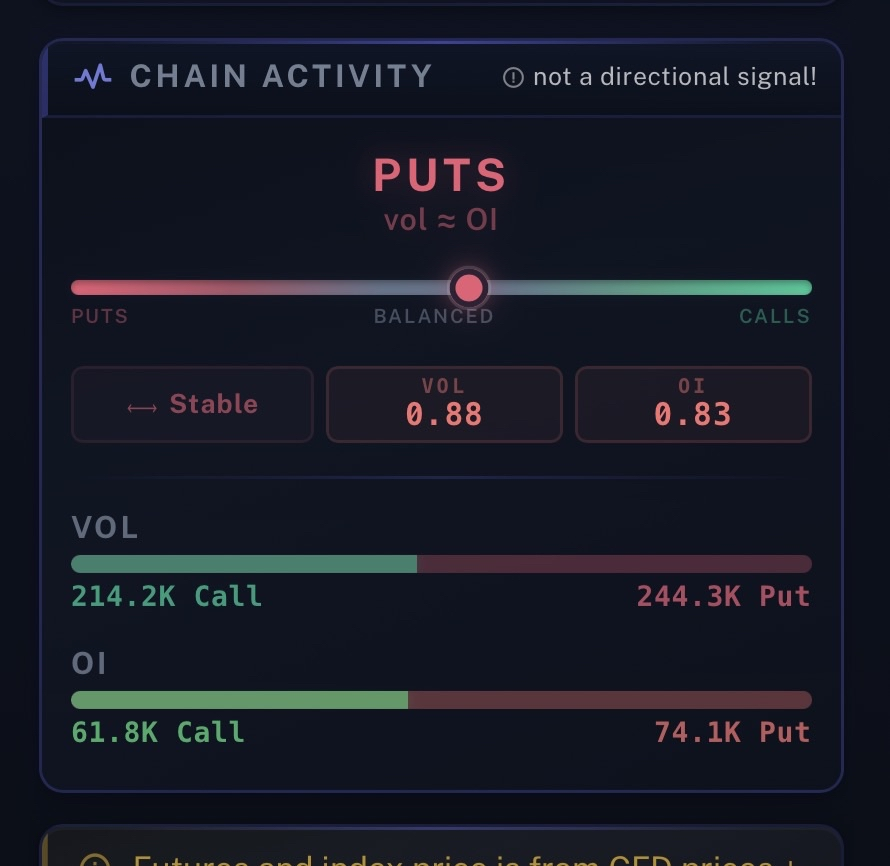
GEX Live Chart View: A brand-new interactive chart-based experience powered by Lightweight Charts (TradingView). View candlestick data with configurable timeframes (1m, 3m, 5m, 15m, 1H, 4H, 1D), premarket toggle, GEX profile columns, and real-time level lines — all alongside the familiar data sidebar.Profile Columns on Chart: Up to 3 configurable profile columns (left, R1, R2) flanking the chart with draggable handles. Each column supports 8 metrics (Net GEX, Net DEX, Net OI, Detailed OI, Absolute OI, Net Volume, Detailed Volume, GEX by Volume) via dropdown selectors.Earnings Marker on Chart: Earnings dates are now visually marked on the chart's time axis with a vertical dashed line and the same interactive badge used in the sidebar. Hover for full details.Chain Activity Gauge — Lean, Shift & Activity (not a directional signal): Replaces the old Chain Activity score with a mathematically correct, share-based calculation. Lean (absolute call/put dominance using 70/30 volume/OI blend), Shift (relative flow vs positioning), and Activity (volume intensity vs open interest). Each metric has its own hover tooltip with explanation.Volume C/P Ratio Card: New sidebar metric showing total call volume vs put volume ratio with color-coded bars, complementing the existing OI C/P ratio.Navigation Menu Update: The sidebar navigation now shows "Gex Live Table" and "Gex Live Chart" as two separate, directly clickable menu items with distinct icons.Candle Theme Picker: Choose from 4 chart styles — Classic (green/red), Monochrome (white/gray), Hollow (traditional hollow candles), or Line chart. Your preference is saved automatically. The picker sits next to the timeframe selector.
Improvements
Complete Sidebar Visual Redesign: Glassmorphism effects, custom dark scrollbar, refined card headers with accent stripes, polished GEX/DEX metrics with better typography and hierarchy, sleeker change indicators, and consistent styling across all cards.Unified Tooltip Styling: All Bootstrap tooltips across both GEX Live views now share a consistent dark theme with monospace font, indigo-tinted borders, and subtle shadows.Sidebar Height Matching: The sidebar now dynamically matches the height of the adjacent chart or table area via CSS flexbox stretch, eliminating the old fixed viewport-based max-height.Sidebar Collapse Handle Redesign: The collapse/expand buttons now float over the sidebar's edge using negative margins instead of consuming layout space. Default state is subtle and translucent; hover reveals the interactive indigo highlight.Expiry Vertical Line on Chart: The selected expiry is marked with a colored vertical line and label on the chart. When the line scrolls off-screen, a sticky label appears in the bottom-right corner.Colored Dominance Zones on Chart: Call Zone, Transition Zone, and Put Zone are rendered as semi-transparent overlays on the chart's Y-axis, clamped correctly to the visible price range during zoom.Data Delay Badge: A "Data delayed ~1 min" badge in the chart's bottom-left corner clearly communicates data latency to users.Chain Activity Disclaimer: "not a directional signal!" note added to the Chain Activity card header for user education.Responsive Chart Height: Fine-tuned chart heights across all breakpoints for better vertical utilization.Gamma Profile Card Reordered: The Gamma Profile / Key Levels card now appears above the GEX/DEX metrics in the sidebar for better information hierarchy.
Bug Fixes
Fixed Chart Zone Misalignment: Colored dominance zones no longer "slip" when zooming the Y-axis. Zones are properly clamped to the visible chart area.Fixed Tooltip Initialization in Table View: Resolved issue where tooltips for the view switcher and sidebar buttons failed to initialize in the GEX Live table view due to overly broad tooltip disposal in loadGexData.Fixed Sidebar Collapse Button on Mobile: The sidebar collapse/expand buttons no longer appear on mobile breakpoints where the sidebar itself is hidden.
Major UI redesign across all data views with a modern dark theme, cockpit-style aesthetics, and improved mobile experience.
New Features
Column Presets (Ctrl+M): Quick-switch between pre-configured metric layouts with a beautiful spotlight popover. Choose from Daytrader, Gexbot, SwingKing presets or create your own Custom configuration - all saved automatically.Customizable Strike Table Metrics: Three configurable columns in the GEX Live strike table now support 8 different metrics (Net DEX, Net OI, Detailed OI, Absolute OI, Absolute GEX, Net Volume, Detailed Volume, GEX by Volume). Your browser remembers your selections.Mobile Details Panel: GEX Live now has a floating action button on mobile that opens the full data panel (charts, metrics, gamma profile) in a slide-out drawer.GEX/DEX Change Indicators: Daily change values now display with directional arrows and color-coded styling for instant trend recognition.Dual Net GEX Bars: Expiry bubbles now show both Cumulative and Standalone Net GEX bars side by side. The selected mode is colored, the other is gray - allowing instant visual comparison without switching modes.
Improvements
Modern Dark Theme: All data views (GEX Matrix, GEX Live, Options Screener) now feature a cohesive dark UI with subtle glows and glass-morphism effects.Cockpit-Style Data Panels: GEX Live sidebar redesigned with instrument-panel aesthetics - monospace fonts, accent lines, and enhanced readability.Monospace Chart Fonts: All GEX profile charts (including popovers) now use consistent monospace typography for a professional look.Responsive Metrics Grid: GEX Matrix metrics collapse into a compact 2-row layout on mobile devices.Unified Watermarks: Subtle TanukiTrade watermark now appears behind all data tables.Sticky Expiry Column: GEX Matrix expiry column stays visible while scrolling horizontally.
Bug Fixes
Fixed Menu Jumping: Resolved annoying menu animation issue where the sidebar would jump even when collapsed.Fixed Expand Button Link: The expand button in the GEX Live popup on the Matrix page now correctly navigates to the GEX Live view.
Major UX improvements to GEX Live with space-saving compact mode, visual earnings indicators, and enhanced symbol information display.
New Features
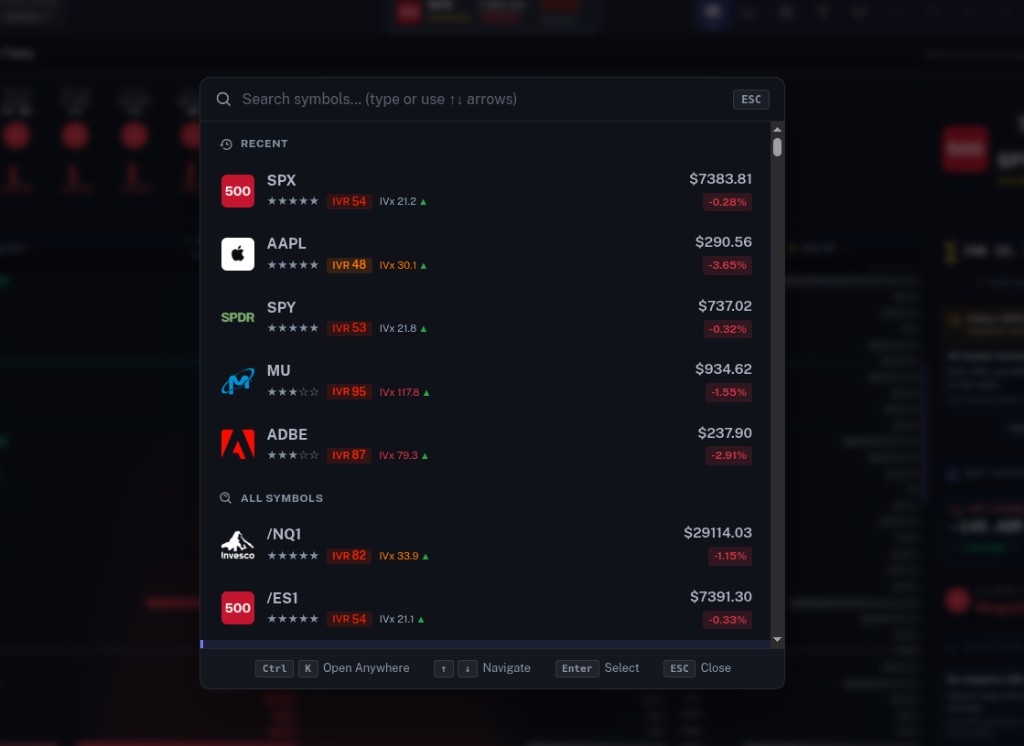
Compact Mode Toggle: New collapse button in GEX Live hides refresh button, inactive method selector, Net GEX bars, and DTE text - saving significant vertical space. State persists across sessions.Earnings Highlight: Expiry bubbles now pulse purple when earnings impact that expiration. AMC earnings highlight the next trading day's expiry; BTO earnings highlight that day's expiry.IVx Average Display: Symbol selector now shows IVx Avg below IVR badge with Options Screener color coding (Gray < 30, Orange 30-60, Red > 60). Change arrows (▲/▼) indicate IV direction.Spotlight Search Enhancement: IVx Avg now visible in Command Palette (Ctrl+K) search results alongside IVR.
Improvements
Mobile Optimization: Breadcrumb navigation hidden on mobile devices for maximum screen utilization.Smooth Transitions: Compact mode uses CSS animations for professional expand/collapse effect.Tooltip in Compact Mode: Expiry bubbles show DTE in tooltip when compact mode hides the DTE text.
Bug Fixes
Fixed Call/Put Ratio: OI Stats chart now displays correct C/P ratio using pre-calculated totals instead of post-trim values.Fixed 0DTE C1 (Highest Call Wall): Resolved confusing display of distant zero values for C1 when 0DTE data expires near market close.
v1.6Beta
January 2, 2026
Data Refresh Window Indicator & NQ Mapping Sync
Added a visual indicator to GEX Live that clarifies when real-time data updates are active, and synchronized NQ/MNQ mapping between TradingView indicators and the WebApp.
New Features
TradingView Indicator Update: NQ and MNQ futures mapping in TradingView indicators now matches the WebApp's improved mapping algorithm. Both platforms should display nearly identical GEX values for Nasdaq 100 futures.
Improvements
GEX Live now displays a clear "Data Refresh Paused" warning when viewing the app outside of the active update window (weekdays 6:40 AM – 4:00 PM ET).The spot price line on the strike table turns gray with a ❆ symbol when data refresh is paused, providing an instant visual cue.The GEX Profile chart also reflects this state with gray spot price styling during off-hours.
Bug Fixes
Clarified that options data, spot prices, and futures GEX values are all refreshed on the same schedule — only during the active update window. This prevents confusion for futures traders who may expect 24-hour updates.
2025
v1.5Beta
December 19, 2025
Futures Support for Day Traders
Analyze ES and NQ futures with minute-refreshed mapped GEX data. We now map futures contracts to their most liquid underlying options chains, giving intraday traders instant access to gamma exposure levels.
New Features
Futures Charting Available: /ES1 and /MES1 (E-mini & Micro E-mini S&P 500) are now mapped from the SPX options chain for maximum liquidity and accuracy./NQ and /MNQ Support: Nasdaq 100 futures (E-mini & Micro) are mapped from the QQQ options chain, providing reliable GEX data for NQ day traders.Front-Month Focus: Designed specifically for day traders - only the front-month expiration (as defined by TradingView) is available. This keeps the data relevant for intraday execution.Seamless Access: Simply start typing "ES1" or "NQ1" in the GEX-Live spotlight search (Ctrl+K), select from the dropdown, and view real-time GEX values instantly.
Improvements
Important Note: Futures GEX data is derived from CFD prices and our proprietary mapping algorithm - not official real-time CBOE data. You may see 1-2 ticker points of difference, but this does not affect the overall gamma exposure picture.Coming Soon: For /NQ and /MNQ, the GEX-Live WebApp currently provides more accurate mapping data than our TradingView indicators. We plan to update the TV indicators soon to match this improved accuracy.
v1.4.1Beta
December 1, 2025
Gery Nagy Joins as Chief Options Expert
A milestone for TanukiTrade — Gery Nagy officially joined the project as Chief Options Expert. For us this is both a professional honour and a validation that the toolkit is built on real options-trading depth, not chart cosplay.
New Features
Chief Options Expert — Gery shapes TanukiTrade's options education framework and the professional methodology behind our indicators and WebApp. Complex concepts get presented clearly, with risk awareness and structured position-management front and centre.Who is Gery — nearly 20 years in the market, 17 years teaching options full-time, founder of Hungary's largest derivatives-education community. Swing-based SPX trader (multi-day holds), positive-theta spread structures with flat delta, and the developer behind several proprietary screeners that predated TanukiTrade.Partnership with Greg — Gery has worked with Greg as senior professional advisor since the earliest product direction; this release marks the formal role on the team and in the Member Area onboarding journey.
Improvements
Member onboarding emails and educational touchpoints now carry Gery's voice for options methodology — trial welcome, learning path, and community guidance.
v1.4Beta
November 20, 2025
Subscription Flexibility & Billing Enhancements
More control over your subscription with custom discounts, seamless upgrades, and extended access options.
New Features
Custom User Discounts: Personalized discount codes can now be applied to individual users for special pricing.Upgrade & Renew Subscription: Easily upgrade your current plan or renew your subscription directly from the member dashboard.No-Expiration Access: New subscription tier option that provides permanent access without renewal requirements.
Improvements
Further optimized GEX-Live view performance for faster load times and smoother real-time updates.
Bug Fixes
Fixed NetGEX Expiry Table Data Consistency: The expiry table was displaying stale data after midnight due to a timezone boundary issue. Values are now properly synchronized with GEX-Live to ensure consistent readings across all views.
v1.3Beta
November 14, 2025
Stability Patch & Screener Enhancements
Stronger platform reliability, a refined GEX Live layout, and smarter filter tooling for active traders.
New Features
Primary screener presets now include Liquidity and Min Price filters so you can apply core screening criteria without leaving the main view.Introduced a dedicated Gamma Squeeze filter to highlight symbols showing elevated gamma-squeeze conditions.GEX Matrix now properly identifies and highlights IV backwardation scenarios, providing clearer visibility into volatility structure.
Improvements
GEX Live layout now maxes out at 1600px on ultra-wide monitors, keeping the summary rail proportional while preserving data density.Reweighted liquidity ratings so that only the most liquid symbols earn five stars, aligning the UI with actual fill quality.Expanded diagnostics: backend now captures detailed logging whenever a rare 404 or 500 occurs, making future anomalies easier to trace.Liquidity note: the five-star rating identifies symbols with the strongest liquidity characteristics in our dataset. Liquidity and minimum-price filters can be used to narrow the screener universe for further analysis.
Bug Fixes
Patched the intermittent 404 and 500 errors reported across the app; request handling is now hardened and the incidents should be dramatically rarer.Resolved the authentication anomaly that forced daily re-logins; sessions now persist as expected.Corrected IVx avg (Implied Volatility Index Average) calculations in the GEX Matrix - values were previously computed incorrectly due to an algorithmic error.Fixed Total GEX/DEX change metrics which were displaying inaccurate percentage changes; the calculation logic has been completely rebuilt to ensure precision.
v1.2Beta
November 5, 2025
Market Context Bar + Responsive Improvements
Comprehensive market timing and context awareness with improved mobile responsiveness.
New Features
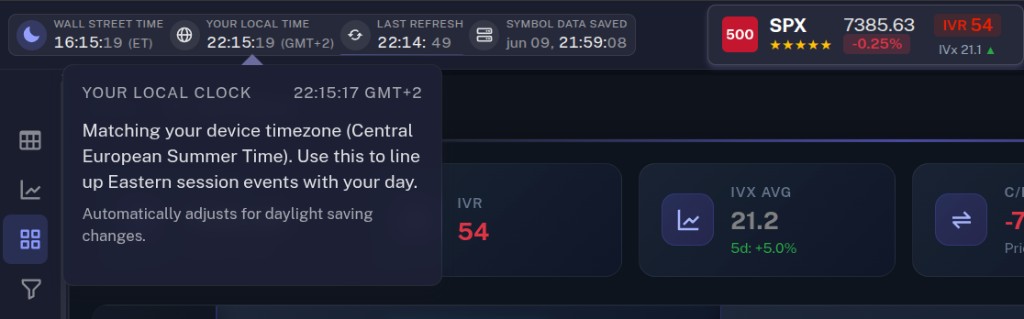
Market Context Bar (Header): Real-time market phase indicators with Eastern Time and local timezone display. Visual status icons show premarket (pulsing sun), market open (green dot), and after-hours (moon) phases.Interactive Popovers: Hover over any time indicator to see detailed market session timelines, next phase transitions, and relative timestamps.Dual Clock Display: Simultaneous view of New York Eastern Time and your local timezone for easier international trading coordination.Enhanced Data Timestamps: Option chain and refresh timestamps now clearly labeled with timezone indicators (ET) and interactive explanations.
Improvements
Responsive Data Panel (GEX Live): Right-side analytics panel now maintains better visibility on laptop and smaller desktop screens with optimized breakpoints.Improved Header Layout: Market context information moved from scattered locations to a unified, professional navbar component.Smooth Popover Updates: Eliminated flicker when popovers update with new data every second - content only refreshes when actively visible.Professional Icon Design: Replaced generic icons with semantic ones (server icon for option chain data, globe for local time).
Bug Fixes
Fixed Timezone Display: Corrected market phase detection to use accurate New York Eastern Time calculations (09:31 market open).Fixed Popover Memory Leaks: Properly disposed of tooltip instances to prevent Bootstrap conflicts.
v1.1Beta
November 4, 2025
Bug Fixes + UI/UX Enhancements
Major improvements to user experience and critical bug fixes following the initial beta release.
New Features
Quick Symbol Search (Ctrl+K): Press Ctrl+K anywhere on the site to instantly access the spotlight symbol search! Find and switch symbols lightning-fast.Enhanced Time Display: Last update timestamp now shows relative time in your local timezone with improved clarity in the header.Table Cell Size Controls (GEX Live): New zoom functionality (levels 1-5) to customize table cell size for optimal readability. Your preference is automatically saved.
Improvements
GEX Live Bubble Layout: Completely redesigned expiry bubble proportions and spacing for better readability and efficient use of screen space.Gamma Profile Panel (GEX Live): Enhanced font sizes and design refinements in the right-side panel for clearer regime identification.GEX Matrix View: Streamlined and more compact layout for improved information density.Removed Flickering Effects: Eliminated visual flash effects during expiry transitions for a smoother, more professional experience.
Bug Fixes
Fixed DTE Date Misalignment: Corrected DTE (Days to Expiration) values in GEX Live view that were shifting incorrectly during premarket hours due to timezone conversion issues (US Eastern Time).Fixed 0 DTE Display Bug: 0 DTE expiries now correctly display "0 DTE" instead of "- DTE".Fixed GEX Matrix Multiple Initialization: Resolved bug causing duplicate initialization of matrix components.Fixed Spot Price Accuracy: Matrix service now uses real-time prices from stock_prices table instead of cached batch data, ensuring accurate gamma profile regime classification.Fixed Logo Path Issues: Global symbol selector now correctly maintains logo paths when loading expiry data.Fixed Scroll Behavior: Table now properly scrolls to spot price row when changing calculation methods or manually refreshing.Fixed Tooltip Errors: Resolved "Cannot convert undefined or null to object" errors by disabling tooltip animations and proper disposal handling.
v1.0Beta
November 1, 2025
GEX Options WebApp Launch
The GEX Options WebApp is live in the Member Area — TanukiTrade's intraday command center for minute-refreshed gamma exposure on 220+ U.S. symbols. What began as a companion to our TradingView indicators is now where most members spend their session: real-time structure, multi-expiry context, and screening without waiting for TV's five daily auto-refreshes. An active PRO subscription (or trial) and a completed trader profile open GEX Live, Matrix, and Screener. Connecting Discord in My Account is optional and only joins the community and the GEX bots (we request `identify` + `guilds.join`). Watch the Getting Started video below, then read the GEX primer if dealer positioning is new to you.
New Features
Optional Discord connect — My Account →Connect Discord→ Authorize on Discord's OAuth screen if you want the PRO community and bots. The WebApp does not require Discord. Log in with your 6-digit email code and an active PRO subscription (or trial). If you do connect, the Premium role usually lands within ~1 minute — refresh Discord if PRO channels don't appear yet.Why the WebApp is core now — same OPRA-derived Gamma Classification Engine as TradingView and Discord, refreshed roughly every minute during market hours (weekdays 6:40 AM – 4:00 PM ET) instead of five times per day on TV. Most active members open the WebApp first; indicators and Manual Override (later releases) close the loop when you want levels on your chart.GEX Live — strike-level Net GEX table, expiry bubbles, gamma profile & sentiment rail, key levels (HVL, Call/Put walls, dominance zones), and Call/Put ratio tracking in one view built for 0DTE and intraday monitoring.GEX Matrix — every listed expiry for a symbol side by side: Net GEX/DEX, IVx, chain activity, and configurable metric columns without hopping tickers one by one.Options Screener — filter 220+ symbols on IVR, IVx, skew, gamma regime, earnings calendar, and liquidity; built-in presets (including swing-oriented layouts) help organize and narrow the symbol universe before you drill into GEX Live.One ecosystem, three surfaces — WebApp for depth at your desk, Discord 🤖│options-gex-bot for mobile `/gex` and `/matrix` lookups, TradingView PRO scripts for charting. OAuth connect once; your Premium role stays synced with Stripe subscription state.Fast, dark, responsive UI — layouts tuned for long screen sessions on laptop and mobile; no separate app install.Release notes — this page tracks every WebApp update from v1.0 forward so you always know what shipped and when.
The TanukiTrade Member Area went live — subscription management, optional Discord OAuth connect, TradingView indicator access, and the first version of the member dashboard in one place. The setup path most new members follow: log in, confirm TradingView access, then open the WebApp. Connecting Discord is optional and is for the community and the bots, not for WebApp access.
New Features
User subscription management — view your plan, trial status, and billing from My Account without hunting through Stripe emails.Basic member dashboard — your home base for account settings, indicator access status, and links into the WebApp tools.TradingView indicators access — PRO invite-only scripts (GEX Profile PRO, Options Overlay PRO, Oscillator PRO, Screener PRO) grant automatically after checkout; add them from Indicators → Invite-only scripts on any supported chart.Discord bot access — minute-level GEX between TradingView's five daily refreshes: /gex, /gex0, /gexw1, /matrix, /levels, /symbols, /help in 🤖│options-gex-bot (Premium role required).Step 1 — Log into the Member Area: go to app.tanukitrade.com, enter the email you signed up with, click Send code, then type the 6-digit code from your inbox (valid 3 minutes — check spam or Promotions if it doesn't land).Step 2 — Connect Discord (optional community): My Account → Connect Discord → Authorize on Discord's OAuth screen if you want the server and the Premium role. We only request identify + guilds.join — enough to add you to the server and assign your Premium role; we never read your DMs or other servers. This step is not required for the WebApp, the API, or the indicators. Role usually lands within ~1 minute; refresh Discord (Ctrl+R) if you don't see PRO channels yet.Step 3 — Confirm TradingView username: the username from your TV profile URL (tradingview.com/u/YOUR_USERNAME/) must match what we have on file — that's how invite-only access is granted. Update it in My Account if you ever change it on TradingView; scripts should appear under Invite-only within a few minutes of an active subscription.Step 4 — Add indicators to a chart: TradingView → Indicators → Invite-only tab → pick a TanukiTrade PRO script → add to SPX, SPY, QQQ, or another supported symbol. Auto-refresh runs five times per day; use the WebApp Copy Levels flow when you need fresher intraday levels.Step 5 — Try the Discord bot: in 🤖│options-gex-bot run /gex SPX for the current profile, /gex0 SPX for 0DTE, /matrix SPX for the full matrix view, or /help for the full command list. Same visual language as the TradingView indicators.Already in our Discord server? OAuth skips the join step and just attaches Premium to your existing membership — no manual “please add me” DM needed.
Improvements
Discord ↔ subscription sync — connect once in the Member Area and your Premium role stays aligned with your Stripe status (active trial or paid PRO). Connecting is optional.WebApp opens with an active subscription — Discord is not required for GEX Live and the related tools.
v0.02Origin
February 2025
Discord Community Goes Live
The TanukiTrade Discord server opened its doors — not just a chat room, but the home base for options-GEX education, tech support, and minute-level bot access between TradingView's five daily indicator refreshes.
New Features
Premium Discord server — join at discord.gg/Dd8njgQwEQ; public welcome channels for newcomers, PRO-only areas unlock after you connect your subscription.🤖│options-gex-bot — slash-command GEX visuals refreshed every minute during market hours (/gex, /gex0, /gexw1, /matrix, /levels, /symbols, /help).Community channels — 📚│newbies-n-basics and 📜│helpful-info-faq for learning, 💬│tech-support when something breaks, plus PRO educational spaces that grow with the product.Discord ↔ Stripe sync — connect once in the Member Area and your Premium role lands automatically; no manual “please add me” DMs.
Improvements
Same color language as TradingView indicators — when you pull GEX in Discord, the profile reads like the chart you already know.
The core TanukiTrade toolkit shipped as invite-only TradingView scripts: real OPRA chain data, auto-refreshed GEX levels, IVR/IVx/skew panels, probability curves, and a multi-symbol screener — built for traders who chart on TV but execute on Tasty, IBKR, TOS, or Schwab.
New Features
GEX Profile PRO — auto-updated Net GEX, HVL (gamma flip), Call/Put walls, 0DTE depth, and multi-expiry cumulative vs standalone modes on 220+ U.S. symbols (5× daily refresh cadence).Options Overlay PRO — expiry table, delta / expected-move curves, IVR dashboard, vertical & horizontal IVx skew, and Murrey Math grid overlay on the same chart.Options Oscillator PRO — IVRank, IVx, IV change %, and Call/Put volatility skew as histogram or line — the “vitals panel” for quick regime checks.Options Screener PRO — tabular multi-ticker view of IVR, IVx, skew, deltas, and expected move — filter the whole market without leaving TradingView.
Improvements
Designed around one workflow: chart on TradingView, see real options structure on the canvas, no tab-hopping to a separate chain browser.Lite vs PRO split — five-symbol public Lite scripts for discovery; full 220+ symbol PRO access through membership.
It started with a frustration every options trader on TradingView knows: you can chart price beautifully, but the stuff that actually moves intraday — gamma, dealer positioning, real skew — was either missing, buried in another tab, or fake. Greg had spent 15+ years building data systems and had been actively trading options since 2018. The obvious next step: stop complaining and build the toolkit we wished existed.
New Features
The thesis — bring institutional-grade options metrics (GEX, IVR, IVx, skew, expected move, delta curves) onto the chart platform traders already live on, with refresh cadence and UX that respects how 0DTE and swing traders actually work.Founder — Gregory Szilágyi: lead software architect for 15+ years across international startups and enterprise systems; actively trading options and building quantitative models since 2018. Volatility structures, theta & gamma dynamics, and turning opaque chain data into tools real traders can actually use — that's the day job now. Off the desk: bonsai, tree rescue, an energetic dachshund, and the occasional refactor that should probably wait until Monday.Why “Tanuki” — the raccoon-dog mascot is deliberate: curious, adaptable, a little mischievous. We take the math seriously; we don't take ourselves too seriously.
You've seen the journey. Now trade with all of it.
Every milestone above is live right now — and it's all included in a single PRO subscription,
together with everything we ship next. Start free, keep what you love.
Two focused YouTube playlists: one for real trade examples and practical market-analysis workflows,
one for getting started fast with the TanukiTrade toolkit.
Try all 6 TradingView indicators + GEX Live WebApp FREE for 7 days with 250+ symbols
SPX, /ES, /NQ, /MES, /MNQ also included via futures mapping
Daily options market commentary, GEX analysis and educational support through our Discord community membership
Cancel anytime during the 7-day trial with no charges or commitments
About Us
Meet the team behind TanukiTrade — combining decades of technical expertise and options trading experience to bring you professional-grade tools and education.
Gregory Szilagyi
Founder, Head of Product
Role
Responsible for designing TanukiTrade's data-driven infrastructure, quantitative models, and strategic product direction. Beyond architecting the mathematical, statistical, and technological frameworks, he defines the methodology behind practical decision-support tools, ensuring that the system delivers reliable, interpretable and practical analytical outputs in real market conditions.
He conceives each product, brings it to life, and stays with it through its complete lifecycle. TanukiTrade, GEX Live, and the webapp — their look, distinctive design, and functionality — are his creations.
He was the first to invent an efficient, automated way to synchronize options data onto TradingView.
Bio
Greg brings over 15 years of experience in the international startup and enterprise technology sector, where he worked as a lead software architect designing complex corporate systems and scalable technology solutions. Throughout his career, he has built data-intensive platforms and business processes that supported high-reliability, high-load operations across multiple countries.
Since 2018, he has been actively involved in options trading, quantitative modeling, and probability-based market analysis. His professional focus includes volatility-driven market structures, theta & gamma dynamics, market microstructure, and automated statistical and mathematical analysis conducted on large datasets. As a quantitative specialist, his goal is to develop models and analytical frameworks that help identify and visualize meaningful patterns in options and market data.
As the founder of TanukiTrade, he is dedicated to making modern quantitative analysis and professional options-based thinking accessible to a broader trading community—through intuitive visualizations, transparent models, and effective decision-support tools.
Outside of his professional work, he is passionate about bonsai artistry, tree rescue, and gardening, and is the mindful owner of an energetic dachshund who reminds him daily of the importance of being present. Music, adventure, travel, nature, and exploring the world all play a defining role in his life. He is deeply committed to self-knowledge and personal growth. Creativity and a strong connection to nature shape his everyday life and serve as a constant source of inspiration in his professional thinking as well.
Gregory Szilagyi
Founder, Head of Product
Gery Nagy
Chief Options Expert
Gery Nagy
Chief Options Expert
Role
Supports the development of TanukiTrade's options-focused educational framework and contributes to the professional methodology behind the platform's tools and indicators. Ensures that complex option concepts are presented clearly and responsibly, with particular emphasis on risk awareness and structured position-management principles.
Bio
With nearly 20 years of trading experience, Gery has built one of Hungary's most recognized communities in derivatives education. For the past 17 years, he has been teaching options trading full-time, helping thousands of students understand the mechanics, risks, and practical application of options in real-world markets. He is the founder of Hungary's largest options education platform, trusted by a broad audience of retail and advanced traders alike.
Gery's trading style is rooted in swing-based positioning, typically spanning a few days to a few weeks. He specializes in the SPX, focusing on positive-theta spread structures with relatively flat delta exposure and disciplined risk management across different market environments.
Beyond trading, Gery is also a developer, having built multiple proprietary options screeners and analytical tools to support his own decision-making. These tools later evolved into widely used scanners and data-driven solutions within his education ecosystem.
Since the very beginning of TanukiTrade, Gery has worked closely with the founder, Greg, as a senior professional advisor, helping with the platform's strategic direction and the development of its options-related concepts.
Outside the world of trading and technology, Gery is dedicated to personal growth and meaningful experiences. He loves exploring new places, practicing self-development, and spending quality time with his family. Sports play an important role in his life as well — especially table tennis, swimming, and skiing — helping him maintain balance, focus, and long-term resilience both on and off the markets.
Chris Pulver
0DTE Strategy Expert
Role
Serves as TanukiTrade's 0DTE Strategy Expert, bringing nearly 25 years of market experience and a risk-adjusted approach to short-dated options strategy. His focus is on practical positioning, disciplined decision-making, and asymmetric risk/reward structures across changing market cycles.
Bio
Chris is the Founder and CIO of Streamwise Capital, with nearly 25 years of experience trading financial markets across stocks, options, futures, forex, and crypto. His journey began with a curious investment in Apple after buying his first iPod, followed by Netflix during its DVD-by-mail era. What started as a hobby grew into a professional passion, eventually leading him to co-found a trading club and work with private funds, institutional desks, and global investment banks.
Over the years, Chris has developed multi-strategy approaches focused on risk-adjusted returns, disciplined positioning and structured risk management across changing market cycles. He leverages proprietary tools to identify market inefficiencies, helping traders navigate different market cycles with proper positioning and discipline.
His trading philosophy is simple and powerful: "Trade to be profitable, not to be perfect." In the fast-moving world of 0DTE options, he often emphasizes that the main goal is to survive the day first.
Chris's work and insights have been featured in Investopedia, FX Street, FXTC Magazine, Equities.com, and across trading platforms, shows, conferences, and competitions around the world.
Outside the markets, Chris is a proud father and a French bulldog dad.

 On TradingView