
Discord
Choose the right channel
The channel categories separate educational resources, conversation, bot requests, and member strategy discussions. Use the purpose of the channel to decide where to start.
The server at a glance
Read and get oriented
Rules · announcements · educational resources
CHATSAsk and discuss
Tool questions · market discussion · technical support
BOTSRequest and review data
Slash commands · SPX feed · automatic recap
MEMBER STRATEGIESStudy and document a process
Contributor threads · activity log · member trade journals
Channel names and contributor lists can change. The screenshots show the category structure; use the descriptions and pinned posts to identify a channel’s current purpose.
START HERE: rules and education
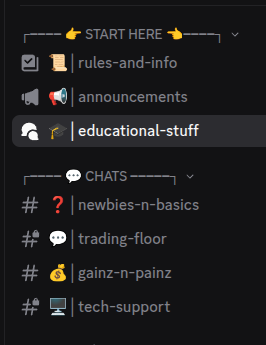
| Channel | Use it for |
|---|---|
rules-and-info | Server rules and essential information before participating. |
announcements | Product and community updates. This is a read-only announcements channel for members. |
educational-stuff | Tool explanations, examples, and educational resources. |
CHATS: questions and discussion
| Channel | Use it for |
|---|---|
newbies-n-basics | Questions about using or understanding TanukiTrade tools. |
trading-floor | Discussion of markets, options, analysis, and strategies. |
gainz-n-painz | Sharing trading experiences and lessons with the community. |
tech-support | A feature that fails, an error message, or another reproducible technical issue. |
For help writing a useful question or bug report, see what context to include. Use private support for account-specific billing matters.
BOTS: lookups, feed, and recap
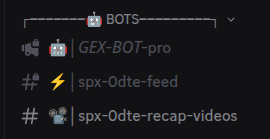
| Channel | Use it for |
|---|---|
GEX-BOT-pro | Run slash commands here. The command channel may also appear as options-gex-bot. |
spx-0dte-feed | Automatic SPX 0DTE updates during the weekday update window, 6:40 AM to 4:00 PM ET. |
spx-0dte-recap-videos | The automatically generated end-of-day SPX 0DTE recap. |
Keep conversation in CHATS so bot requests remain easy to find. See GEX bots for commands and output examples.
Member Strategies: threads and journals
| Channel or area | Use it for |
|---|---|
read-before-start | Read the educational purpose and participation rules for this category. |
strategy-activity-log | Find notifications of newly created threads and follow the link to the original discussion. |
| Alpha Contributor channels | Read voluntary explanations and follow-up discussions from contributing members. |
member-trades | Document your own analysis, decisions, management, and lessons. |
Read Member strategies before using the examples. Posts are educational and may be delayed; they are not a copy-trading service.
Other channels and private support
The server may also include suggestions, FAQs, welcome messages, swing-analysis notes, or an off-topic area. Check the channel description before posting. For subscription, invoice, or payment questions, use private support chat.
TanukiTrade documentation. Levels are context, not a recommendation. tanukitrade.com