
Account and support
Manage your account
Sign in, find your subscription settings, connect Discord, and access your API credentials. Login-email and TradingView username changes are handled by support.
Sign in to the Member Area
- Open the Member Area.
- Enter the email and TradingView username registered to your account.
- Enter the 6-digit email code on Verify Your Code. It is valid for 2 minutes and is used once after a successful sign-in.
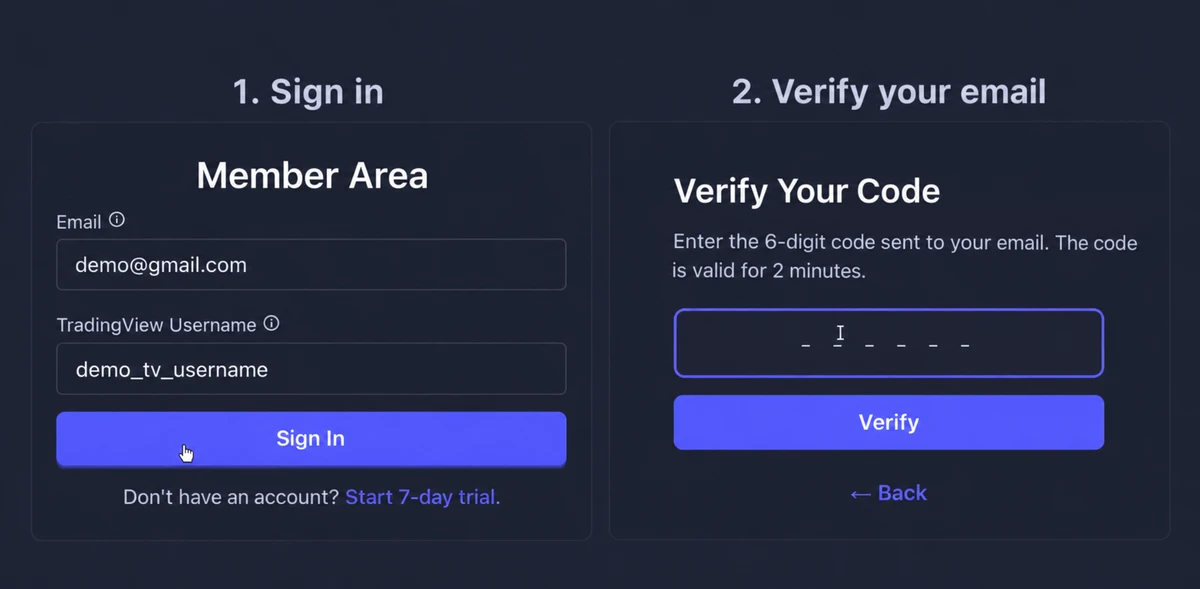
Member Area sign-in is passwordless. If a code does not arrive or has expired, use the login checklist. The complete setup guide is Account and login.
What you can manage yourself
| Task | Where to manage it |
|---|---|
| Plan, payment method, invoices, or cancellation | My Account → Manage Subscription. Review the billing portal’s confirmation for any change. |
| Billing email for receipts | The billing portal. This is separate from your Member Area login email. |
| Discord connection | My Account → Connect Discord or Disconnect Discord. |
| REST API and MCP credentials | The signed-in API Access page. Use its personal bearer token in the supported client setup. |
Correct a TradingView username
Use the username in your TradingView profile URL, such as tradingview.com/u/YOUR_USERNAME/, rather than a display name. Invite-only access is linked to that account.
To correct the username stored by TanukiTrade, contact private support with the current username, intended username, and the reason for the change. Support can review and update the account link; creating another TanukiTrade account is not the correction process.
Change a login or billing email
Contact support
This is the address used for Member Area verification codes. Ask support to review a change to the registered account email.
Use the billing portal
Changing a billing contact address does not change where Member Area login codes are sent.
Connect or switch a Discord account
Use My Account → Connect Discord to link the Discord account you authorize. To switch accounts, disconnect the current one, sign in to the intended Discord account in your browser, and connect again. Check the account shown on the authorization screen. Disconnecting Discord does not cancel your subscription.
Discord is optional for the WebApp, TradingView, REST API, and MCP. The link is needed for member Discord channels and bots. See Access and roles.
API and MCP access
PRO includes REST API and MCP access. Copy your personal bearer token from the signed-in API Access page. Your TradingView username and email login code are not API credentials.
Follow API & MCP access for a visual tour of the token page, Playground, and client setup. For an access problem, report the route, HTTP status, error code, and request time with credentials removed.
Plan and account closure
Use Manage Subscription for billing changes. For account deletion or another privacy request, follow the privacy-request guidance.
TanukiTrade documentation. Levels are context, not a recommendation. tanukitrade.com