
Learn
Confluence: read the overlap
Confluence means several level labels share a strike. It helps explain why an area deserves investigation: gamma sensitivity, open interest, and traded volume may concentrate there together. The overlap does not determine the direction or probability of the next move.
Four layers, four questions
What is the environment?
Locate HVL and the transition boundaries, then check the profile’s quality.
HVL · cT · pTWhere is sensitivity concentrated?
Compare primary and secondary walls, plus combined gamma concentrations.
C1–C6 · P1–P6 · Ab1–Ab3Where are contracts outstanding?
Read call, put, net, and total open-interest peaks.
COI · POI · nCOI · nPOI · AbOIWhere have contracts traded?
Read volume at the same strikes, with the correct session label.
CV · PV · nCV · nPVThis order stops a busy volume strike from becoming the whole analysis. First establish the selected chain’s regime and structure, then examine the positioning and activity around the areas of interest. DEX adds delta sensitivity alongside these layers.
What the confluence count means
Level Analysis groups labels that land on the same strike. The product’s language describes two labels as moderate overlap, three as strong, and four or more as exceptional. These are descriptive categories, not a calibrated success rate or a recommendation to increase position size.
COI and AbOI may both be largest at one strike because calls dominate its total OI. C1 and Ab1 can overlap for a similar reason. Several labels can express closely related information. See Secondary level badges for how raw, net, and combined peaks (COI vs. nCOI vs. AbOI, and CV vs. nCV) are defined.
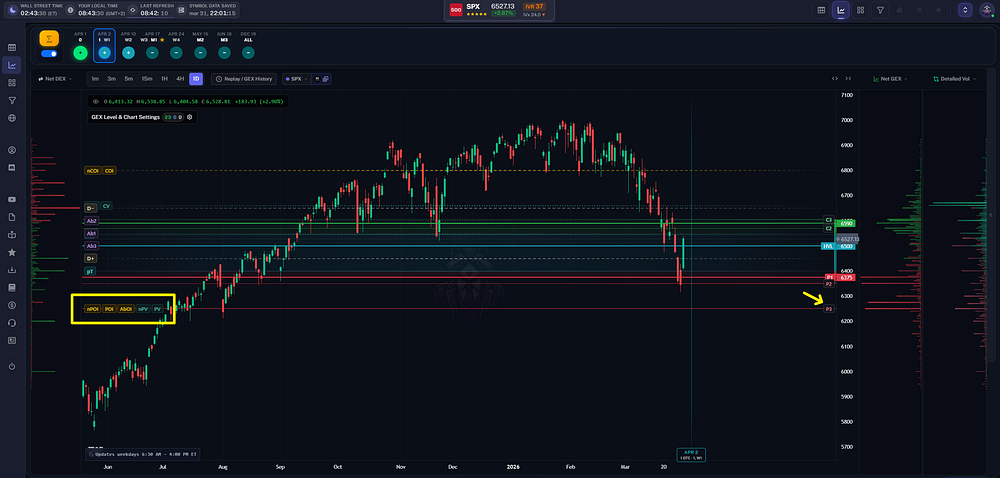
In this historical SPX illustration, positioning and volume cluster with P3 at 6250. The overlap does not change P3 into the primary put wall. Original article and full example.
Shared inputs do not become independent evidence
Gamma exposure uses OI as an input, so a gamma peak and OI peak are partly connected by construction. Net and total volume are also derived from the same call and put trades. Agreement between standalone and cumulative profiles is useful, but the selected standalone expiration is itself part of that cumulative sum.
A nearby prior high, overnight range boundary, VWAP, or chart pattern adds a different type of context. It still does not turn the combined observations into a known probability. Specify which information comes from the chain and which comes from price or another source.
Historical example: GOOGL at 300
The confluence article’s saved GOOGL example places C1, COI, and AbOI at 300. Call-volume labels also align there. That connects gamma, outstanding contracts, and trading activity at one strike. The information identifies a concentration; it does not establish that calls were bought, that dealers were short, or that 300 would reject price.
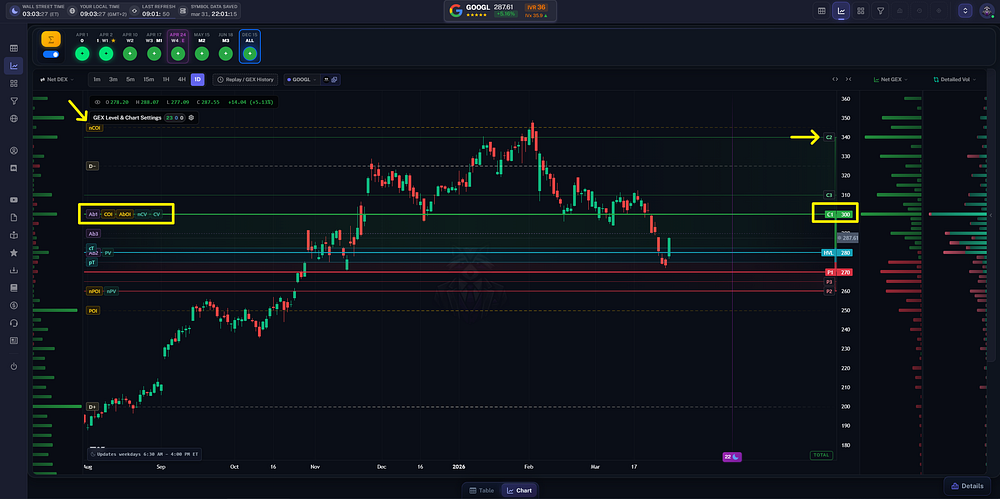
The saved example highlights the call wall and open-interest concentration at 300. Other OI peaks sit farther from the current price and answer a different proximity question. Original article and full example.
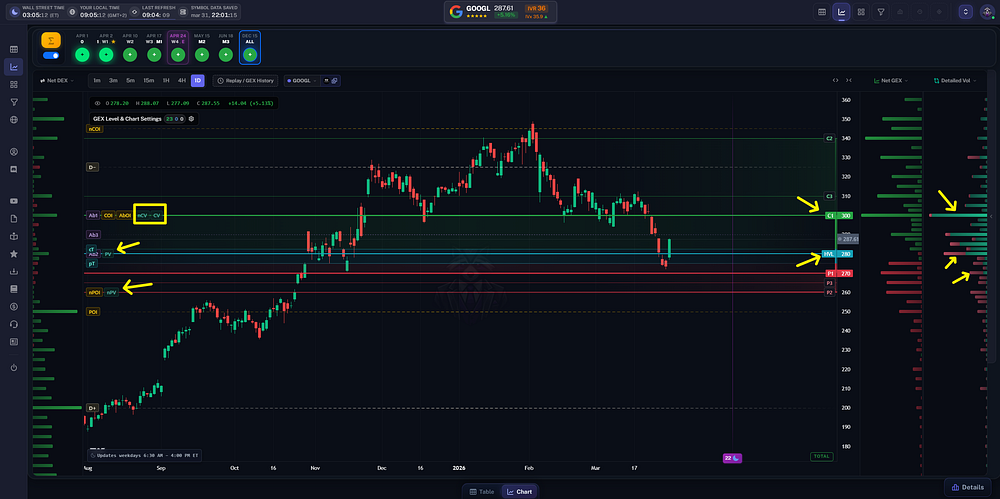
Call-volume labels align with 300 in the same historical example. The volume totals show activity, without identifying the buyer’s intent or whether new positions remained open. Original article and full example.
The complete example is in From GEX to Confluence. Read the original snapshot and its scope when comparing it with another chart.
Inspect what actually overlaps
- Select a level label on GEX Live Chart to open Level Analysis.
- Read each definition and identify its metric family. A net peak, a total peak, and a side-specific peak are different measurements.
- Check the strike’s distance from spot and the surrounding zone context.
- Compare the raw metric-column distributions if the labels hide important secondary concentrations.
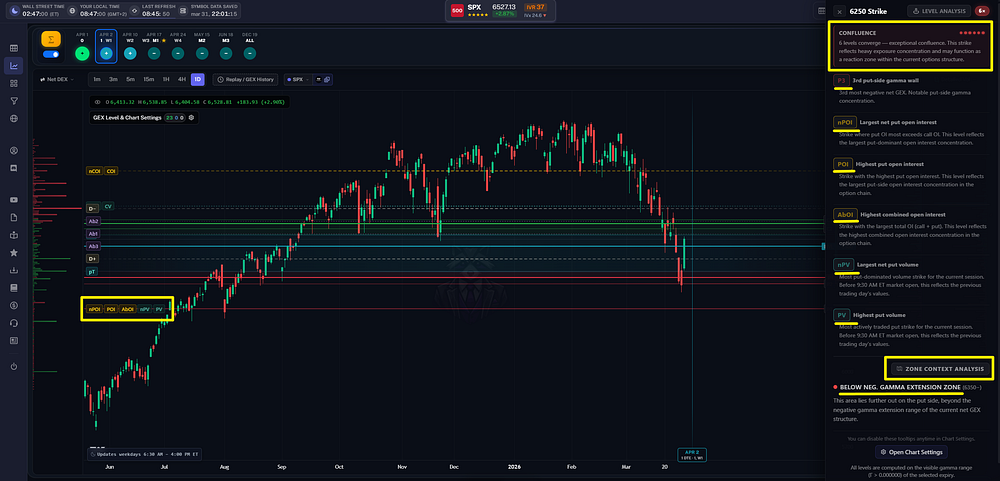
Level Analysis expands the labels that converge on a strike and places the selection inside the surrounding gamma zones. Use the definitions to understand the count. Original article and full example.
Reduce clutter without changing the meaning
Enable the groups needed for the question, adjust the number of secondary walls, and use relative-size filtering to reduce visible detail. A hidden label has not ceased to exist in the underlying chain. The level-status panel distinguishes filtered labels from levels outside the visible price range.
A smaller wall close to spot may be relevant even when a larger but distant wall dominates the ranking. Filtering is a display preference, not a statistical test of relevance. See relative-size filtering and the full reading workflow.
Where you see it
Explore secondary levels and Level Analysis in GEX Live Chart and GEX Live Table. Use the metric columns to compare the full distributions behind the highlighted peaks.
TanukiTrade documentation. Levels are context, not a recommendation. tanukitrade.com