
Learn
Delta curves
A delta curve maps a chosen option delta to a lower and upper price level for each expiration. Read it as two distances from the current reference price: one to an out-of-the-money put level, the other to an out-of-the-money call level.
The target magnitude is 0.16: approximately −0.16 for the put and +0.16 for the call. The number identifies option-price sensitivity, not a 16-point price distance.
Locally, a +0.16 call delta means about +0.16 in premium for a one-point rise in the underlying, all other pricing inputs unchanged.
Read the two sides at your expiration
Choose the expiration first, then read its upper and lower levels. Each expiry uses its own option chain. Connecting those levels forms the forward envelope; the connecting lines are not a predicted route for price.

The wings need not be symmetric. Call-versus-put pricing skew can put the same delta magnitude at different distances from spot. A wider downside wing describes that pricing geometry; it does not forecast a decline. See vertical skew.
Why the level can sit between strikes
Listed strikes are discrete. If no contract has exactly the target delta, TanukiTrade interpolates between the surrounding strikes rather than simply choosing the nearest one. An interpolated boundary need not itself be a listed, tradable strike.
The simplified linear example below explains the idea using the same reference price of 100 and the same Expiry C as the illustration. The input deltas are hypothetical.
Find −0.16 between two deltas
- Strike 80
- Δ −0.10
- Strike 90
- Δ −0.20
The target is 60% of the way from 0.10 to 0.20 in delta magnitude.
80 + 0.60 × (90 − 80)86 interpolated put levelFind +0.16 between two deltas
- Strike 110
- Δ +0.20
- Strike 115
- Δ +0.10
The target is 40% of the way from 0.20 down to 0.10.
110 + 0.40 × (115 − 110)112 interpolated call levelInterpolation fills the gap between available observations. It does not make the option Greeks exact or remove their sensitivity to the pricing inputs.
What changes when you select another delta?
For comparable vanilla options in the same chain and snapshot, a smaller absolute delta generally corresponds to a strike farther out of the money. A larger absolute delta generally brings the level closer to the money. Compare both wings after changing the selector; their point distances need not change by the same amount.
Keep the manual curve and Smart separate
The WebApp offers 16, 20, 25, 30, 35, and 40. In the Matrix, a configurable volatility slot can show an interpolated delta range as points, percent, or lower–upper levels.
Smart EM Range always uses Δ16 within its BEM / STD¹ / delta blend. Changing the separate manual delta setting does not change Smart’s delta component.
Options Overlay PRO on TradingView offers 16, 20, 25, 30, and 40. Check the platform’s available ladder before comparing views.
Explore the Matrix range controls →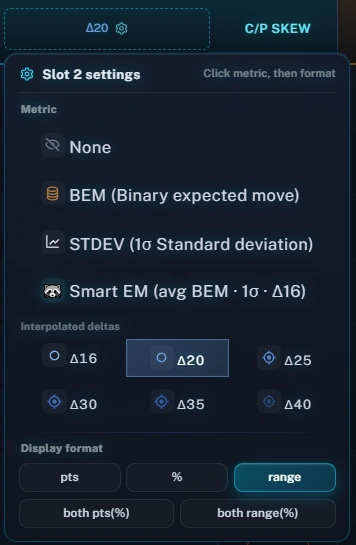
Why a curve moves between observations
Spot changes
As the underlying moves, the same listed option’s delta changes. The strike matching the target can shift.
Pricing changes
Implied volatility and skew can reprice the two wings differently, even with little movement in spot.
Time changes
Less time remains until expiration. A new snapshot need not preserve the prior boundaries or width.
Compare the same symbol, expiration, delta setting and analytics time before attributing a difference to one input. A different expiration has its own chain and event exposure; a farther expiry is not required to produce a perfectly smooth extension of the nearer one. See IVx and term structure and data clocks.
Delta, touching, and profit answer different questions
Delta measures local option-price sensitivity. It is sometimes used as a rough, model-dependent proxy for terminal moneyness; it is not an exact real-world probability. Touching a boundary during the path and finishing beyond it at expiration are different events.
The two delta wings also do not establish a universal 68% containment band. A position’s breakeven and probability of profit depend on its structure and premium. Continue with Probability and position risk for those distinctions, or compare delta with BEM, STD¹ and Smart.
A quick reading routine
- Match the horizon. Name the symbol and calendar expiration, then check the analytics timestamp.
- Name the delta. Keep a manual Δ20 observation separate from Smart’s fixed Δ16 component.
- Read both wings. Record the lower and upper levels, their distances from the reference, and the total span.
- Add context. Compare nearby gamma levels, skew and scheduled events. An overlap is a reason to investigate, not an automatic trade instruction.
For the underlying Greek, see OIC’s explanation of option delta. For combining range boundaries with other levels, see Confluence.
Where you see it
TanukiTrade documentation. Levels are context, not a recommendation. tanukitrade.com