
WebApp
GEX Matrix
Compare volatility, expected moves, and options exposure across expirations in one table. Read each expiration on its own in the standalone block, or compare the combined analytics through that date in the cumulative block.
The Matrix is the whole expiration chain on one page. It is the view for calendars, diagonals, and a fast check of whether near-term IVx is richer than the next expiry. Open GEX Matrix from your signed-in WebApp session.
Find your way around the Matrix
Four areas run down the page: the summary cards, the volatility columns, then the cumulative and standalone blocks. The numbered highlights match the list.
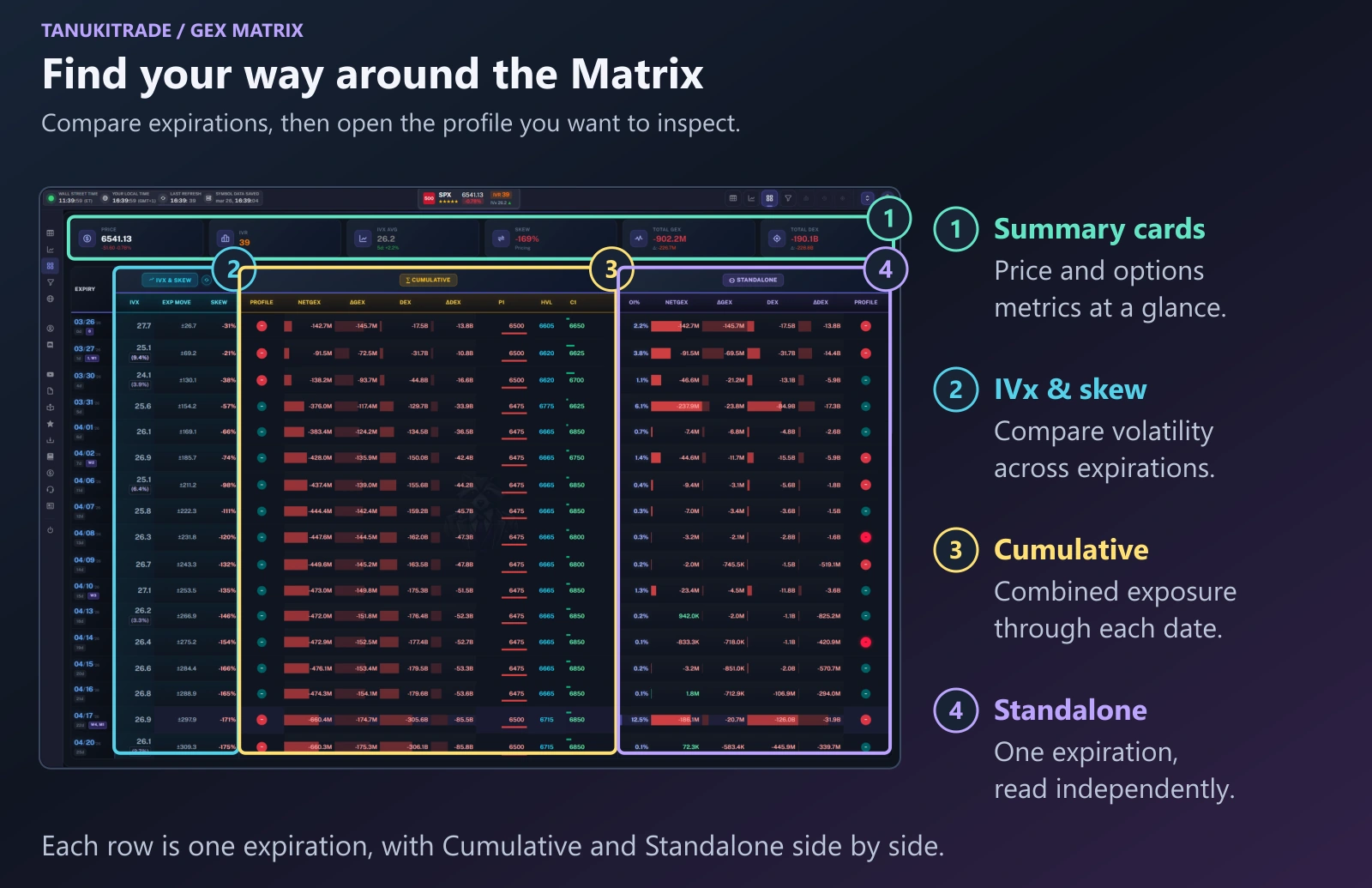
- Start with the summary cards. Check the underlying price, volatility measures, and total exposure above the table.
- Compare volatility across expirations. Read IVx, the displayed expected move, and skew down the left-hand columns.
- Read the cumulative block. Examine combined exposure through each expiration, alongside the levels derived from that combined profile. See Standalone and cumulative.
- Read the standalone block. Isolate an expiration's exposure and its share of total open interest. See Expirations.
Read across a row to compare cumulative and standalone analytics for the same expiration. Read down a column to see how that measure differs across expirations.
Start with the summary cards
The cards above the table summarize the selected symbol before you read individual expirations.
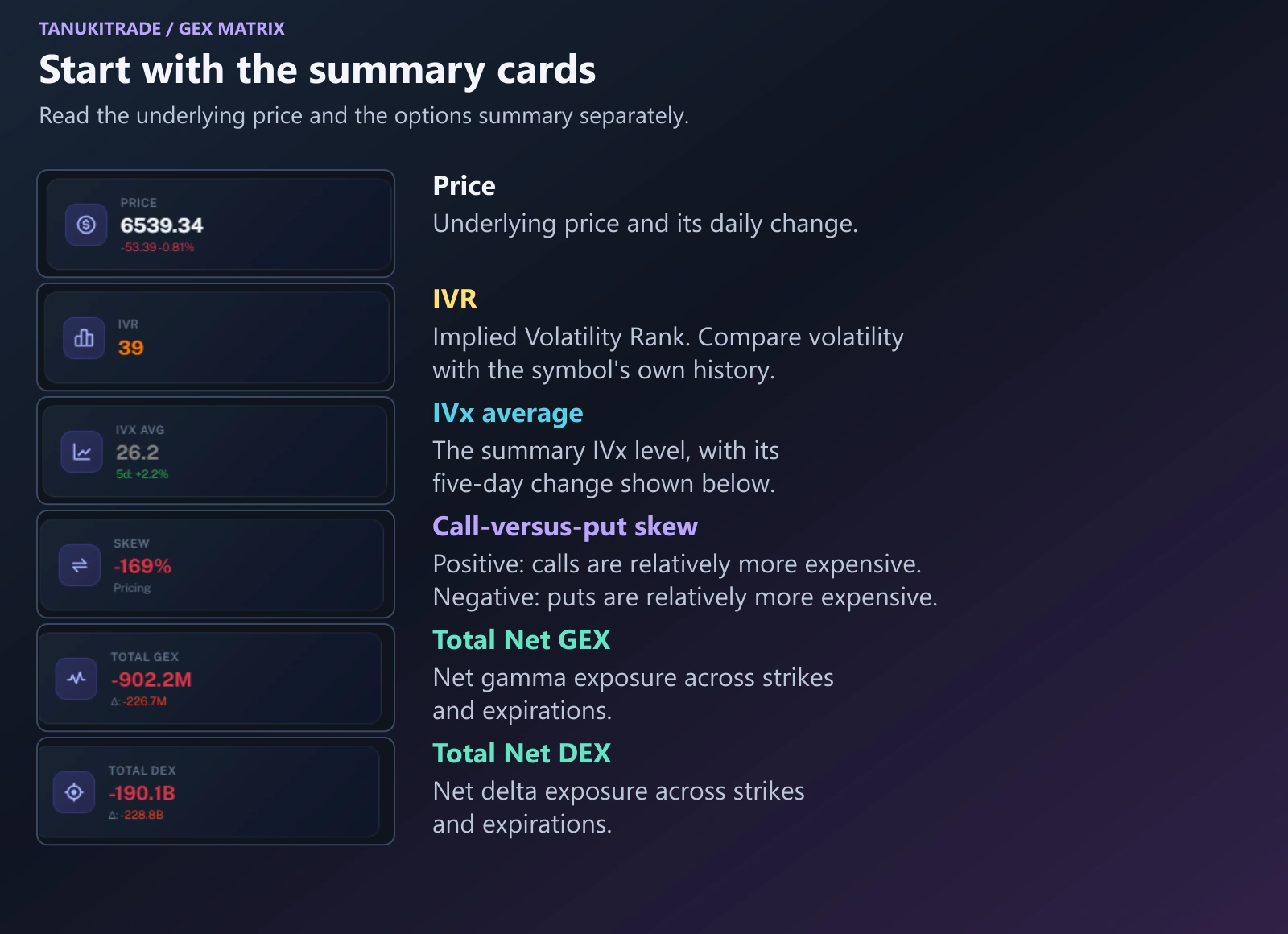
| Card | What to read |
|---|---|
| Price | The underlying price and its daily change. |
| IVR | Implied Volatility Rank: volatility relative to the symbol's own history. |
| IVx Avg | The summary IVx level, with its five-day change below. Use the table for IVx at an individual expiration. |
| Skew | The call-versus-put pricing skew. Positive values indicate relatively more expensive calls; negative values indicate relatively more expensive puts. |
| Total GEX | Net gamma exposure across strikes and expirations. |
| Total DEX | Net delta exposure across strikes and expirations. |
Read the sign of an exposure value separately from its change. A positive Net GEX value can have a negative daily change: exposure remains positive, but it has decreased from the previous day. Green and red on the totals follow the sign.
Compare volatility across expirations
The left-hand columns compare how the options market prices each expiration: IVx, the expected move, and both kinds of skew.
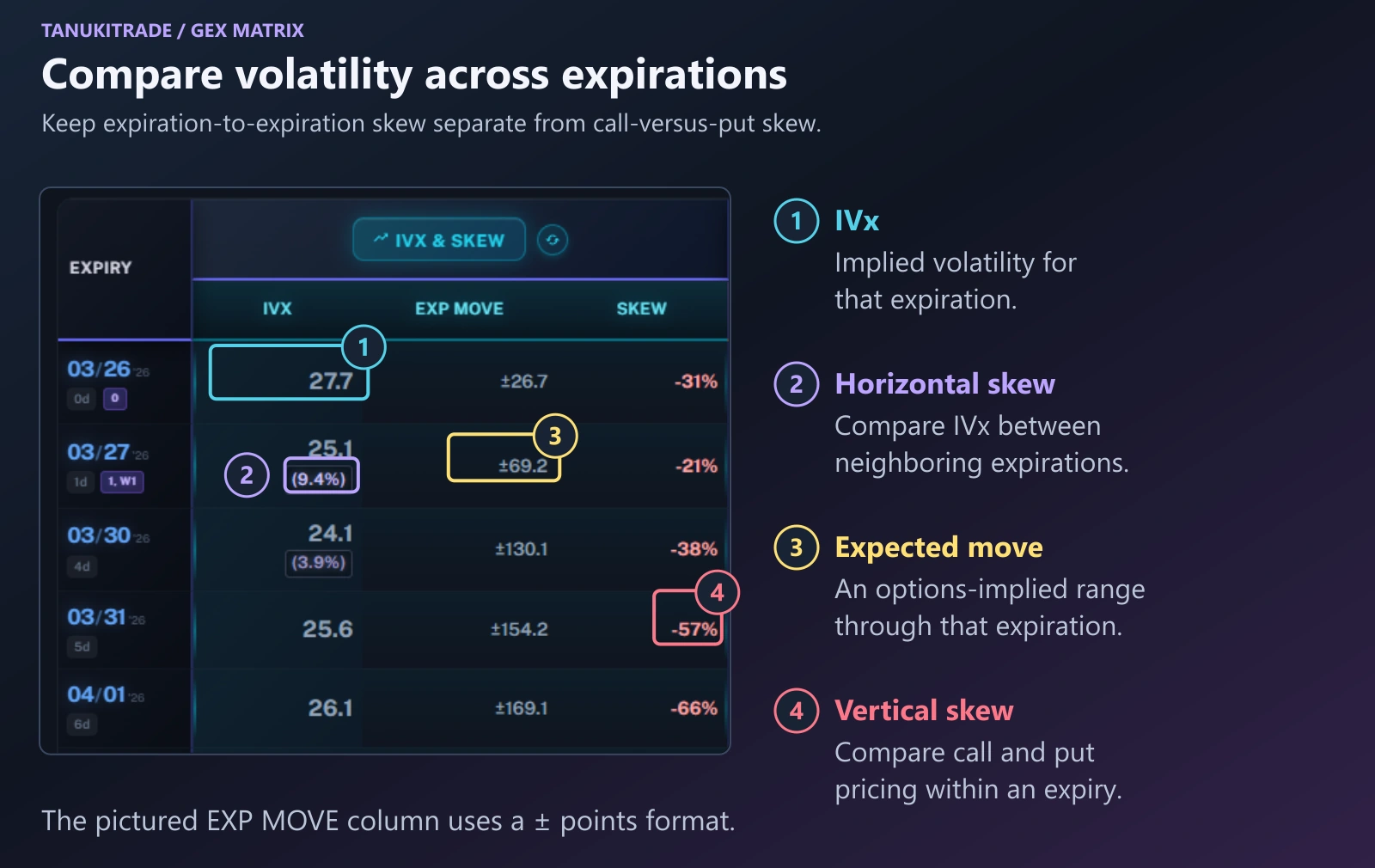
IVx shows the implied volatility level for each expiration. Compare the values down the column to see how the options market prices volatility over different horizons.
Horizontal skew compares IVx between neighboring expirations. The Matrix highlights these differences in parentheses. When the nearer expiration has higher IVx than the later expiration, the term structure is in backwardation. When the later expiration has higher IVx, it is in contango. The first two rows in the pictured example show higher IVx in the nearer expiration.
EXP MOVE shows an options-implied price range through that expiration. The example uses a ± points format. Read the selected metric and format before comparing values; an expected-move range is not a forecast that price will reach either boundary.
Vertical skew, in the SKEW column, compares call and put pricing within an expiration. Positive skew means calls are relatively more expensive than puts at equal distances from spot. Negative skew means puts are relatively more expensive than calls. This is a different comparison from horizontal skew across expirations.
Read the cumulative block
On each later expiration, the cumulative block combines exposure from the next session through that date, then shows the profile levels from the combined book.
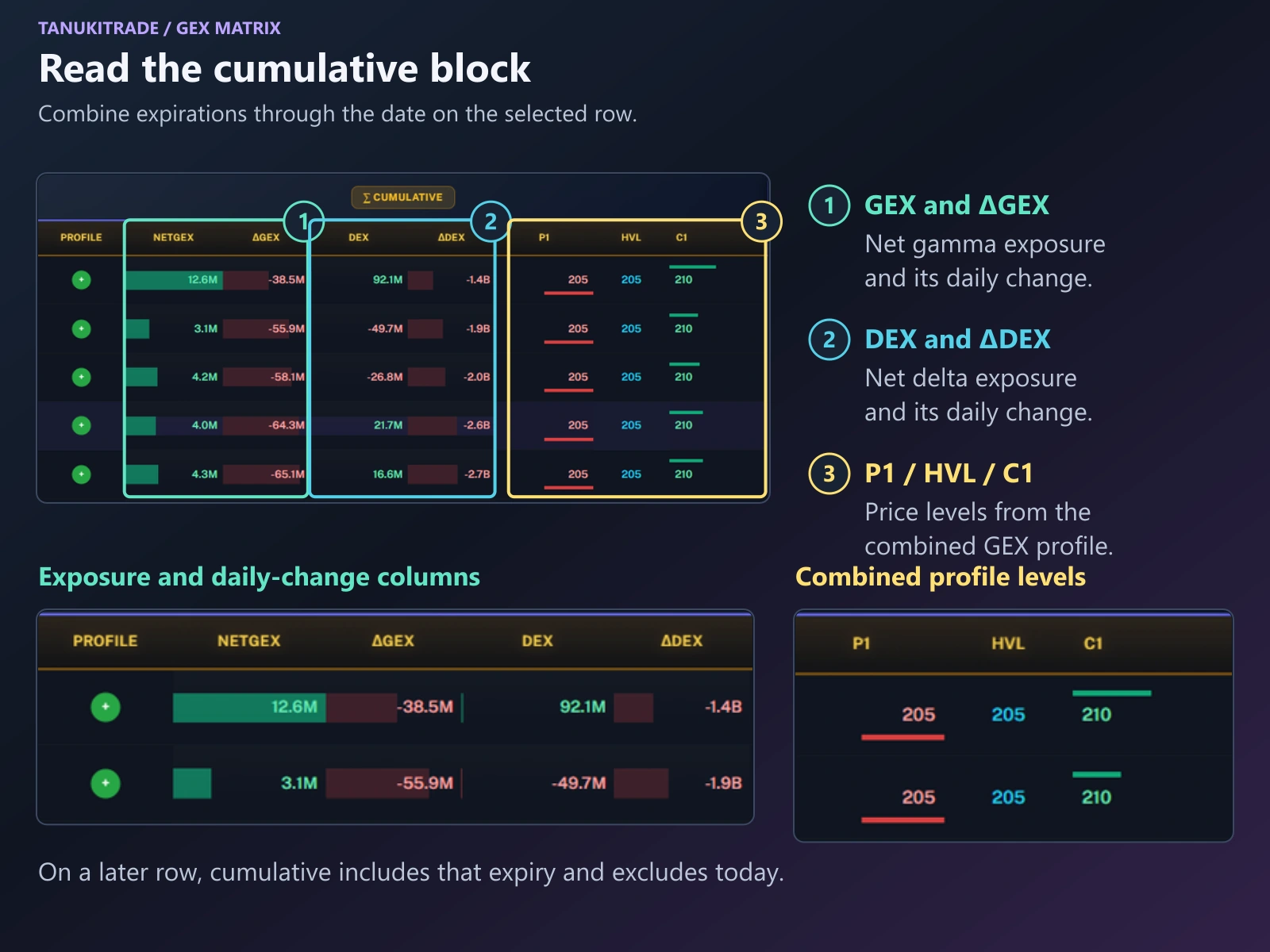
P1, HVL, and C1. All come from the same saved cumulative view.On a later expiration row, cumulative analytics include expirations from the next session through the date on that row, including that date and excluding today. On today's row, cumulative covers today only.
This is an aggregation across expirations at the current snapshot. It is not a history of how positioning developed over time.
| Column | What it shows |
|---|---|
| Profile | The gamma profile state for the combined expirations. Select the mark to open GEX Live Table or GEX Live Chart for that expiration. |
| NETGEX | Net gamma exposure across the strikes and expirations included in the cumulative scope. |
| ΔGEX | The day-over-day change in that Net GEX. |
| DEX | Net delta exposure across the strikes and expirations included in the cumulative scope. |
| ΔDEX | The day-over-day change in that Net DEX. |
P1 | The Put Wall derived from the combined GEX profile. |
HVL | The High Volatility Level derived from the combined GEX profile. |
C1 | The Call Wall derived from the combined GEX profile. |
The exposure is aggregated before the profile levels are identified. P1, HVL, and C1 are price levels derived from the resulting profile; their prices are not added together across expirations.
See Standalone and cumulative for the scope rules and Expirations for selecting expiration views.
Read one expiration on its own
The standalone block keeps one expiration by itself: its share of open interest, its own exposure, and its own profile levels.
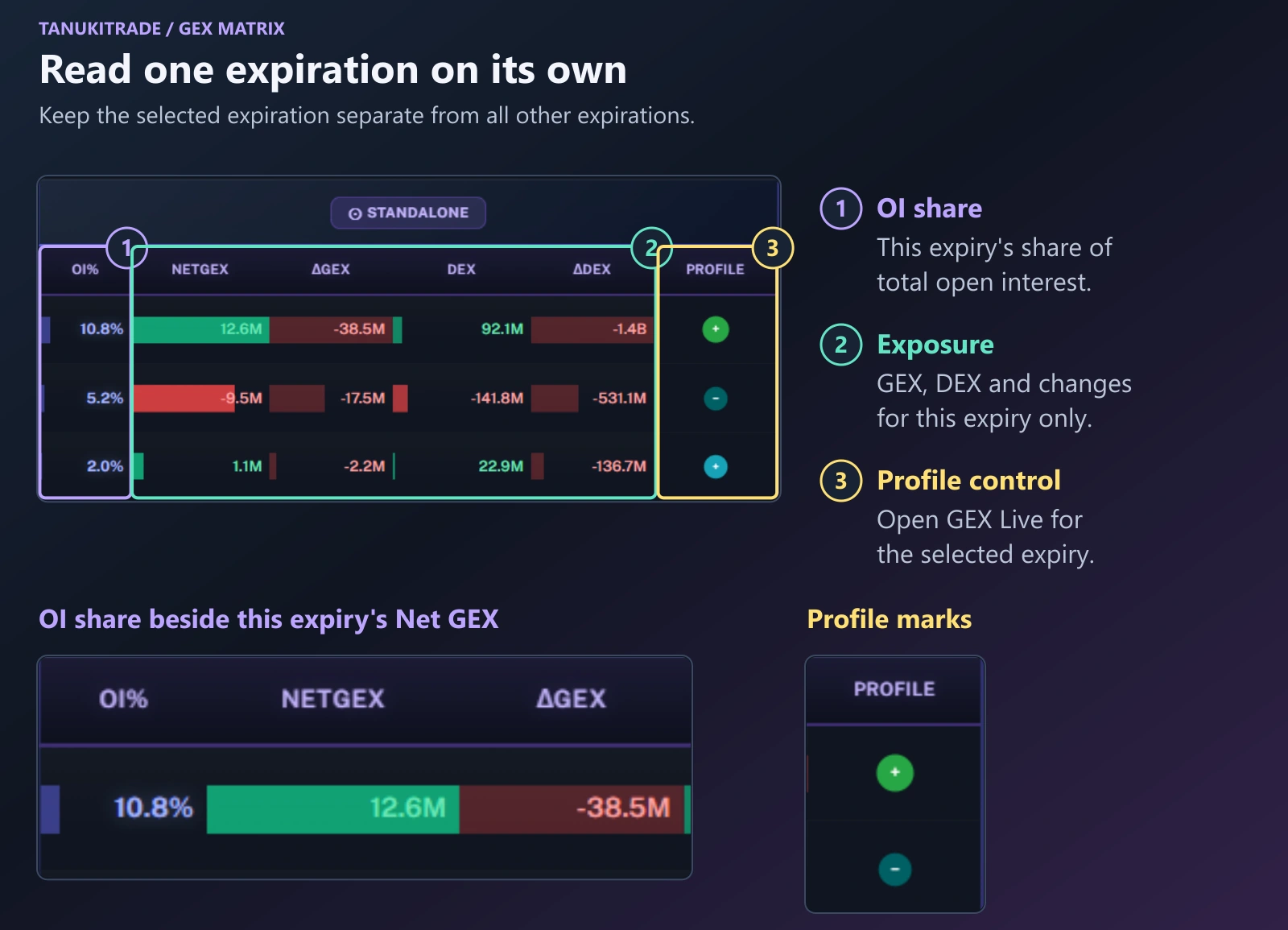
Use the standalone block to examine one expiration without combining it with other expirations. NETGEX, ΔGEX, DEX, and ΔDEX have the same meanings as in the cumulative block, but apply only to that expiration.
OI% is the expiration's share of total open interest. It helps you compare how open interest is distributed across the expiration chain. It is not the expiration's share of Net GEX, and it does not indicate a buy or sell signal.
A concrete comparison appears in the SPX overview: on the March 30 row, cumulative Net GEX is −138.2M, while standalone Net GEX is −46.6M. The values differ because cumulative includes other expirations through March 30, while standalone includes March 30 only. These figures come from the overview, rather than the separate close-ups above.
Select a profile mark to open GEX Live for that expiration, then confirm the expiration and aggregation mode before comparing individual strikes. The mark is the gamma profile state. Use GEX Live Table for numeric strike-by-strike analytics or GEX Live Chart to view profiles and levels alongside price candles.
Choose the volatility columns and formats
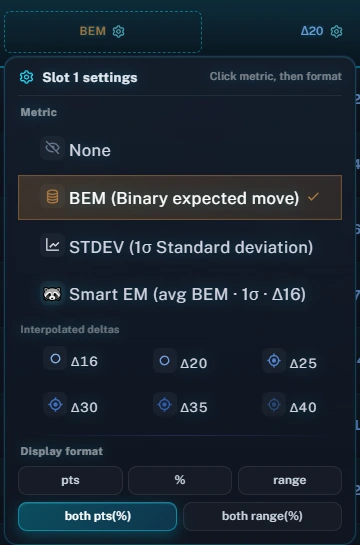
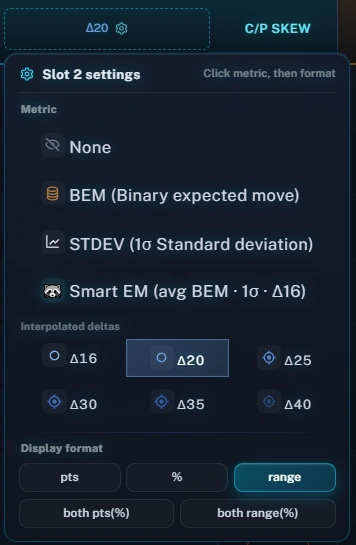
Two columns to the right of IVx can display different range measures. The second configurable column is available on desktop. Click the gear icon in either column header to choose its metric and display format. Nothing extra is fetched.
| Choice | What it displays |
|---|---|
| BEM (Binary expected move) | 0.6 times the ATM straddle, plus 0.3 and 0.1 on the first and second OTM strangles. Default for the first slot. |
| STDEV (1σ Standard deviation) | The one-standard-deviation IV estimate. Compare its width with BEM for the selected expiry. |
| Smart EM (avg BEM · 1σ · Δ16) | The asymmetric Tanuki blend, locked to the 16-delta. |
| Interpolated deltas (Δ16–Δ40) | A range at 16, 20, 25, 30, 35, or 40 delta. The second slot defaults to Δ20. |
| None | Hides that slot. |
Display formats are pts (± points), % (± percent), range (lower–upper strikes), both pts(%), or both range(%). Delta-based ranges can be asymmetric because call and put pricing differs. Hover over a metric for its explanation.
Read colors alongside labels and values
Positive exposure values use green, and negative values use red. Read the Δ columns separately to see whether exposure increased or decreased from the previous day. The Profile mark describes the gamma profile state; it should not be read as the sign of every exposure or change column.
Call-rich vertical skew leans green, while put-rich vertical skew leans red. IVx runs from gray to hot as the level rises, and IV change uses an up or down mark. Earnings rows pulse purple. Read the numeric value and the column label alongside the color.
On a narrow screen, the expiration column stays pinned while you scroll the table horizontally.
Check the update time
WebApp options analytics refresh about once a minute from 6:40 AM to 4:00 PM ET on weekdays.
Spot prices stream separately in real time while the live feed is available. A changing price does not mean the options analytics have refreshed at the same moment. See Data clocks and model limits.
Levels and exposure measures provide analytical context, not buy or sell signals or trade recommendations. See Misconceptions.
TanukiTrade documentation. Levels are context, not a recommendation. tanukitrade.com