
WebApp
Adaptive Expected Move
View an options-implied range across future expirations and see how it changes as the options analytics update. Use the Smart EM Range blend for one combined view, or choose Advanced to compare the underlying range methods.
Select an expiration in GEX Live Chart or GEX Live Table and expand Adaptive Expected Move in the right-hand Details sidebar, or press Ctrl+M to switch between Tanuki Smart EM Range and the Advanced manual curve picker.
Follow the range to an expiration
On the chart, Adaptive Expected Move draws a forward-looking purple cone from current spot toward each listed expiration, with a vertical bracket marking the upper and lower boundaries of your selected expiry.
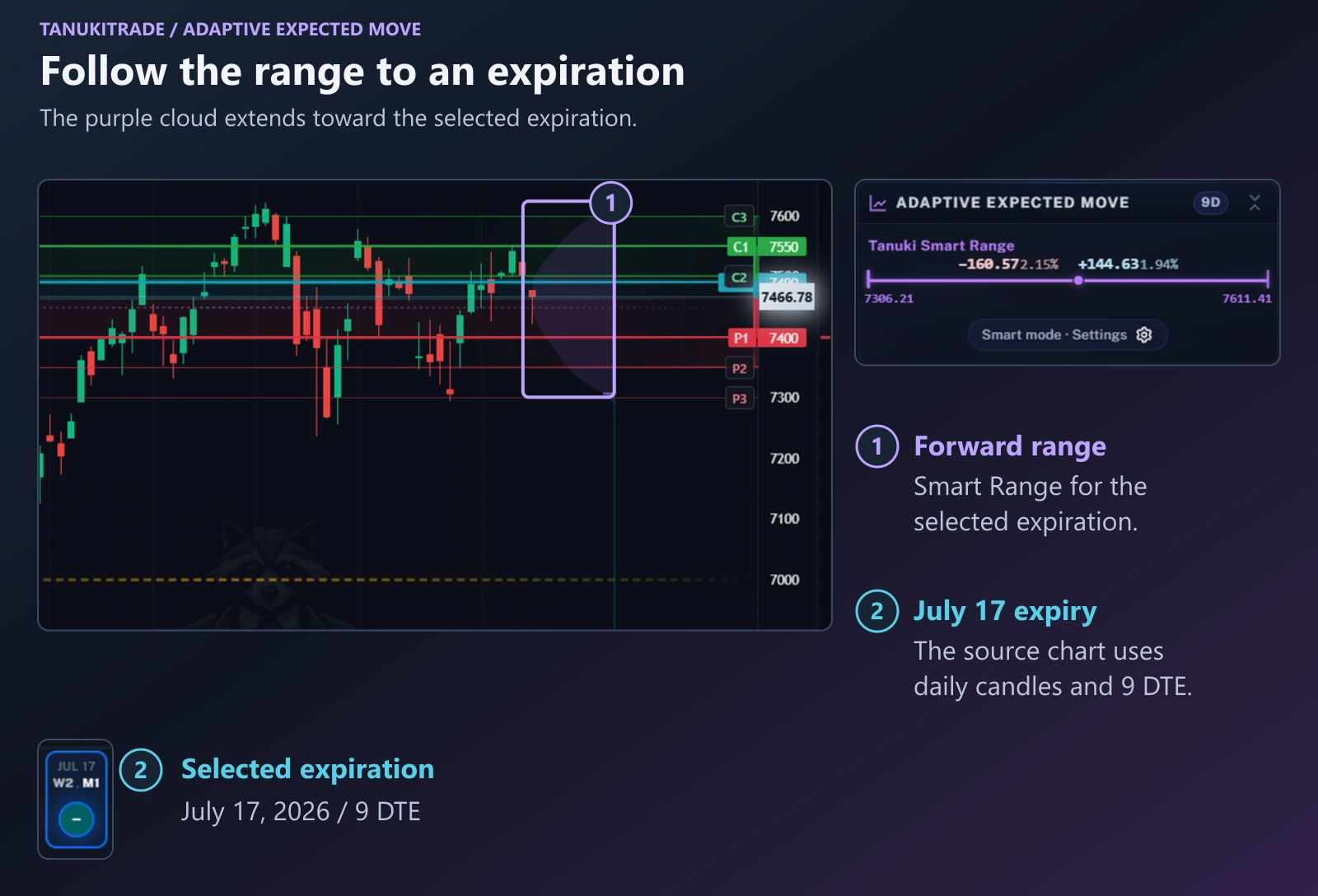
Start with the expiration you want to examine. On the chart, the forward range extends toward the expiration dates, with a bracket identifying the selected expiration. The sidebar provides its numeric lower and upper boundaries and the distances on each side.
Check the expiration separately from the candle timeframe. 1D in the chart is the candle interval; 9 DTE describes the time remaining to the selected expiration. See Expirations.
As implied volatility and time to expiry change, the range expands or contracts. The cone provides options-pricing context for that horizon; its edges are not price targets or buy or sell signals.
Read both sides of Smart Range
Tanuki Smart EM Range averages symmetric and skew-sensitive range measures on each wing separately, so you can see immediately whether the options market prices a wider downside or upside move.
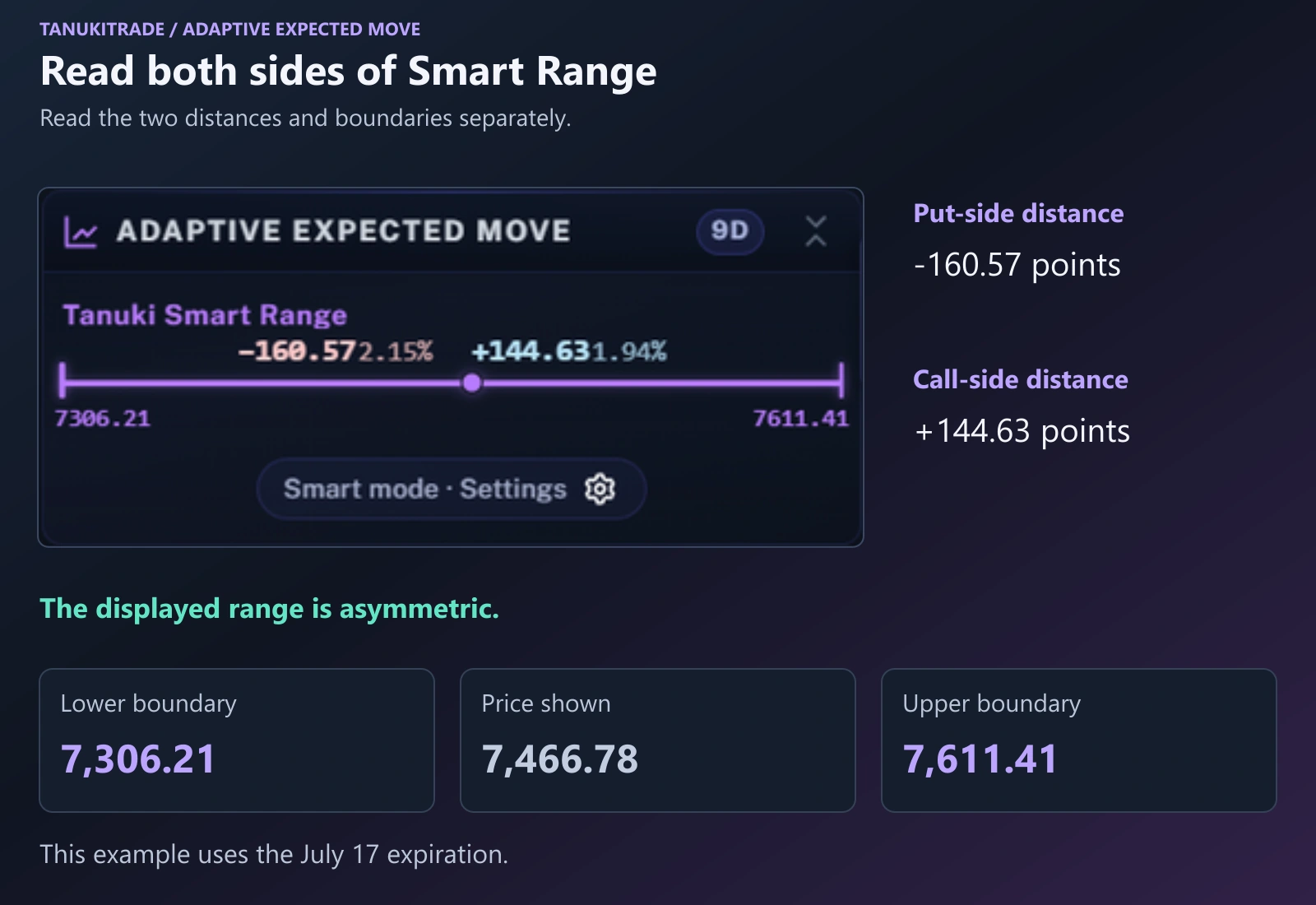
Read the put-side and call-side distances separately. In this example, the downside distance is larger than the upside distance, so the range is asymmetric.
| Reference | Value in this example |
|---|---|
| Lower boundary | 7,306.21 |
| Underlying price shown | 7,466.78 |
| Upper boundary | 7,611.41 |
| Put-side distance | −160.57 points |
| Call-side distance | +144.63 points |
Smart EM Range is the default blended view. For each expiration, it averages three distance measures separately on the put side and the call side: Binary Expected Move (BEM), one standard deviation (STD¹), and the 16-delta distance (Δ16). Calculating each wing separately lets the resulting envelope reflect call-versus-put vertical skew.
Smart always uses Δ16. Changing the delta selector for the Advanced delta curve does not alter the Δ16 component inside Smart Range.
Compare the Advanced range methods
In Ctrl+M → Adaptive Expected Move, turn on Advanced (Manual Curve Picker) when you want to replace the single Smart blend with the individual curve families on the chart.
| Component | How it is calculated | Curve color |
|---|---|---|
Tanuki Smart EM Range (S) | Asymmetric average of BEM, 1σ STD¹, and Δ16 on each wing (put-side average vs. call-side average). Mutually exclusive with the manual curves on the chart. | Purple |
Binary Expected Move — BEM (B) | Weighted straddle/strangle blend per expiry: 0.6 × ATM straddle + 0.3 × 1st OTM strangle + 0.1 × 2nd OTM strangle. A symmetric premium-derived estimate without a fixed containment probability. | Brown |
Standard Expected Move — STD¹ (σ) | One-standard-deviation IV range per expiry: S × IV × √(DTE / 365). Symmetric; the familiar ~68% interpretation uses a normal approximation for the terminal outcome, not a guarantee of staying inside. | Ivory |
OTM Delta envelope (Δ) | Interpolated distance to the put and call strikes that price at the chosen delta (16, 20, 25, 30, 35, 40). Diverges on the put and call sides when vertical skew is asymmetric. | Blue |
ATM means at the money; OTM means out of the money. See Expected move for the range formulas and Delta curves for the OTM delta distance calculation.
Expiry breakdown drawer & Narrative
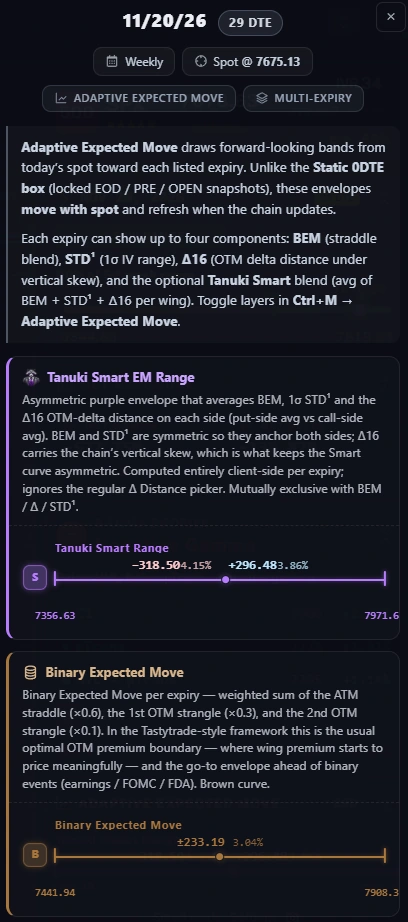
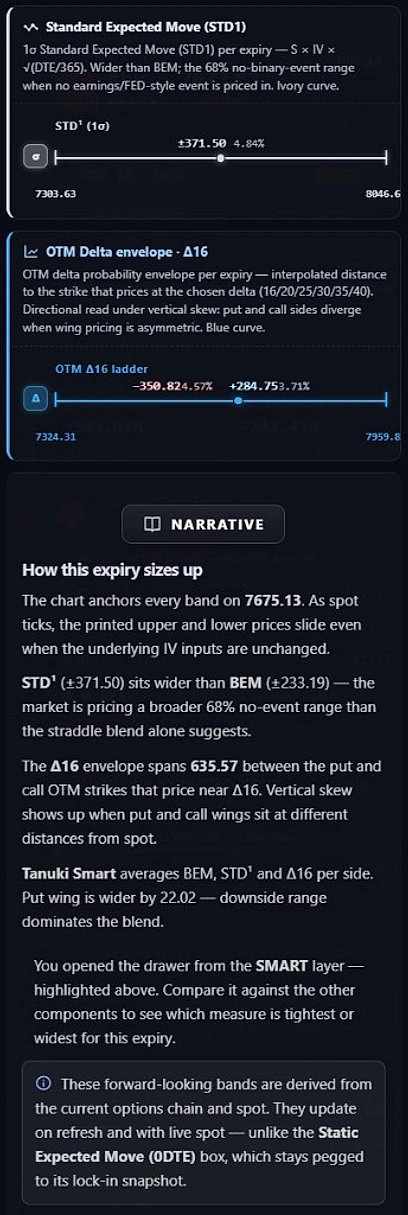
Click the Adaptive Expected Move card in the right-hand sidebar (or a curve badge) to open the full multi-expiry breakdown drawer. It compares all four components side by side for the selected expiration, even when only Smart Range is plotted on the chart.
In the 11/20/26 (29 DTE, Spot @ 7,675.13) example below:
- Tanuki Smart Range (
S):−318.50(4.15%) on the put wing to7,356.63, and+296.48(3.86%) on the call wing to7,971.61. The put wing is 22.02 points wider than the call wing because Δ16 carries the chain's downside skew. - Binary Expected Move (
B): symmetric±233.19(3.04%), spanning7,441.94to7,908.32. - Standard Expected Move — STD¹ (
σ): symmetric±371.50(4.84%), spanning7,303.63to8,046.63—wider than BEM, showing a broader 1σ IV envelope than the straddle blend alone. - OTM Delta envelope · Δ16 (
Δ): asymmetric−350.82(4.57%) down to7,324.31and+284.75(3.71%) up to7,959.88(a total span of635.57points). - Narrative — How this expiry sizes up: summarizes how all four bands anchor on live spot (
7,675.13), why printed boundary prices slide as spot ticks even when IV is unchanged, and which wing dominates the blend.
Compare Smart Range with a saved session snapshot
On 0DTE, you can display the static Expected Move Box and the forward-looking Adaptive Expected Move together—just remember that static snapshots stay locked to their anchor while Smart Range moves with live spot and chain refreshes.
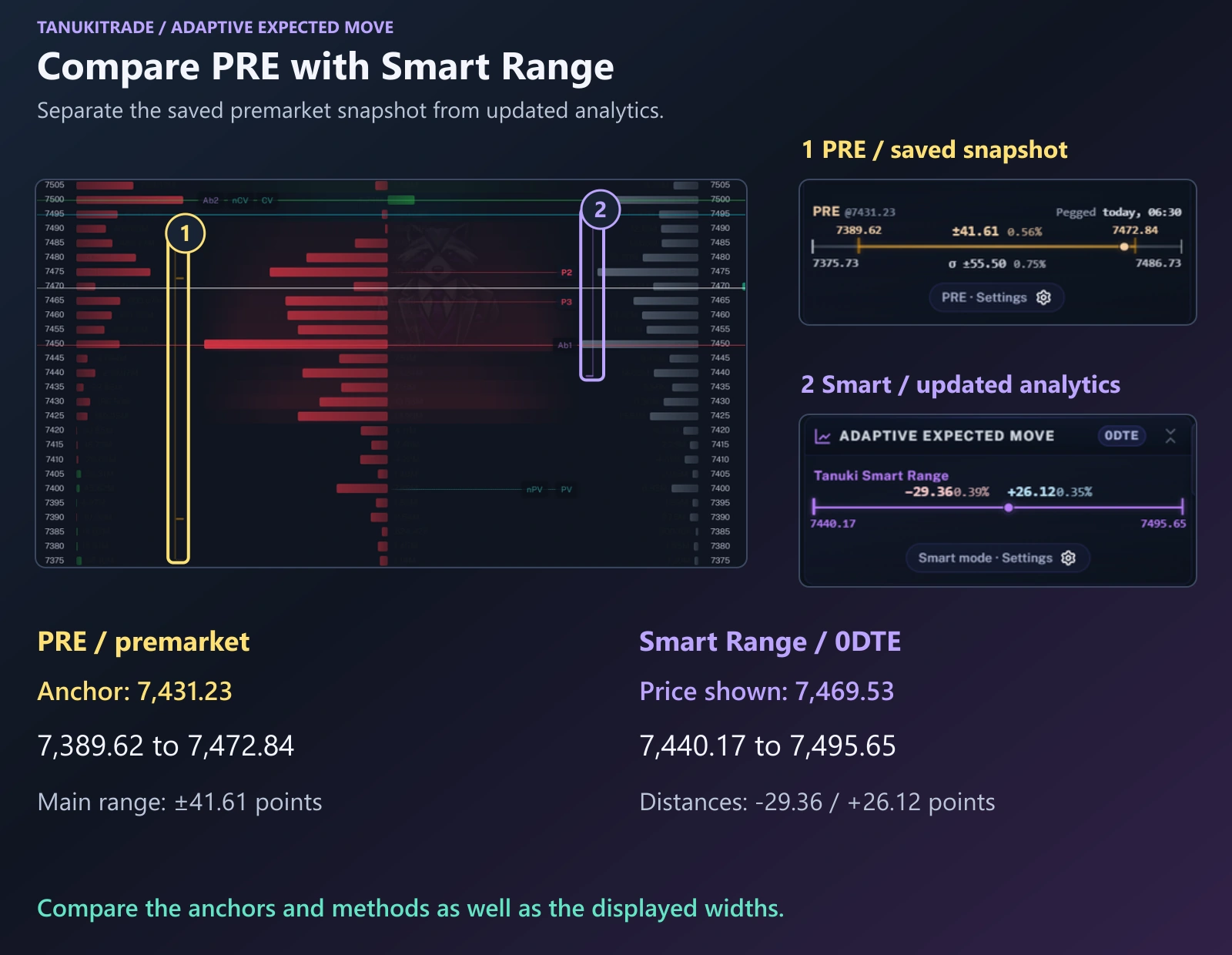
In this same-day expiration example:
- PRE is the saved premarket snapshot, anchored at 7,431.23. Its main expected-move band runs from 7,389.62 to 7,472.84, a distance of ±41.61 points from that anchor.
- Smart Range shows −29.36 points on the put side and +26.12 points on the call side, with boundaries of 7,440.17 and 7,495.65 around an underlying price of 7,469.53.
These ranges use different reference prices and different calculation methods. Compare those inputs along with the displayed widths. Read the panel labels and range colors: amber identifies PRE; purple identifies Smart Range.
Use Smart Range in Chart, Table, or Matrix
The same Adaptive Expected Move calculation appears across all three GEX views so you can check the forward range whether you are reading candles, strikes, or the full expiration term structure:
- GEX Live Chart: read the purple forward cone and the bracket at the selected expiration alongside price candles.
- GEX Live Table: read the purple range marker and its compact label for the selected expiration alongside the strike grid.
- GEX Matrix: choose Smart EM (avg BEM · 1σ · Δ16) in either configurable volatility slot to compare the range across every expiration row.
Check when the analytics updated
Unlike the static 0DTE box (which stays pegged to its lock-in snapshot), Adaptive Expected Move bands slide with live spot and recalculate whenever the options chain refreshes.
WebApp options analytics refresh about once a minute from 6:40 AM to 4:00 PM ET on weekdays, while spot prices stream in real time. As spot ticks between chain refreshes, the printed upper and lower boundary prices shift with spot even when the underlying IV inputs have not changed. See Data clocks and model limits.
For the related TradingView overlay, see Options Overlay PRO. The video walkthrough below covers Adaptive Expected Move starting at 16:29:
TanukiTrade documentation. Levels are context, not a recommendation. tanukitrade.com