
WebApp
Symbols and futures
Ctrl+K opens Spotlight from anywhere in the Member Area, including Replay. Type a supported ticker the way you would on TradingView. The current U.S. options universe is joined by mapped futures and a small set of CFD and crypto display symbols.
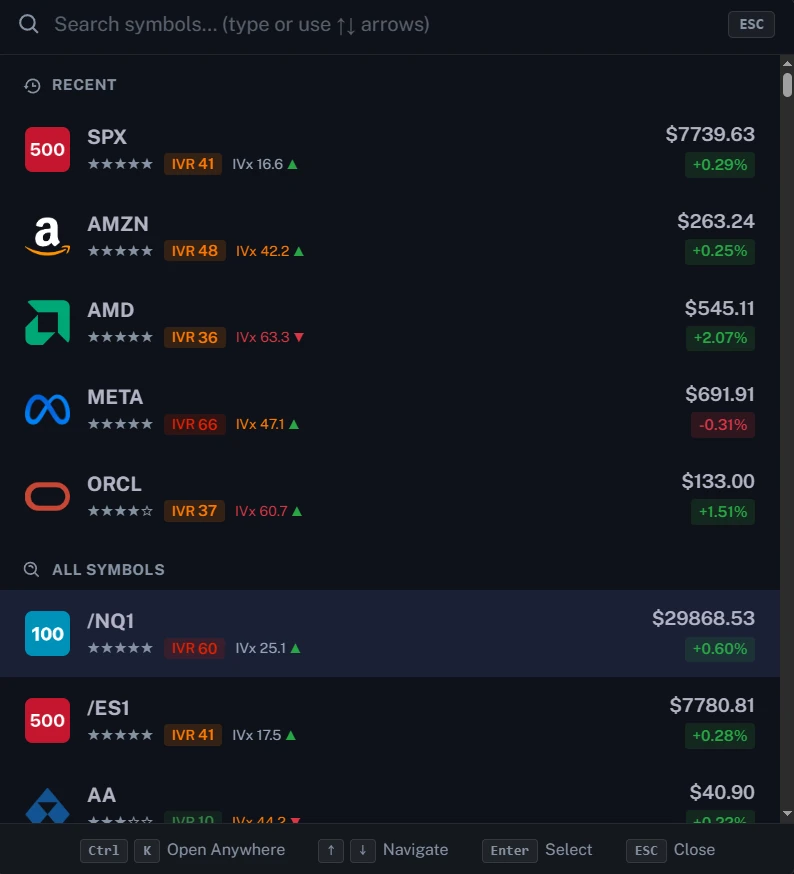
Spotlight
- Click the current symbol, or press Ctrl+K (Command+K on Mac).
- Recent names sit above the full list. Arrow keys move. Enter selects.
- Each row carries an IVR badge and an IVx Avg color: gray under 30, orange from 30 to 59, red at 60 and above.
- The choice follows you across Table, Chart, Matrix, and Screener.
Futures mapping
Spotlight includes these front-month futures: /ES1 (SPX), /NQ1 (QQQ), /YM1 (DIA), /RTY1 (IWM), /GC1 (GLD), and /SI1 (SLV). Futures mapping covers how those levels are scaled, the micro and spot-proxy aliases, and which markets are not mapped.
The price badge
- Live derived price, with a pulsing green mark, means the spot stream is up.
- ~1 min delayed spot price means the view fell back to the minute snapshot. That is normal, not a broken feed.
- Off hours: Updates weekdays 6:30 AM – 4:00 PM ET.
Before 9:30 AM ET, volume peaks still reflect the previous session. A brokerage quote can differ by a tick. The badge is telling you which clock the app is on.
Open GEX Live: app.tanukitrade.com/webapp/gex-live.
TanukiTrade documentation. Levels are context, not a recommendation. tanukitrade.com