
WebApp
Sign in to the WebApp
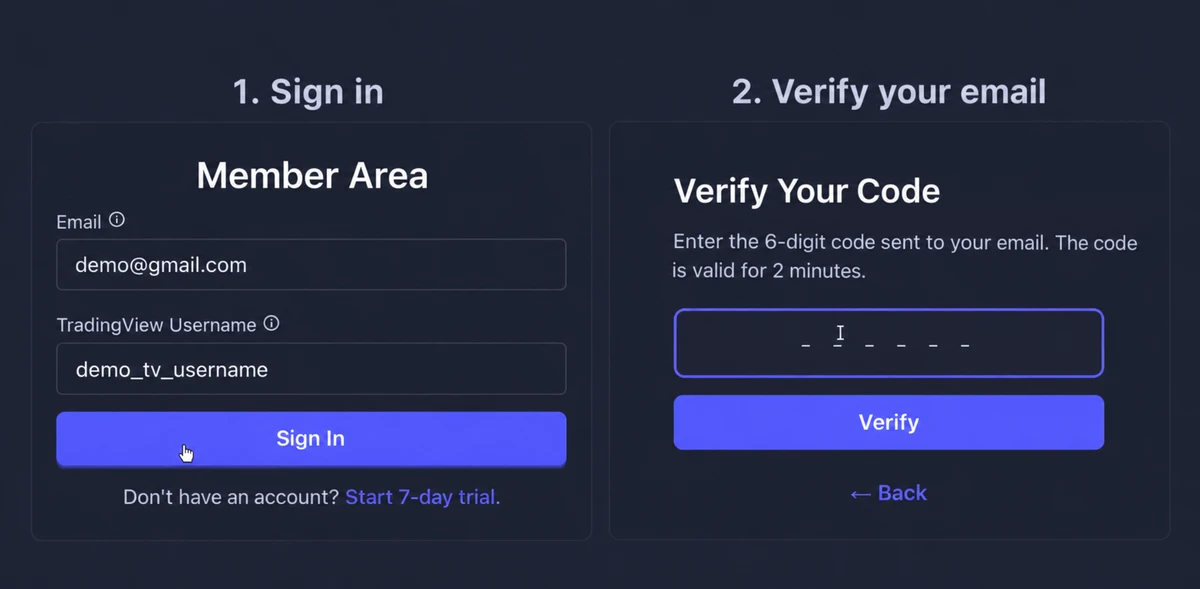
Use your TanukiTrade account email and TradingView username, then verify the 6-digit code sent to your email. Member Area sign-in is passwordless.
Already have an account? Open Member Area sign-in and use the details linked to your membership. If you are already signed in, open GEX Live Table directly.
WebApp access requires an active trial or PRO subscription. If you still need to create an account, start with Account and login.
Sign in and verify your email
- Enter your account details. On the Member Area form, enter the email address and TradingView username linked to your TanukiTrade membership, then select Sign In. Use the username from
tradingview.com/u/YOUR_USERNAME/, rather than your display name. - Verify the code. Open the email, enter its 6-digit code in the single field on Verify Your Code, then select Verify. The code is valid for 2 minutes.
Open your WebApp tools
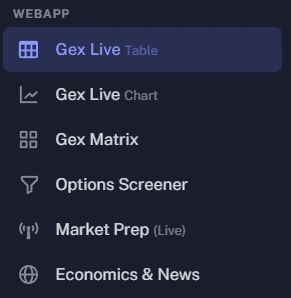
After signing in, use the navigation menu to open GEX Live Table, GEX Live Chart, GEX Matrix, or Options Screener. See the WebApp overview to choose a starting view.
Signing in to the Member Area is separate from adding invite-only indicators in TradingView. If you also use those indicators, follow Add the TradingView indicators.
If you cannot sign in
- No code email? Check spam and Gmail Promotions, then confirm that both the email address and TradingView username match your account. Check for messages from
noreply@tanukitrade.com. - Code expired or rejected? Use Back to return to the sign-in form and request a new code. Enter the new code in the verification field within its 2-minute validity window.
- Username does not match? Check the username in your TradingView profile URL. If the email or TradingView username stored on your account needs correcting, contact TanukiTrade webchat.
For login, account, or billing help, use chat.tanukitrade.com. The Support guide explains where to ask other product questions.
TanukiTrade documentation. Levels are context, not a recommendation. tanukitrade.com