
TradingView
0DTE Expected Move Box PRO
The options-implied range for contracts that expire in the current session.
Lite keeps historical boxes and backtests. The current-day EOD, PRE, and OPEN ranges stay locked. Open the Lite script.
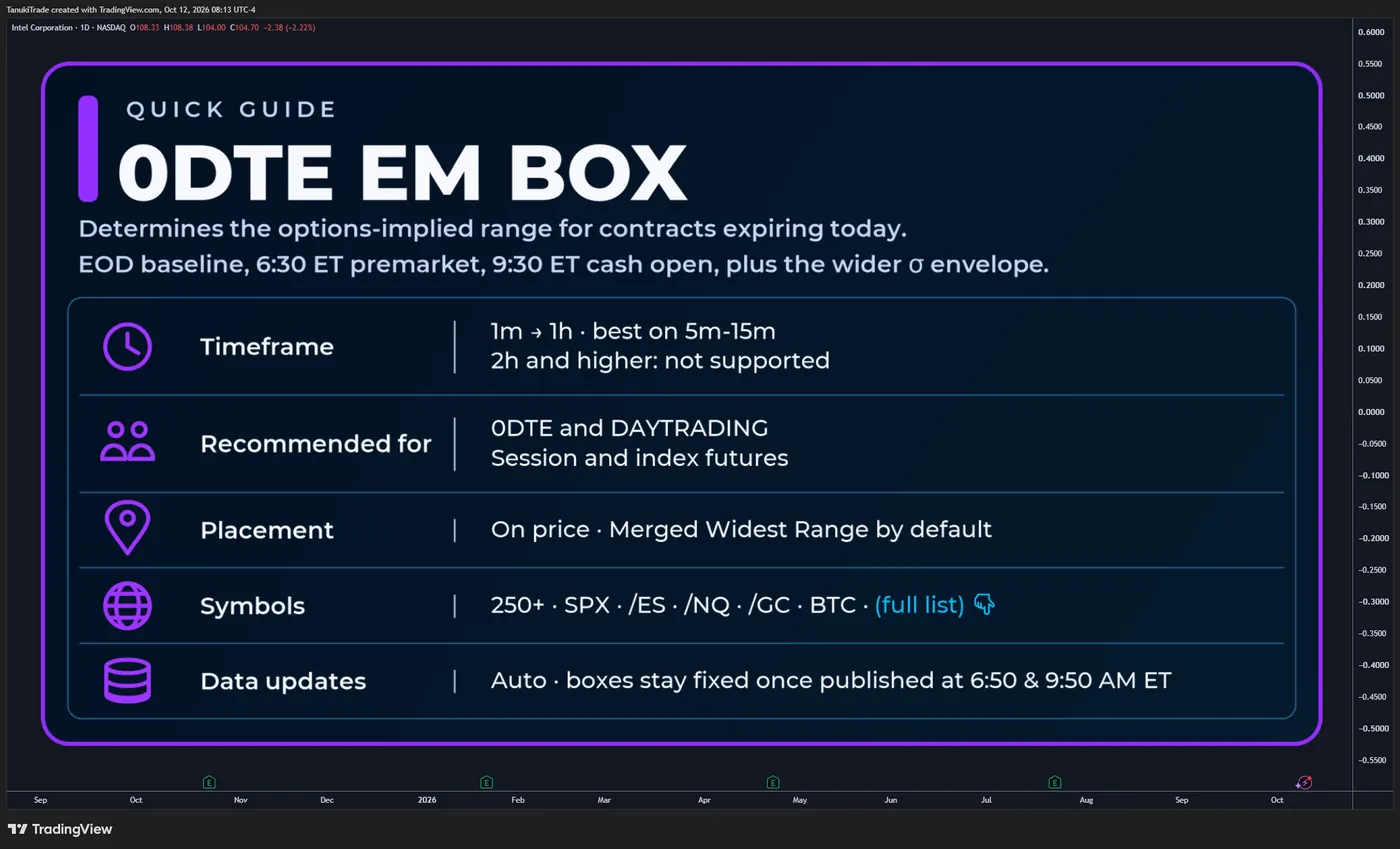
The 0DTE Expected Move Box displays the options-implied range for contracts expiring during the current trading session. It combines EOD, premarket and cash-open snapshots with historical EM Boxes, a wider STD1 (σ) envelope and built-in closing-range backtests.
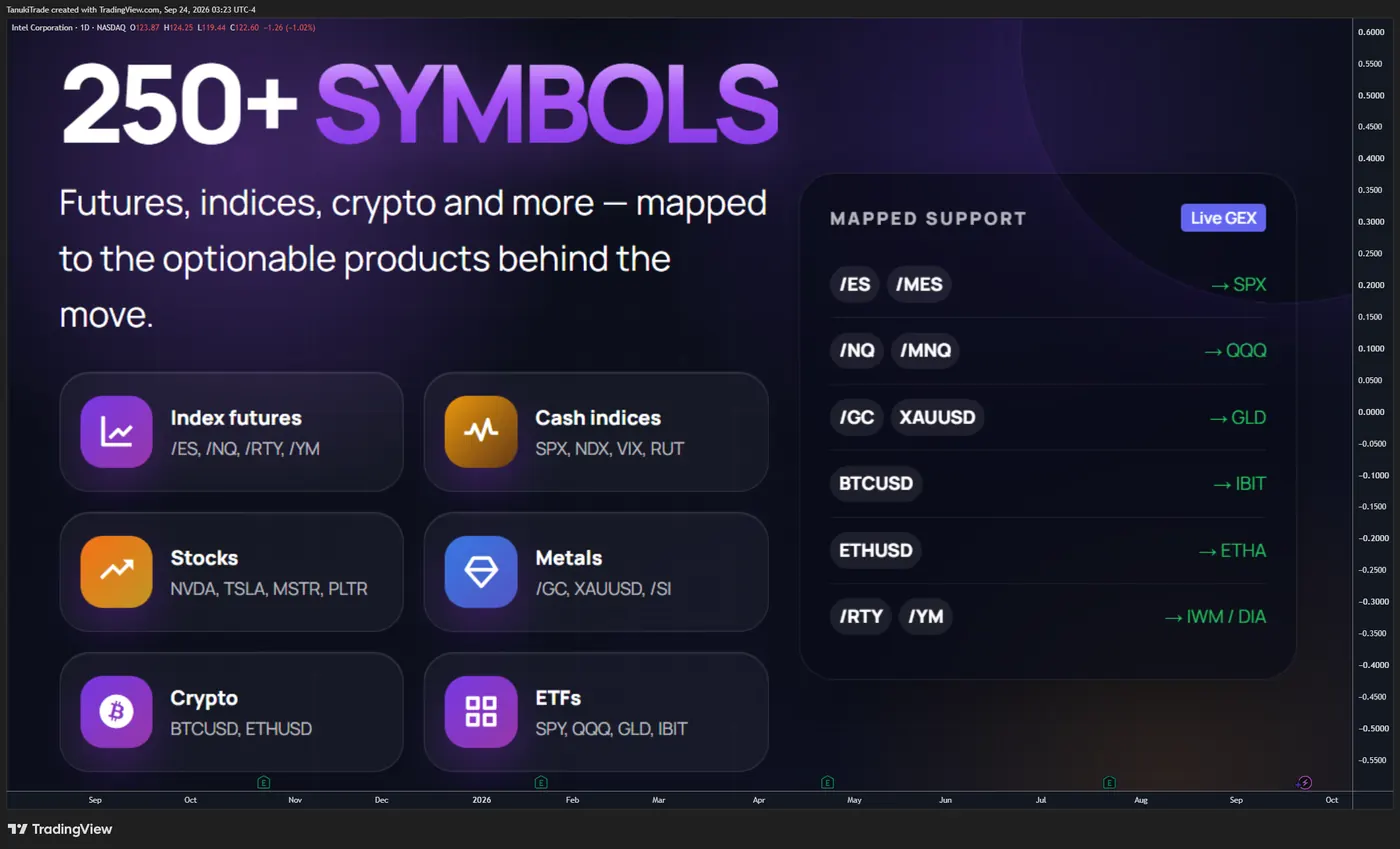
Available for 250+ highly liquid U.S. market symbols and mapped markets including SPX, /ES, /MES, /NQ, /MNQ, /YM, /RTY, BTCUSD and XAUUSD—with automatic TradingView updates and no manual refresh required. Full list: TanukiTrade supported-symbol watchlist.
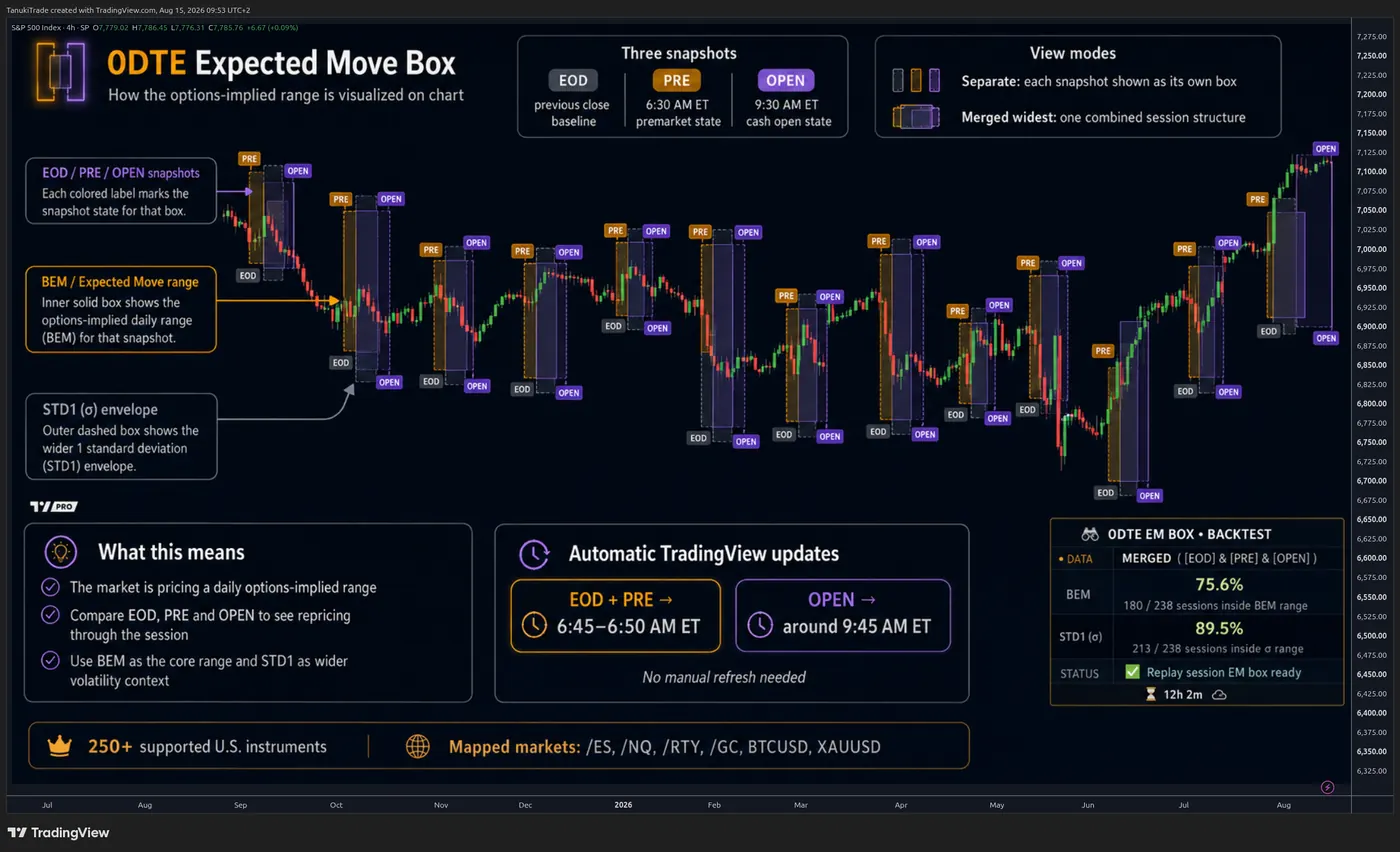
🔶 SEE THE RANGE THE OPTIONS MARKET IMPLIES FOR TODAY
Instead of showing only one static level, the indicator can visualize three distinct options-market snapshots:
- EOD — the baseline known from the previous session’s closing options data
- PRE — the 6:30 AM ET premarket state
- OPEN — the 9:30 AM ET cash-open state
Use the snapshots separately to study how the expected range changes around the opening bell, or combine them into one clean Merged Widest session box.
🔹 Key features
- Historical 0DTE Expected Move Boxes
- Wider STD1 (σ) volatility envelope
- Built-in BEM and STD1 closing-range backtests
- Merged and Separate rendering modes
- Automatic futures, index, CFD, metals and crypto mapping
- Automatic TradingView data delivery
- Coverage for 250+ highly liquid U.S. market symbols
🔶 WHY THIS INDICATOR IS DIFFERENT
Many range Tradingview indicators use a fixed percentage, ATR or historical volatility.
This indicator is different: its levels come from the options market’s expected move and volatility structure for the same-day expiration.
It helps answer questions such as:
- Is price still trading inside the range implied by the options market?
- Did overnight repricing (gapup/gapdown) materially change the expected range?
- Did the 9:30 AM cash open expand, contract or shift the session structure?
- Is price outside the core Expected Move but still inside the wider STD1 envelope?
- How often did this symbol historically close inside the selected range?
The box is not a directional forecast. It does not claim that price must move toward either boundary. It is a decision-support framework for visualizing the range implied by the selected options snapshots.
🔶 THE THREE 0DTE SNAPSHOTS
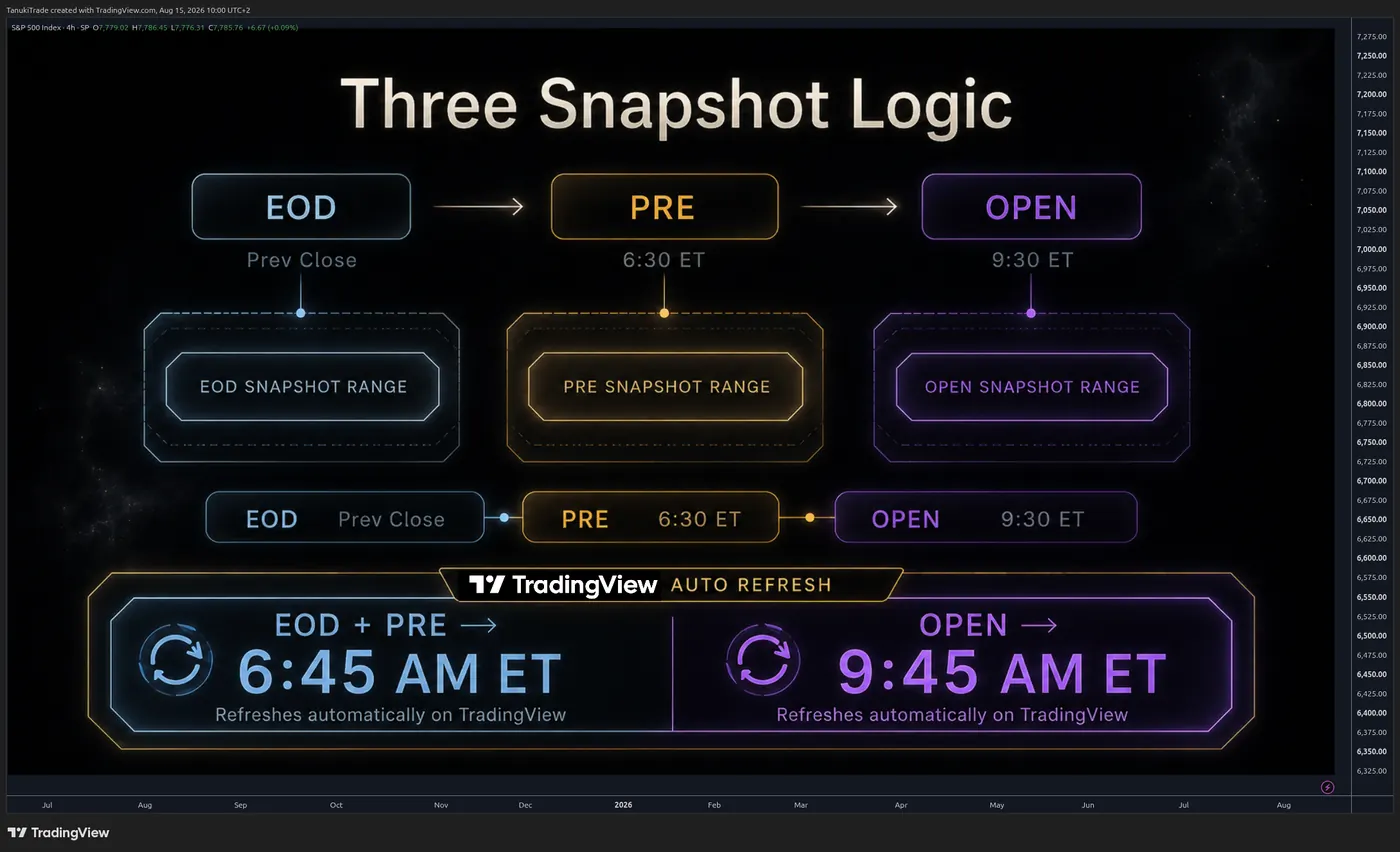
🔹 EOD — PREVIOUS-CLOSE BASELINE
EOD is calculated from the previous session’s closing options data and anchored to the prior cash close.
It provides the baseline that was known before the new session’s premarket repricing. This makes it useful for evaluating overnight movement and comparing the new PRE/OPEN ranges with the expectation established at the previous close.
The EOD range for the target 0DTE session appears on TradingView together with the morning data package, normally between 6:45 and 6:50 AM ET.
🔹 PRE — PREMARKET STATE
PRE represents the 6:30 AM ET premarket state for contracts expiring that same day.
It reflects how overnight price movement and volatility conditions have repriced the expected range before the cash market opens. The PRE range normally appears on TradingView between 6:45 and 6:50 AM ET.
🔹 OPEN — CASH-OPEN STATE
OPEN represents the 9:30 AM ET cash-open state for contracts expiring that same day.
This snapshot captures the range reset that occurs when overnight uncertainty meets live cash-market liquidity. The OPEN range normally appears automatically around 9:45 AM ET.
Once published, the EOD, PRE and OPEN boxes remain fixed. Heartbeat refreshes may continue during market hours, but the published ranges do not move intraday.
🔶 BEM RANGE AND STD1 (σ) ENVELOPE
🔹 BEM / EXPECTED MOVE RANGE
The inner box is the primary options-implied Expected Move range around its snapshot anchor price.
It is designed to answer a simple question: Did the session remain inside the core range implied by the selected options snapshot?
🔹 BEM CALCULATION — THE TASTYTRADE METHOD
In the 0DTE Expected Move Box, a snapshot of this Binary Expected Move is captured at a specific moment and projected as a fixed box through expiration.
The BEM uses a weighted combination of the ATM straddle and the first two Out-of-the-Money (OTM) strangles:
binary_expected_move = (atm_straddle_price * 0.6) + (first_otm_strangle_price * 0.3) + (second_otm_strangle_price * 0.1) - Multiply the ATM straddle price by 0.6.
- Multiply the first OTM strangle price by 0.3.
- Multiply the second OTM strangle price by 0.1.
- Add the three weighted values together.
🔹 STD1 (σ) ENVELOPE
The outer STD1 envelope is the wider one-standard-deviation range. It adds context when price moves outside the core Expected Move but remains within the broader volatility envelope.
🔹 STD1 CALCULATION — STANDARD EXPECTED MOVE
The Standard Expected Move (σ) estimates a one-standard-deviation price range using the underlying closing price, implied volatility and time remaining until expiration.
The calculation follows these steps:
- Multiply the underlying closing price by the implied volatility.
- Divide the number of days to expiration by 365.
- Calculate the square root of this time ratio.
- Multiply both results to obtain the one-standard-deviation expected move.
standard_expected_move = closing_price * implied_volatility * math.sqrt(days_to_expiration / 365.0) The resulting value represents the estimated price movement in either direction:
std1_upper = closing_price + standard_expected_move std1_lower = closing_price - standard_expected_move STD1 is not a guarantee and should not be interpreted as a standalone probability promise. Binary events, volatility shocks, liquidity changes and unexpected news can move price beyond either range.
Hover over the small BEM or σ labels on the chart to see:
- The exact upper and lower boundaries
- The center or anchor price
- The implied move in chart points
- The active snapshot or merged phase
- The applicable session time window
🔶 MERGED WIDEST VS. SEPARATE BOXES
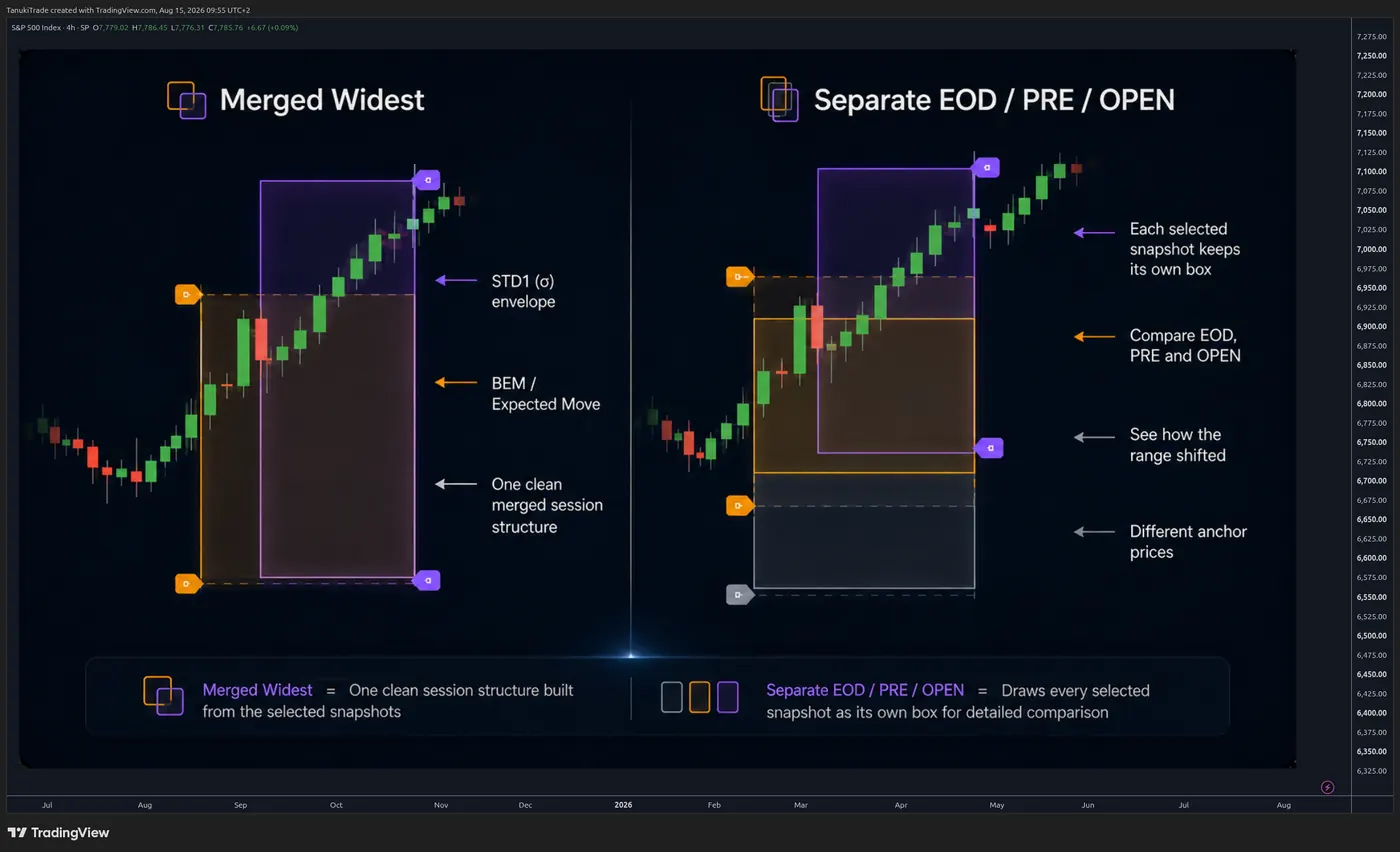
🔹 MERGED WIDEST — RECOMMENDED DEFAULT
Merged mode creates one clean session structure from the selected snapshots.
- Before the cash open, it combines the selected EOD and PRE information.
- When OPEN becomes available, the session structure incorporates the selected OPEN range.
- The displayed boundaries use the widest known selected EM and STD1 levels for that phase of the session.
This mode reduces chart clutter and is the recommended default for most traders.
🔹 SEPARATE EOD / PRE / OPEN
Separate mode draws every selected snapshot as its own box. Use it when you want to study exactly how the range changed:
- From the prior close to premarket
- From premarket to the cash open
- Between different snapshot anchor prices
🔶 BUILT-IN HISTORICAL BACKTEST
The Backtest Info Panel summarizes how frequently completed sessions closed inside the selected ranges.
🔹 BEM RESULT
The BEM percentage measures how many completed target sessions closed inside at least one applicable selected BEM range.
🔹 STD1 (σ) RESULT
The STD1 percentage measures how many completed target sessions closed inside at least one applicable selected STD1 envelope.
The panel displays:
- The closing-range hit rate
- The number of successful sessions
- The total number of evaluated sessions
- The current render mode and selected snapshots
- Mapping information when the chart uses another underlying options chain
- Current data and status information
Hover over either backtest result for a formatted explanation of the calculation, inside/outside counts and the active setup.
Backtest settlement uses the standard chart price at the exact 16:00 ET session close, independently of extended-hours bars. A session without a valid 16:00 ET close is omitted rather than evaluated using an unrelated after-hours price.
The built-in backtest is a descriptive closing-range study. It is not a trading strategy, P&L simulation or guarantee of future performance.
🔶 COVERAGE: 250+ U.S. MARKET SYMBOLS
The TanukiTrade options-data infrastructure supports 250+ highly liquid U.S. market symbols, including major indices, ETFs and actively traded equities such as SPX, SPY, NDX, QQQ, RUT, IWM, AAPL, AMZN, MSFT, META, NVDA, TSLA, GLD, SLV, DIA, IBIT and ETHA. Check the TanukiTrade supported-symbol watchlist for the full list.
An EM Box is displayed when a valid same-day expiration dataset is available for the selected session. Availability can differ by symbol and trading day because not every underlying has a valid same-day expiration every day.
🔶 FUTURES, CFD, METALS AND CRYPTO MAPPING
The indicator is not limited to standard equity charts. It maps a highly liquid underlying options chain to supported futures, CFD, metals, and crypto charts and applies a daily conversion factor so the Expected Move Box is displayed in the chart instrument’s own price scale. See Futures mapping for the supported pairs and conversion rules.
When mapping is active, the Backtest Info Panel clearly identifies the chart symbol and the options-chain underlying used for the range.
Mapped values are derived metrics. They are not the native options chain of the futures, CFD, metal or crypto instrument unless explicitly stated.
🔶 AUTOMATIC DAILY UPDATES
No manual chart refresh is required.
When valid same-day expiration data is available:
- 6:45–6:50 AM ET — EOD and PRE appear, representing the 6:30 AM ET state.
- Around 9:45 AM ET — OPEN appears, representing the 9:30 AM ET cash-open state.
- During market hours — heartbeat refreshes may continue, but the published EOD, PRE and OPEN boxes remain fixed.
These delivery times reflect TradingView’s automated external-data refresh limits—not delayed calculation or manual processing. See the update schedule for the broader TradingView refresh windows and active hours.
The footer of the Backtest Info Panel shows how long ago the latest data refresh arrived. Hover over it for the complete update schedule and script-version information.
🔶 PRACTICAL USE CASES
🔹 PREMARKET PREPARATION
Compare EOD with PRE to see whether overnight conditions expanded, contracted or shifted the expected range before the cash open.
🔹 OPENING-BELL REPRICING
Compare PRE with OPEN to see how the options-implied range reset when cash-market liquidity arrived.
🔹 INTRADAY LOCATION
Use the BEM boundaries as the core implied range and STD1 as the wider volatility context. Price outside BEM but inside STD1 is different from price trading beyond both envelopes.
🔹 VOLATILITY & GAMMA REGIME CONTEXT
Important: On highly volatile sessions, especially during an extreme bullish positive-gamma squeeze, or conversely during a negative-gamma regime where large-amplitude downside moves can occur, price may move beyond the range implied by the options market for that trading session.
🔹 RANGE-BASED STRATEGY PLANNING
Use the box as context when evaluating defined-risk spreads, butterflies, iron condors and other options structures where range and time horizon matter.
🔹 HISTORICAL REVIEW
Use Bar Replay and the Backtest Info Panel to study completed sessions and evaluate how often selected ranges contained the 16:00 ET close.
The indicator does not select a strategy, entry, stop or profit target for you. It provides structured options-implied context for your own process.
🔶 SETTINGS
🔹 RENDER MODE
- Merged Widest — one clean session structure; recommended default
- Separate EOD/PRE/OPEN — individual snapshot boxes for detailed comparison
🔹 SNAPSHOT SELECTION
Enable any combination of EOD, PRE and OPEN.
🔹 STD1 (σ) ENVELOPE
Show or hide the wider standard-deviation band.
🔹 TOOLTIP LABELS
Show or hide the compact BEM/σ labels. Hovering the labels reveals exact ranges and explanations.
🔹 BACKTEST INFO PANEL
- Choose panel visibility and position
- Select S, M, XL or XXL sizing
- Choose HIDE to remove the panel completely
🔹 STYLE
Customize EOD, PRE and OPEN fills and borders, plus the STD1 band color.
🔶 TIMEFRAME AND CHART REQUIREMENTS
- Use an intraday timeframe of 1 hour or lower
- The primary target session ends at 16:00 ET
- For the clearest historical interpretation, use standard time-based candles
- A symbol must have valid Expected Move data for the selected target session
- Mapped derivatives also require a valid conversion factor for that date
If the timeframe is too high or the symbol is unsupported, the indicator displays a clear status or hover note instead of drawing misleading boxes.
🔶 HOW THE DATA IS BUILT
For each valid target session, the data pipeline stores snapshot-specific anchor prices, Expected Move values and STD1 values.
🔹 The displayed boundaries are derived as
- Expected Move upper boundary = anchor + Expected Move
- Expected Move lower boundary = anchor − Expected Move
- STD1 upper boundary = anchor + standard deviation
- STD1 lower boundary = anchor − standard deviation
Historical records are delivered to TradingView through Pine Seeds. Mapped derivative charts use the underlying options-chain range multiplied by the applicable daily conversion factor.
The indicator does not display individual option-contract prices or a live option chain. It displays derived range metrics created from options-market snapshots.
🔶 IMPORTANT LIMITATIONS
- Expected Move is not a guaranteed trading range.
- A close inside the historical range does not mean the entire intraday path stayed inside it.
- A backtest hit rate is descriptive and does not predict future hit rates.
- Snapshot data can differ from another provider because of source, timing and methodology.
- Mapped derivatives inherit basis and conversion-factor risk relative to the underlying options chain.
- Breaking a boundary does not automatically imply continuation or reversal.
- News, macro events, volatility shocks and liquidity changes can move price beyond BEM or STD1.
- Not every supported symbol has a valid same-day expiration on every trading day.
🔶 QUICK START
- Open a supported symbol on an intraday chart of 1 hour or lower.
- Keep Merged Widest selected for the cleanest default view.
- Enable EOD, PRE and OPEN.
- Keep STD1 enabled for wider volatility context.
- Hover over the BEM/σ labels to inspect exact boundaries.
- Use the Backtest Info Panel to review historical closing-range behavior.
- On mapped charts such as /ES, verify the mapping row in the panel.
🔶 DISCLAIMER
This indicator is intended for informational, educational and decision-support purposes only.
It is not investment advice, a trade recommendation, a solicitation, a guarantee of accuracy or a promise of future performance. Options and futures involve substantial risk and are not suitable for every trader.
The indicator uses delayed and scheduled options-market snapshots to calculate derived metrics. Exact real-time option-contract prices are not displayed.
Users are responsible for independently validating all information, understanding the instrument they trade and making their own informed decisions. TanukiTrade and the script authors accept no liability for trading losses, data interruptions, mapping differences, calculation errors or decisions made using this indicator.
Past backtest results do not guarantee future outcomes.
Related
TanukiTrade documentation. Levels are context, not a recommendation. tanukitrade.com