
TradingView
Options Oscillator PRO
IV rank, IVx, call/put skew, and NETGEX in a pane under the candles.
Lite is live on DIA, AAPL, AMZN, TSLA, and ORCL. Open the Lite script.
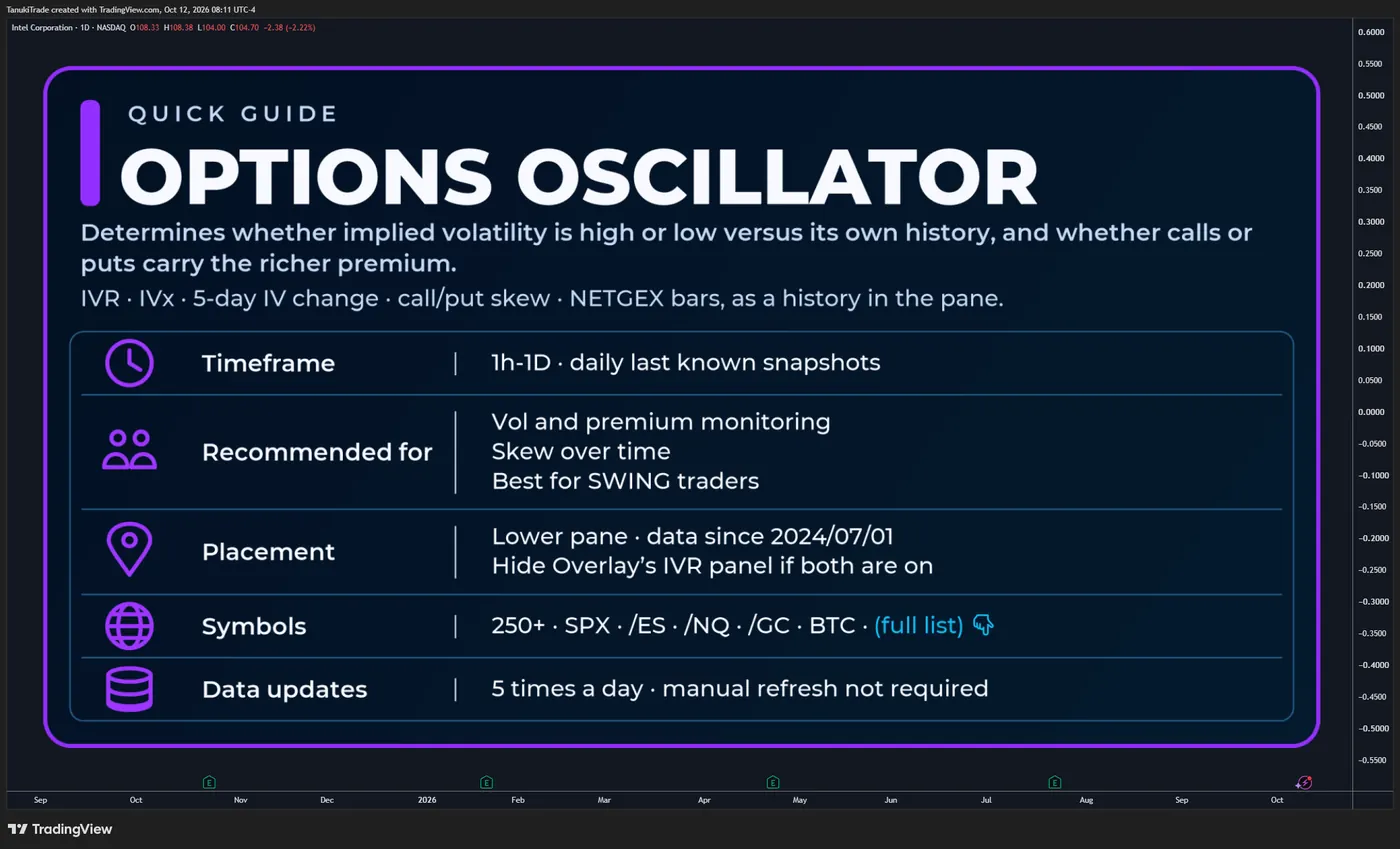
Read IVR, IVx, call/put pricing skew and NETGEX context in a lower-pane oscillator alongside Options Overlay.
Options Oscillator displays IVR, the IVx average and its five-day change, call/put pricing skew, and NETGEX context from scheduled options-data snapshots. IVR and IVx appear as lines, pricing skew as a histogram, and NETGEX as expiration-based bars and markers when available. Intraday candles do not recalculate the options data: IVR, IVx, skew and NETGEX bars change when a new scheduled package arrives, while price-position markers can change between packages as chart price moves relative to the last received HVL and walls.
The indicator is designed to answer:
- Is implied volatility high or low versus its own 52-week range?
- What is the current IVx average through the optimal monthly expiration, and has it expanded or contracted over five sessions?
- Are calls or puts richer at equal Binary Expected Move distance on that monthly expiration?
- What do the NETGEX bars,
HVLmarkers and cumulative Gamma Extension Markers show?
Options Oscillator does not generate entries, exits, stops or price targets. IVR, IVx, skew and NETGEX are decision-support context. They do not verify dealer inventory or forecast direction.
Available for 250+ supported U.S. options roots and selected mapped futures, metals, CFD and crypto-proxy charts. Full list: TanukiTrade supported-symbol watchlist.
🔶 WHY THIS INDICATOR IS DIFFERENT
Many volatility tools leave IV rank, the current IVx level and call/put skew in separate places. Options Oscillator brings IVR, IVx, call/put pricing skew and NETGEX context together in one pane. IVR, IVx and monthly pricing skew use the same constructions as Options Overlay.
Core functionality includes:
- IVR on a 0–100 scale against the trailing 52-week IV range
- IVx average across the 35–70 DTE monthly cycle, through the displayed optimal expiration
- Five-trading-day change in that IVx average
- Call/put pricing skew for the next optimal monthly expiration, at Binary Expected Move distance
- NETGEX context for available expirations, with price-position markers relative to
HVL - Cumulative (⅀) Gamma Extension Markers for the
C1andP1extension zones - Historical IVR, IVx and pricing-skew readings from 2024-07-01
- Scheduled external-data refresh — no manual chart reload is normally required
The plotted series come from externally prepared options snapshots. The Pine script does not rebuild a live option chain from TradingView OHLC and does not display individual contract prices.
Because these readings are already in the oscillator, the Options Overlay IVR panel can be hidden when both scripts are on the same chart.
🔶 IVR (IV Rank)
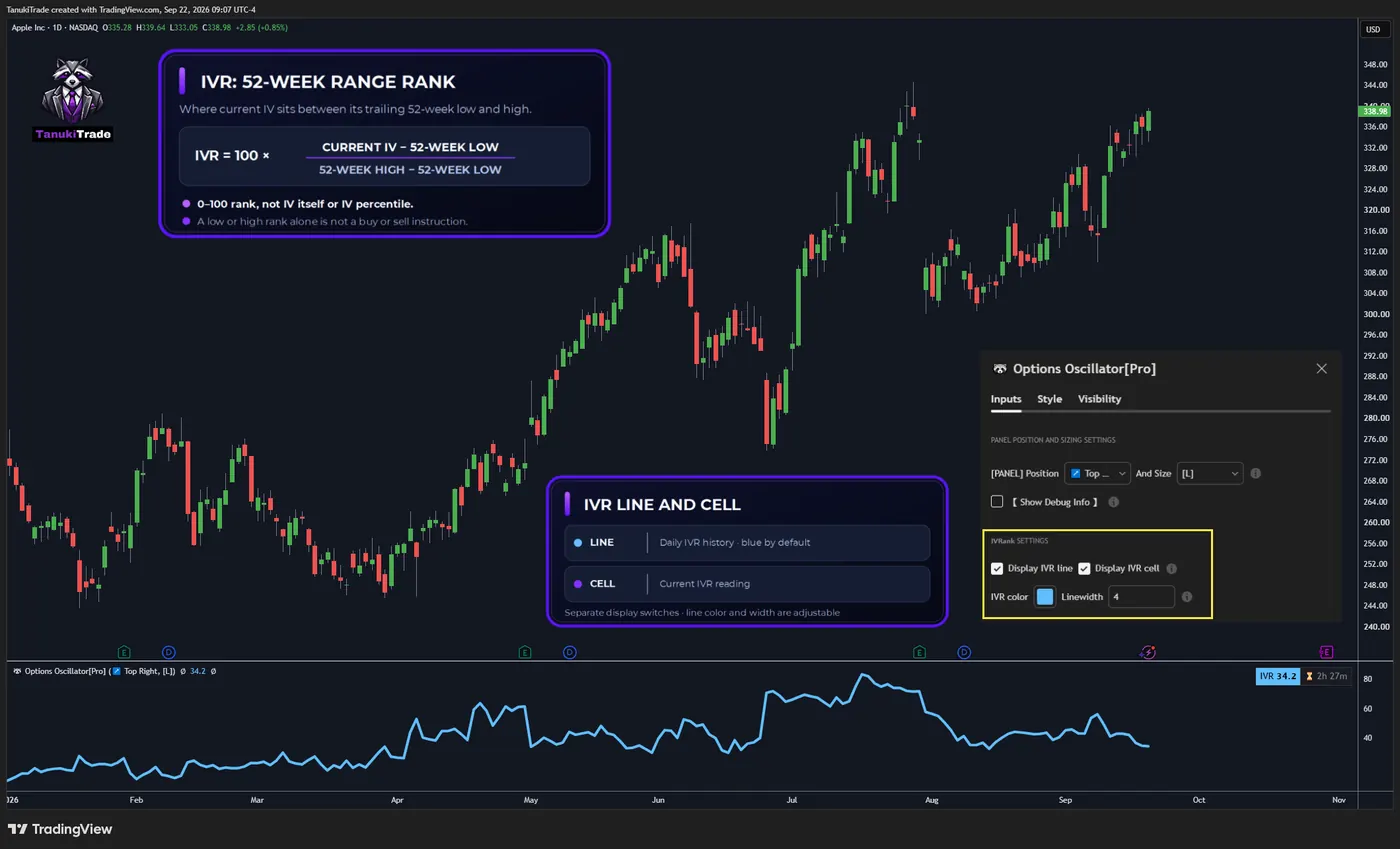
IVR is the current implied volatility’s position within its trailing 52-week range.
iv_rank = 100 * (current_iv - fifty_two_week_iv_low) / (fifty_two_week_iv_high - fifty_two_week_iv_low)IVR is a relative rank on a 0–100 scale, not implied volatility itself and not IV percentile. A low IVR does not by itself make options attractive to buy, and a high IVR does not mean premium must be sold.
The IVR line is blue by default. Display IVR line and Display IVR cell are separate settings. The line color and width can be changed. The line is the daily history; the cell is the current reading.
🔶 IVX AVERAGE AND FIVE-DAY CHANGE
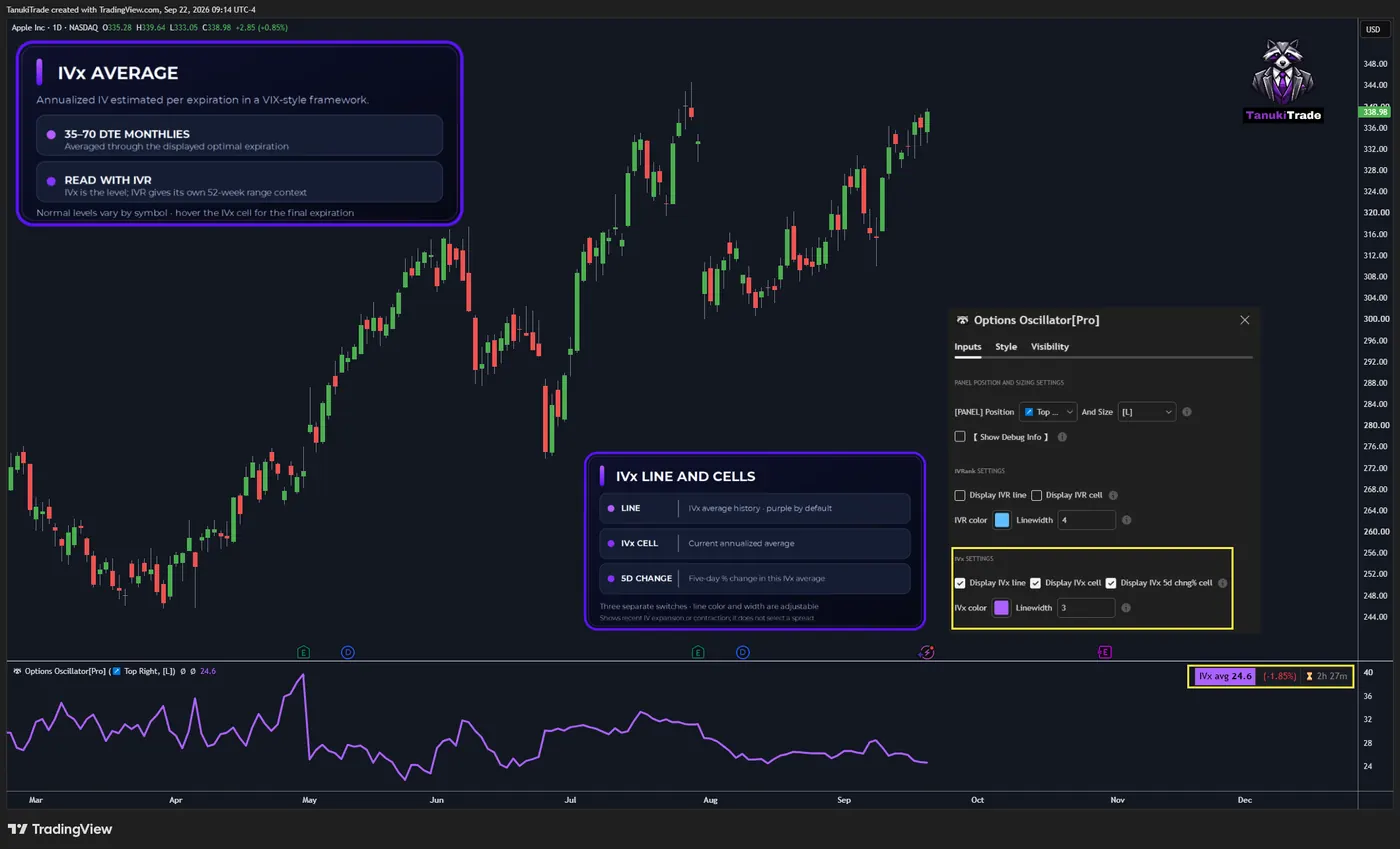
IVx is an expiration-level implied-volatility estimate constructed in a VIX-style framework. For this oscillator, the plotted IVx average aggregates those per-expiration values across the 35–70 DTE monthly cycle, through the displayed optimal expiration.
IVx is annualized volatility. IVR describes where current IV sits within its own trailing range. Some underlyings normally carry higher IVx than others, so the average should be read with IVR. Hover the IVx cell to see which expiration the average runs through.
The IVx line is purple by default. Display IVx line, Display IVx cell and Display IVx 5d chng% cell are separate settings. Line color and width can be changed.
🔹 IVx 5-day change is the five-trading-day change in that IVx average. It describes recent implied-volatility expansion or contraction. It does not select a spread.
🔶 VERTICAL / CALL–PUT PRICING SKEW (HISTOGRAM)
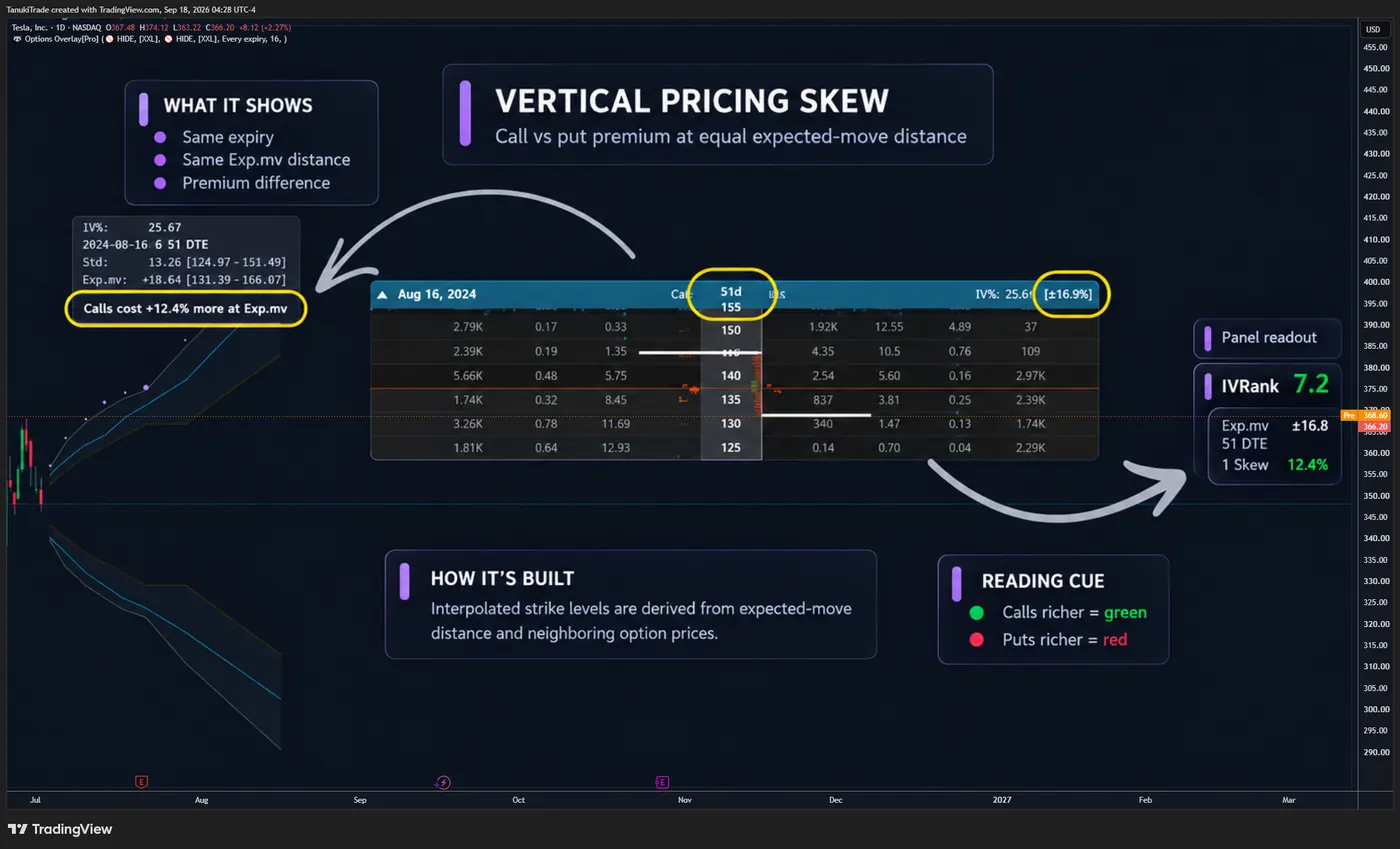
The histogram is the call/put pricing skew of the next optimal monthly expiration. It compares interpolated call and put premiums at equal positive and negative Binary Expected Move distances. This is the same skew Options Overlay reports for that monthly expiration.
The distance is the TastyTrade Binary Expected Move for that expiration:
binary_expected_move = (atm_straddle_price * 0.6) + (first_otm_strangle_price * 0.3) + (second_otm_strangle_price * 0.1)The script interpolates the call and the put at that distance from the neighboring strikes, then prints the percentage difference. The percentage is a premium gap. It is not a forecast of direction.
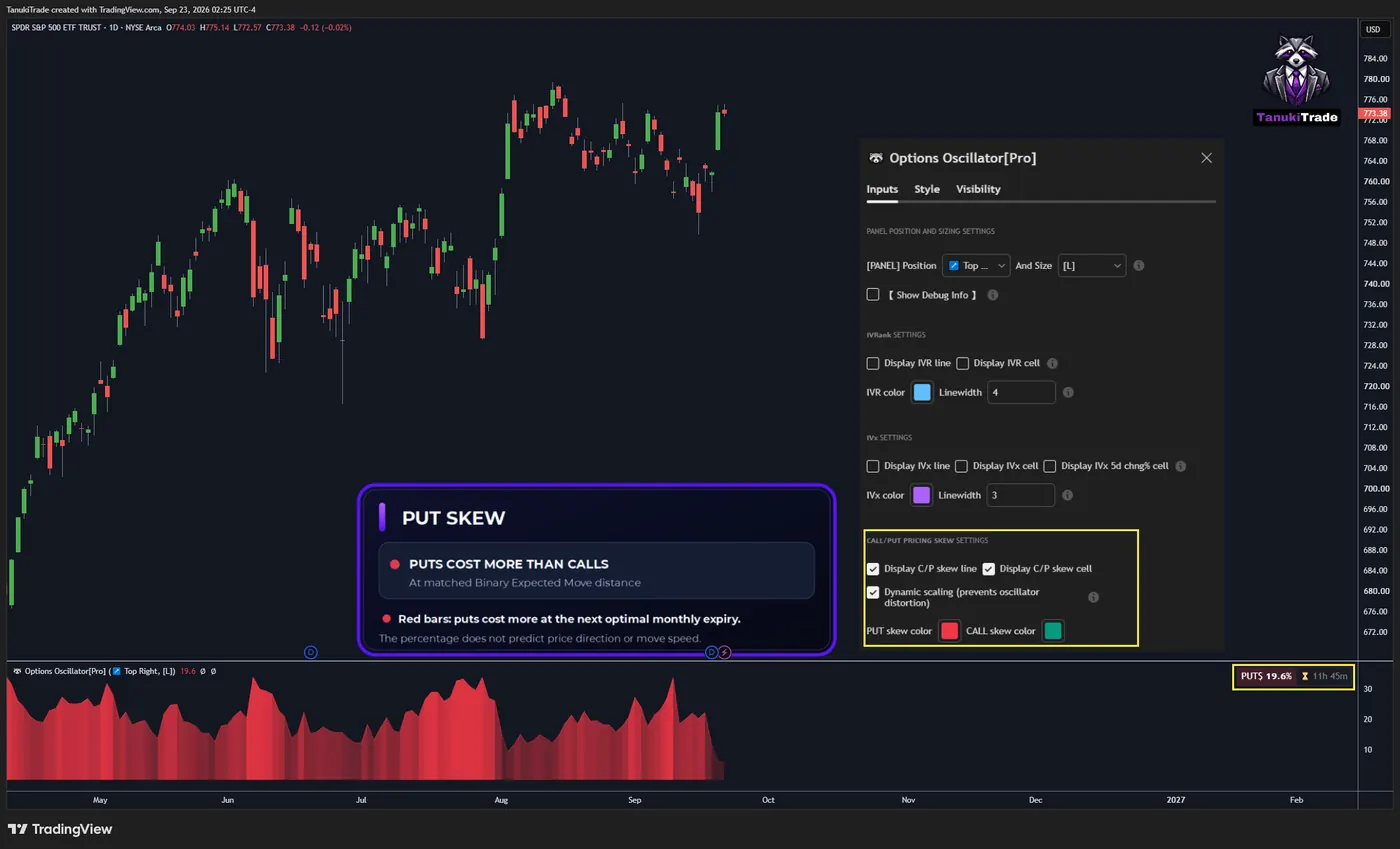
- Put skew: puts are priced higher than calls at that matched distance. The histogram is red by default, and the cell reads “PUT skew is …”.
- Call skew: calls are priced higher than puts at that matched distance. The histogram is green by default, and the cell reads “CALL skew is …”.
Display C/P skew line and Display C/P skew cell are separate settings. Put-skew color and call-skew color can be changed.
🔴 PUT SKEW 🔴
🔹 Put-skew example — SPY
On the sample daily chart, the cell reads PUT skew is 19.6%: put premium is that much higher than call premium at the Binary Expected Move distance of the optimal next monthly expiration. The histogram is red.
🟢 CALL SKEW 🟢
🔹 Call-skew example — INTC
On the sample daily chart, the cell reads CALL skew is 107.7%: call premium is that much higher than put premium at the Binary Expected Move distance of the optimal next monthly expiration. The histogram is green.
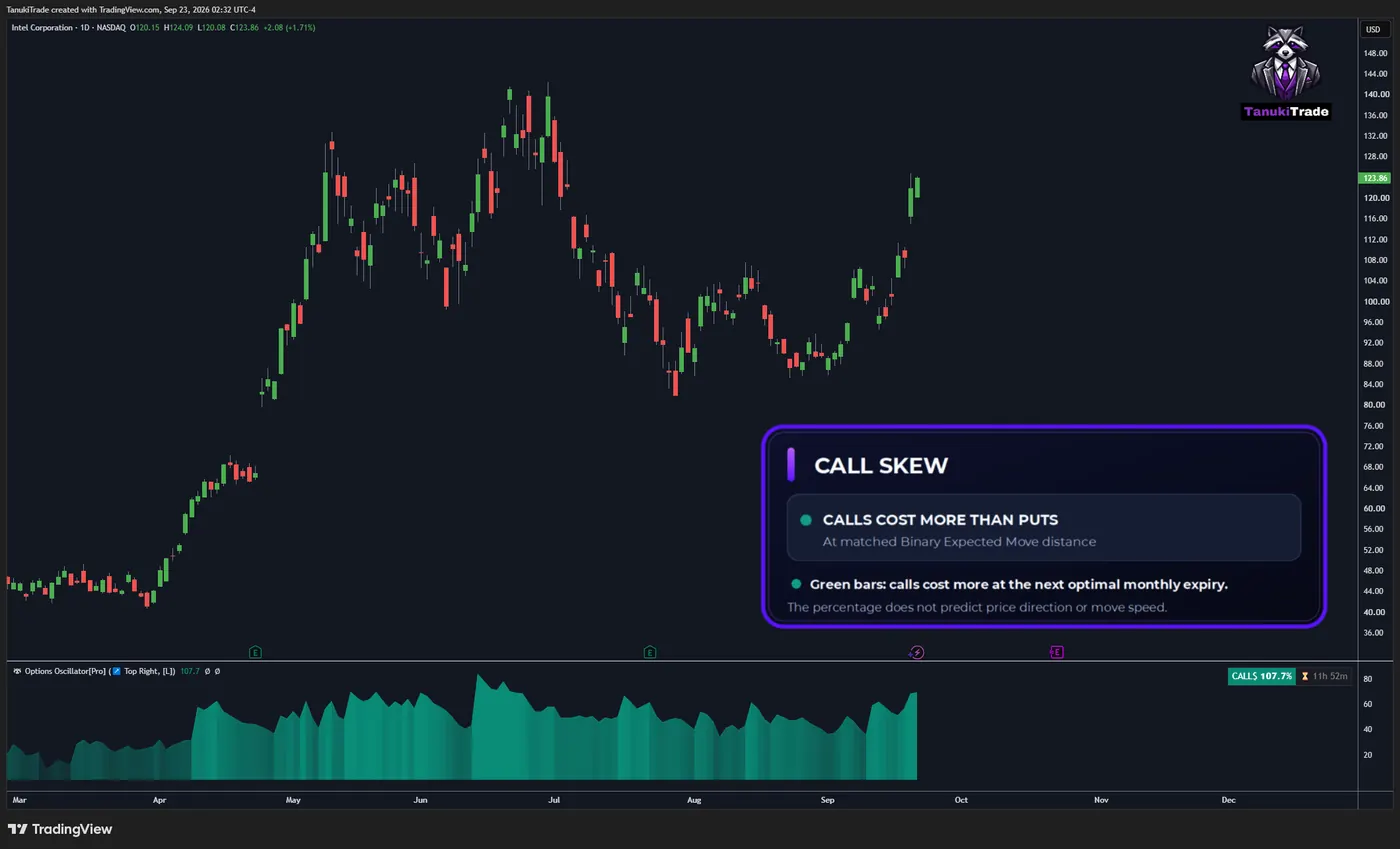
These charts show how the histogram reads a premium gap. They are not a forecast that price will move in the richer side’s direction.
🔶 GEX / NETGEX
When enabled, the oscillator also shows NETGEX context for available expirations. Each expiry bar is the latest scheduled NETGEX snapshot. Its ▲/▼ marker evaluates current chart price relative to that expiry’s last received HVL, so the marker can change between packages while the bar remains unchanged. Hover for the expiry context.
Green and red bars show positive and negative signed NETGEX snapshots for the available expirations. Their height is fitted to the oscillator's shared visual scale, including dynamic skew scaling and IVR capped at 100; bar height is not an absolute NETGEX unit.
Gamma Extension Markers use the cumulative (⅀) profile: a call-side marker refers to the C1 extension zone, and a put-side marker to the P1 extension zone. These are model reference states, not verified dealer positions or a forecast of the next move.
Only cumulative (⅀) profiles can produce these markers; Selected Alone (⊙) profiles cannot. A call-side 🔶 marker requires price to reach C1, wall percentage above 90%, and HVL at or below C1. A put-side 🔷 marker requires price to reach P1, wall percentage above 90%, and HVL at or above P1. Hover identifies the cumulative expiry horizon.
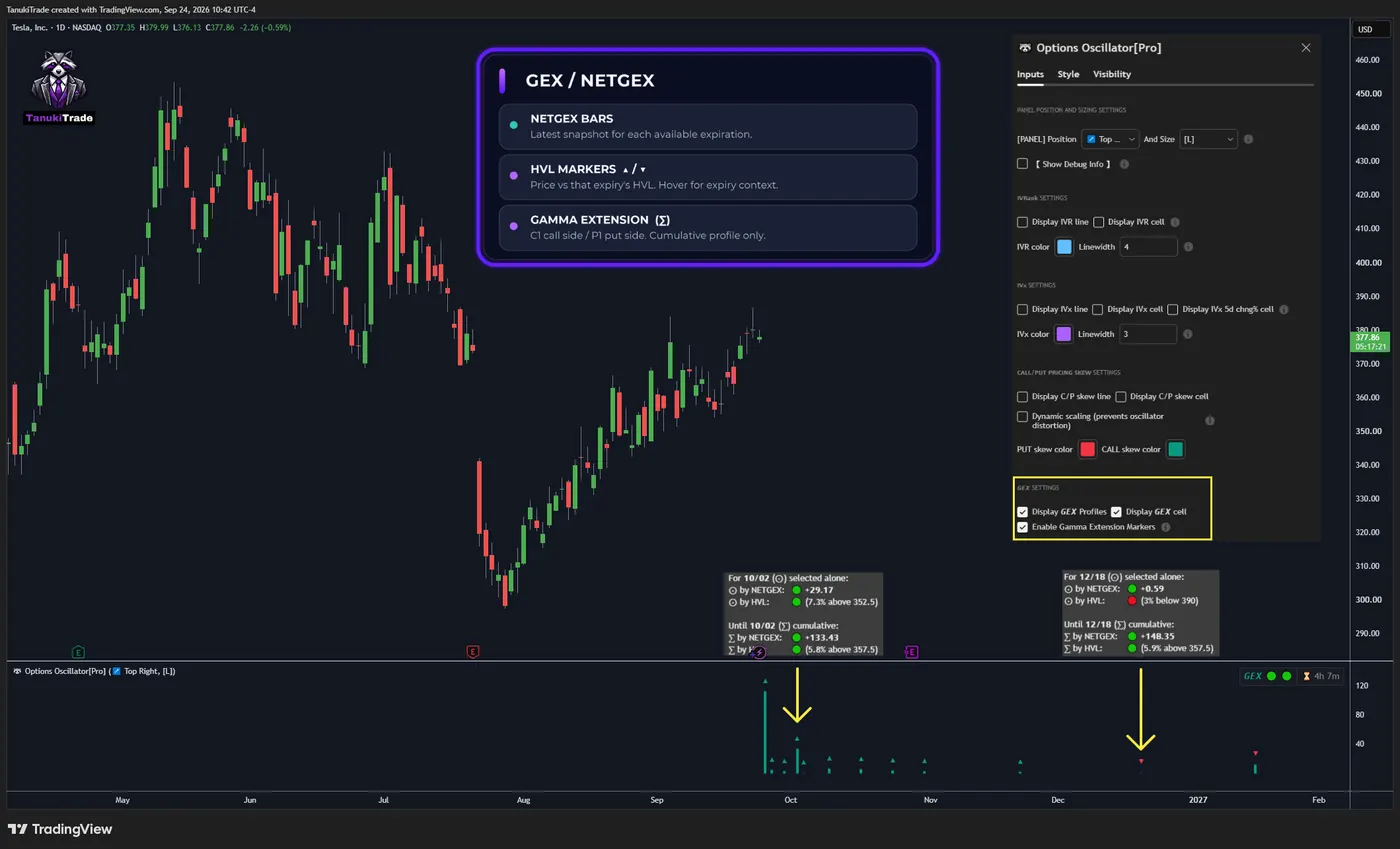
HVL. The yellow arrows point to the markers, and the GEX settings box is highlighted.Open this chart on TradingView ↗🔶 USING IT WITH OPTIONS OVERLAY
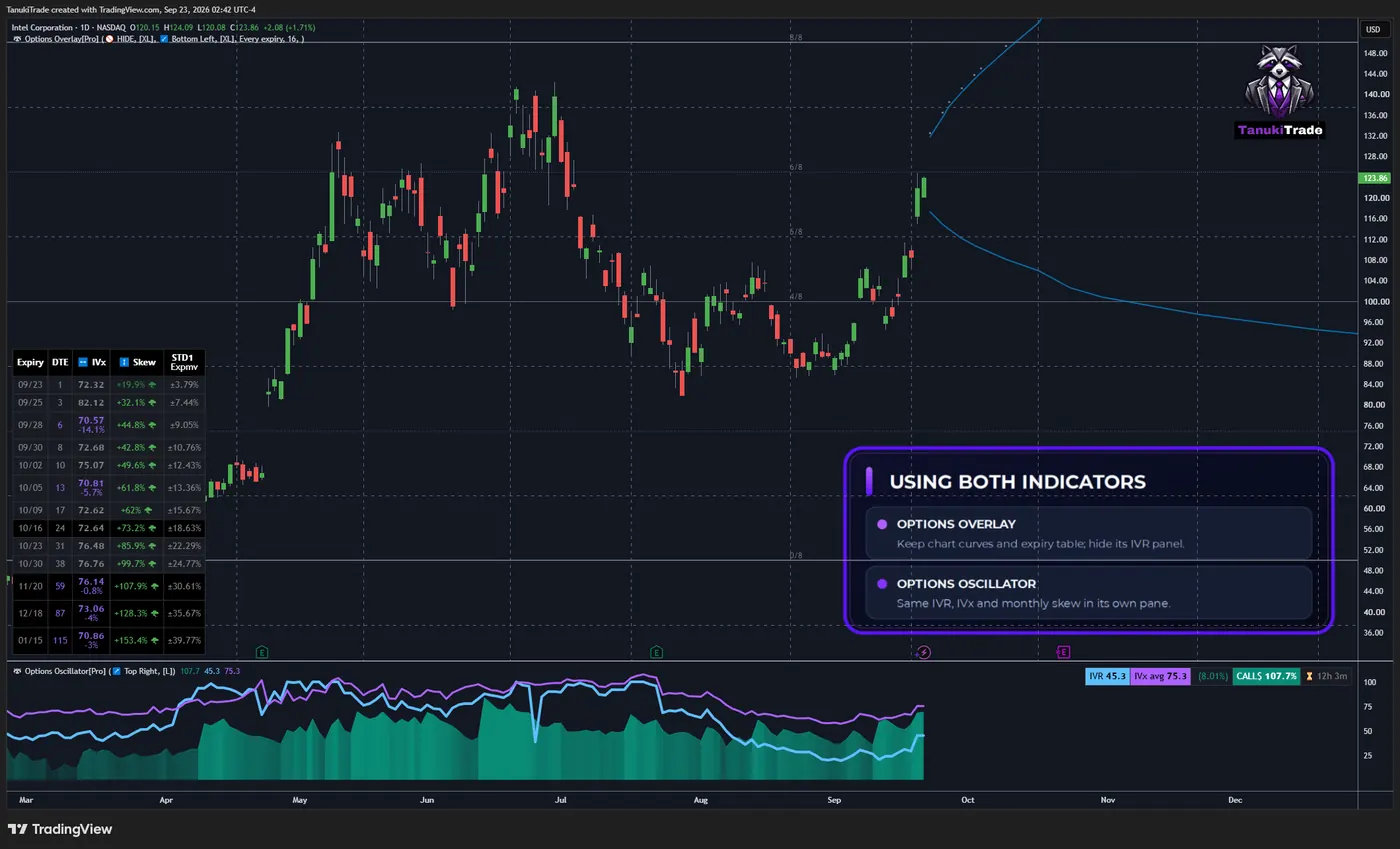
The oscillator uses the same IVR, IVx and monthly pricing-skew readings as Options Overlay. With both scripts on the chart, hide the Overlay IVR panel and keep the oscillator in its own pane.
🔶 HISTORY AND THE DAILY PRINT
The stored IVR, IVx and call/put pricing-skew history starts on 2024-07-01. Earlier dates for those metrics are not backfilled. GEX context is shown only where a valid GEX snapshot exists.
During the session, scheduled packages update the current day's IVR, IVx, call/put skew and available NETGEX readings. Once the daily candle closes, that day's final readings become the end-of-day record.
🔶 SCHEDULED DATA DELIVERY
No manual chart refresh is normally required. The external data package is scheduled for five snapshots on U.S. market days; see the update schedule for the delivery windows and active hours.
These windows describe scheduled external-data delivery, not tick-by-tick option-chain updates. On a daily chart, the time since the latest package appears at the bottom of the pane. Mapped futures, metals and crypto charts still receive options-derived readings according to these U.S. options-data windows.
Broker IV and IVx can differ from these snapshots because platforms may use different inputs, rates, dividend assumptions, interpolation and timestamps. The oscillator follows the IVR, IVx and Binary Expected Move constructions above.
🔶 SYMBOL COVERAGE
The feed covers 250+ supported U.S. options roots. Selected futures, metals, CFD and crypto-proxy charts are also supported through mapping from a related liquid U.S. options chain; see Futures mapping for the supported pairs. Their readings are not calculated from the displayed instrument's native options chain. Check the TanukiTrade supported-symbol watchlist for the exact chart symbols.
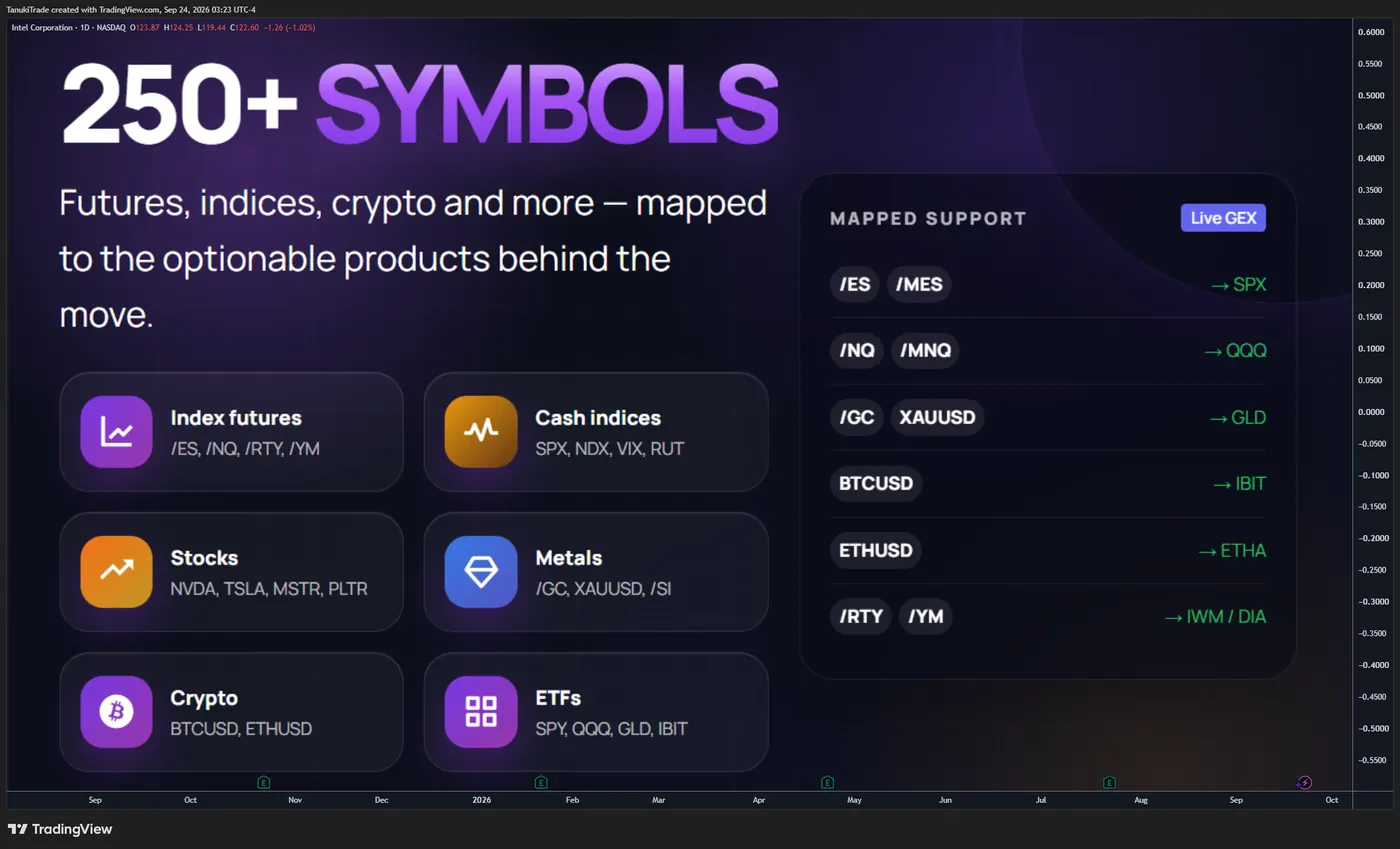
A symbol with no valid options-derived snapshot stays blank rather than being replaced with an estimated series.
🔶 SETTINGS
🔹 Panel position and sizing
- Panel position
- Panel size
🔹 IVRank
- Display IVR line
- Display IVR cell
- IVR color. Default is blue.
- Linewidth
🔹 IVx
- Display IVx line
- Display IVx cell
- Display IVx 5d chng% cell
- IVx color. Default is purple.
- Linewidth
🔹 Call/put pricing skew
- Display C/P skew line. This is the histogram.
- Display C/P skew cell
- PUT skew color. Default is red.
- CALL skew color. Default is green.
- Dynamic scaling (prevents oscillator distortion when skew and the other plotted values share the pane)
The histogram and the skew cell stay on the next optimal monthly expiration.
🔹 GEX / NETGEX
Enable Gamma Extension Markers controls the cumulative (⅀) C1/P1 extension markers. Expiration bars and their tooltips provide the NETGEX and HVL context described above.
🔶 PRACTICAL WORKFLOWS
🔹 Volatility context
Read IVR with the IVx average and the five-day change. IVR supplies the 52-week context, IVx supplies the current annualized level, and the five-day change shows recent repricing.
🔹 Monthly premium gap
Read the histogram as the call/put premium difference at Binary Expected Move distance for the optimal monthly expiration. A richer put side and a richer call side are pricing observations. Neither one selects a strategy.
🔹 With Overlay
Keep Overlay for the price-scale curves and the expiry table. Use the oscillator for the daily history of IVR, IVx and the monthly skew, and hide the Overlay IVR panel if it repeats the same numbers.
🔶 TIMEFRAME COMPATIBILITY
Use a 1D chart. That is the resolution of the end-of-day print and the resolution on which the time since the last package is shown.
An intraday chart can still display the current daily values. Those values do not update with each intraday candle. They update when a new scheduled package arrives.
Timeframes above 1D can hide intermediate daily packages. Non-time-based charts such as Renko may display the history inconsistently because their bars do not advance in regular time steps. Use regular time-based candles for the clearest historical reading.
🔶 IMPORTANT LIMITATIONS
- The series are derived snapshots, not a live option chain and not contract prices.
- IVR is a range rank, not IV percentile, and it does not by itself say whether premium should be bought or sold.
- IVx and its five-day change do not forecast the next move in volatility or select a spread.
- Call/put skew is the premium difference at equal Binary Expected Move distance. The percentage is not the speed of the underlying.
- The histogram is the next optimal monthly expiration, not every listed expiration.
- IVR, IVx and pricing-skew history starts on 2024-07-01; earlier readings are not estimated. GEX context requires a valid GEX snapshot.
- The current day remains provisional until the daily candle closes and the last package is stored as the EOD print.
- Scheduled external data is not tick-by-tick and can be delayed or temporarily unavailable.
- A missing or invalid source snapshot produces no print rather than an estimated substitute.
- Example charts demonstrate the histogram. They are not evidence of how often a richer side is followed by a move in that direction.
🔶 QUICK START
- Open a supported symbol on a 1D chart.
- Read IVR together with the IVx average and the five-day change.
- Hover the IVx value to see which expiration the average includes.
- Read the histogram as the monthly call/put premium gap at Binary Expected Move distance.
- If Options Overlay is also on the chart, hide its IVR panel when the oscillator already shows those readings.
- Check the time since the last package before treating a print as stale.
- Validate every observation with price, liquidity and your own risk framework.
🔶 DISCLAIMER
This indicator is intended for informational, educational and decision-support purposes only.
It is not investment advice, a trade recommendation, a solicitation, a guarantee of accuracy or a promise of future performance. Options, futures, leveraged products and crypto assets involve substantial risk and are not suitable for every trader.
The indicator uses delayed and scheduled options-market snapshots to calculate derived metrics. Exact real-time option-contract prices are not displayed.
Users are responsible for independently validating the information, understanding the instrument they trade and making their own informed decisions. TanukiTrade and the script authors accept no liability for trading losses, data interruptions, calculation errors or decisions made using this indicator.
Related
TanukiTrade documentation. Levels are context, not a recommendation. tanukitrade.com