
TradingView
GEX Profile PRO
Gamma levels and the six location states, drawn on the price chart.
Lite is live on DIA, AAPL, AMZN, TSLA, and ORCL. Open the Lite script.
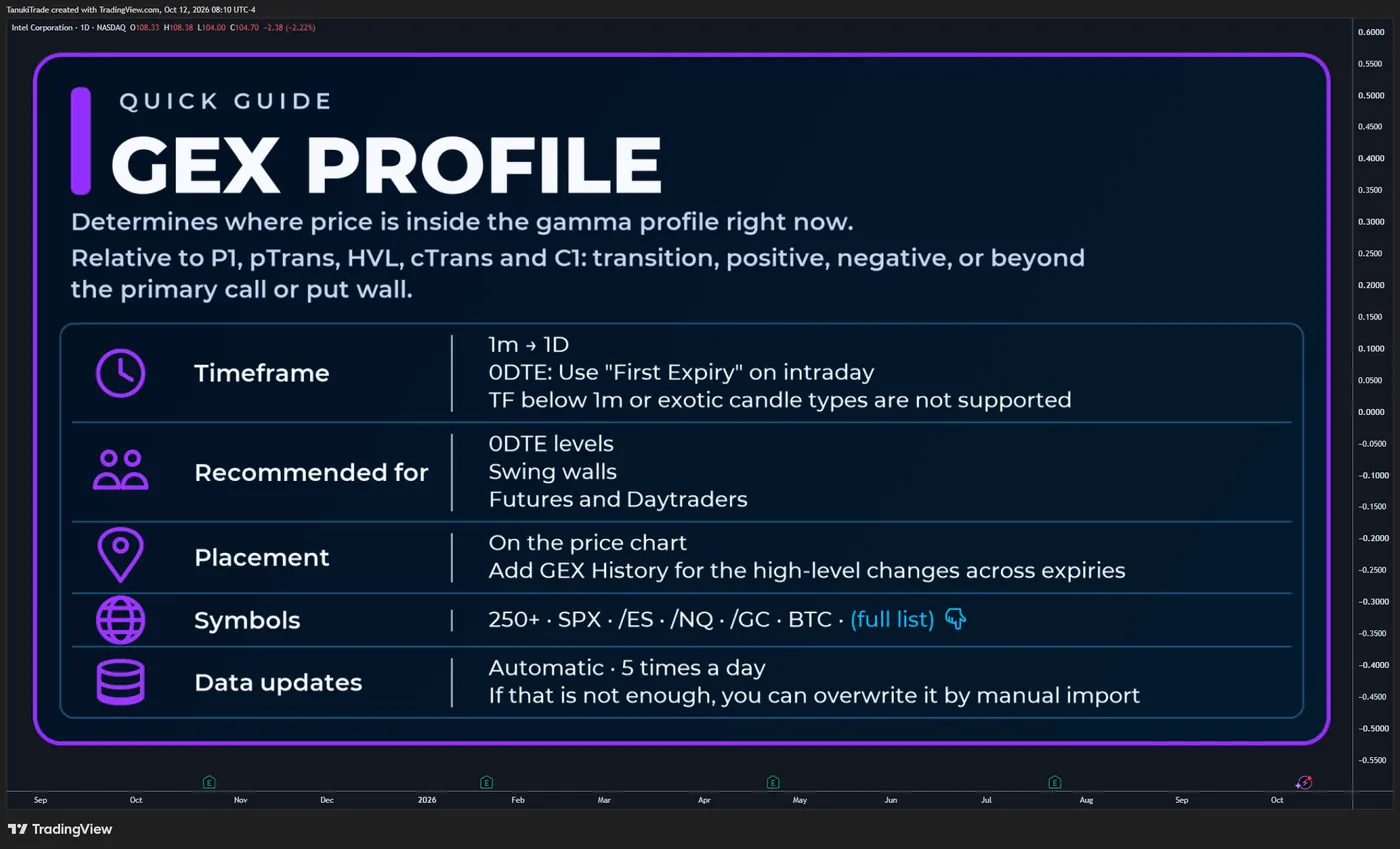
Map options-derived gamma structure directly onto price—and see where the market is trading relative to P1, pTrans, HVL, cTrans and C1.
GEX Profile maps snapshot-based net-GEX walls, transition levels and optional secondary strikes directly onto the chart’s price scale. Select an expiration scope and calculation mode, then read price location, nearby structural concentrations and model-derived gamma-regime context alongside price action, volume and implied volatility.
The indicator is designed to answer:
- Where is price relative to the primary put-side wall,
HVLand primary call-side wall? - Is price inside the central transition structure, in a POS or NEG region, or beyond
P1/C1? - Do additional net-GEX walls or secondary Abs GEX, DEX, open-interest and volume-flow strikes cluster near the same price?
- Does the selected profile represent one expiration or cumulative structure through a later expiration?
GEX Profile does not generate entries, exits, stops or price targets. Its POS, NEG, transition and extension names classify price location within a snapshot-based model profile. They do not independently establish dealer positioning, predict the next move or guarantee that volatility will contract or expand.
Available for 250+ liquid U.S. market symbols and supported mapped charts, including major index futures, metals and selected crypto pairs. Full list: TanukiTrade supported-symbol watchlist.
🔶 WHY THIS INDICATOR IS DIFFERENT
Many gamma displays focus on a flip level or a single expiration. GEX Profile keeps the broader structure visible: primary boundaries, transition levels, ranked walls and optional secondary concentrations—all aligned with the active expiration and calculation mode.
Core functionality includes:
- A five-level structural map:
P1→pTrans→HVL→cTrans→C1 - Six color-coded location states aligned with GEX History
- Cumulative (⅀) versus Selected Alone (⊙) calculation modes
- First Expiry, weeklies, monthlies and Every Expiry profiles
- Optional Abs GEX, DEX, open-interest and session-volume strikes
- Extended net-GEX walls through C7 and P7
- Automatic mapping for supported futures, CFD, metals and crypto charts
- Manual Override for a newer compatible profile snapshot
The plotted strikes come from externally prepared options-derived profile data. The Pine script does not infer them from TradingView candles and does not reconstruct a live option chain from OHLC data.
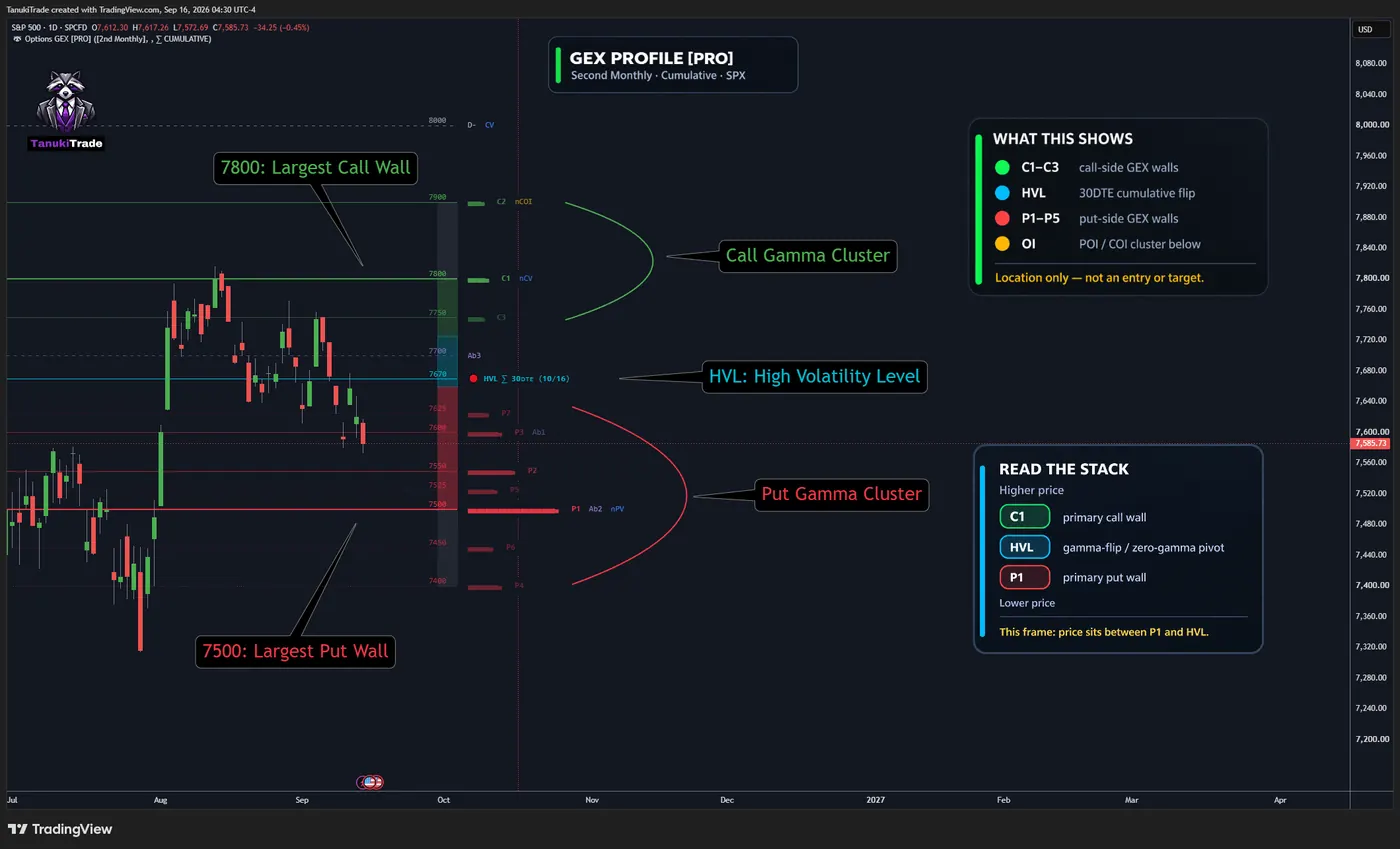
HVL line sits between them.Open this chart on TradingView ↗🔶 WHAT IS GEX
Gamma measures the rate at which an option’s delta changes as the underlying price changes. GEX Profile aggregates option-derived gamma exposure into a signed strike-level structure for the selected expiration scope.
Why can this matter?
If a market maker is in fact long gamma, delta hedging is typically countercyclical: selling underlying exposure as price rises and buying as it falls can dampen movement. If the market maker is short gamma, the hedge adjustment is typically procyclical and can amplify movement.
Near expiration, option gamma can become more concentrated around nearby strikes—particularly for options near the money—making those concentrations useful reference areas to monitor.
These are possible hedging mechanisms, not a reading of market makers’ actual positions. The indicator’s GEX sign, HVL and ranked walls are model outputs; they do not establish that a particular hedge is taking place or that price will pin, reverse or break out.
🔹 How to interpret the model
- Positive GEX (far above
HVL) is commonly associated with more countercyclical hedging behavior, which may dampen realized movement. - Negative GEX (far below
HVL) is commonly associated with more procyclical hedging behavior, which may amplify realized movement. - Concentrated strikes can become relevant reference areas, particularly near expiration, but concentration alone does not prove pinning, rejection or acceleration.
These are conditional model interpretations. Actual market behavior also depends on who holds the options, whether positions are long or short, how exposures change intraday, liquidity, volatility and other flows. GEX sign is therefore not the same as bullish or bearish sentiment, and the chart does not independently verify dealer inventory.
HVL (High Volatility Level) is the model’s central gamma-transition pivot, also described as its gamma-flip or zero-gamma level. In Cumulative mode, HVL comes from the profile aggregated through the selected expiration; in Selected Alone mode, it belongs only to that expiration.
🔶 THE FIVE STRUCTURAL LEVELS
The classification engine compares chart price with five model-defined structural boundaries:
P1 → pTrans → HVL → cTrans → C1
P1: primary put-side net-GEX wallpTrans: lower transition boundaryHVL: central gamma-transition / volatility-regime pivotcTrans: upper transition boundaryC1: primary call-side net-GEX wall
C2–C7 and P2–P7 are additional ranked call-side and put-side net-GEX walls from the same profile. Their rank follows the profile’s net-GEX ordering; it is not a ranking by distance from spot.
Hover a level to inspect its expiration, DTE, calculation mode, distance from spot and location context.
🔶 HOW THE GAMMA ZONES WORK
The chart uses the same six location states as GEX History. Each state describes where price sits relative to the five structural boundaries.
🟢 POS_EXTENSION
Price is at or above C1. This is upper extension territory beyond the primary call-side wall—not a breakout, squeeze or continuation signal.
🟩 POS
Price is at or above HVL and cTrans, but below C1. The model associates this region with more stabilizing conditions, without guaranteeing lower volatility or mean reversion.
🔷 POS_TRANSITION
Price is at or above HVL but below cTrans. This is the upper half of the central transition structure.
🔷 NEG_TRANSITION
Price is below HVL but above pTrans. This is the lower half of the central transition structure.
🟥 NEG
Price is below HVL and at or below pTrans, but above P1. The model associates this region with greater amplification risk, without predicting realized volatility or direction.
🔴 NEG_EXTENSION
Price is at or below P1 and pTrans. This is lower extension territory beyond the primary put-side wall—not a breakdown, reversal or continuation signal.
The state name is determined by location, not by the size of gamma exposure. POS and NEG are model labels; they are not direct observations of dealer books or independent measurements of hedging flow. Zone fills and colors can be adjusted under Design Settings.
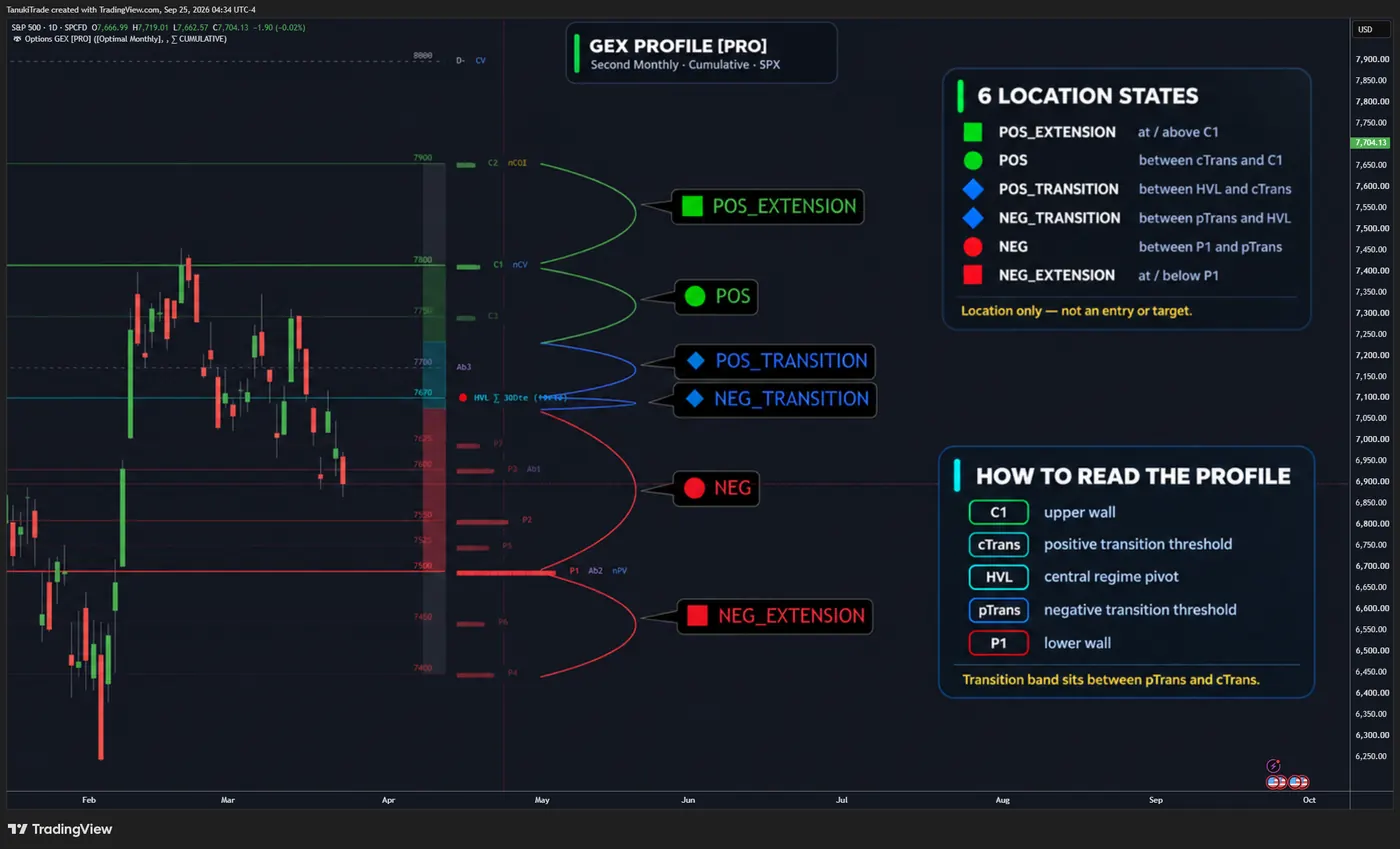
HVL. The legend on the right maps each state to its position between C1, cTrans, HVL, pTrans and P1.Open this chart on TradingView ↗Example charts are selected only to show how zones and flags are rendered. They are not representative of event frequency, trading performance or predictive reliability.
🔶 CUMULATIVE VS SELECTED ALONE
🔹 Cumulative (⅀) aggregates all included expirations through the selected date. Use it when the question concerns the combined structure carried into that horizon.
🔹 Selected Alone (⊙) isolates the chosen expiration. Use it when the question concerns that expiration’s own profile rather than the combined path into it.
The calculation mode changes the full profile—including HVL, transitions and ranked walls—not merely the label shown beside it. First Expiry defaults to Selected Alone; Every Expiry is cumulative by construction.
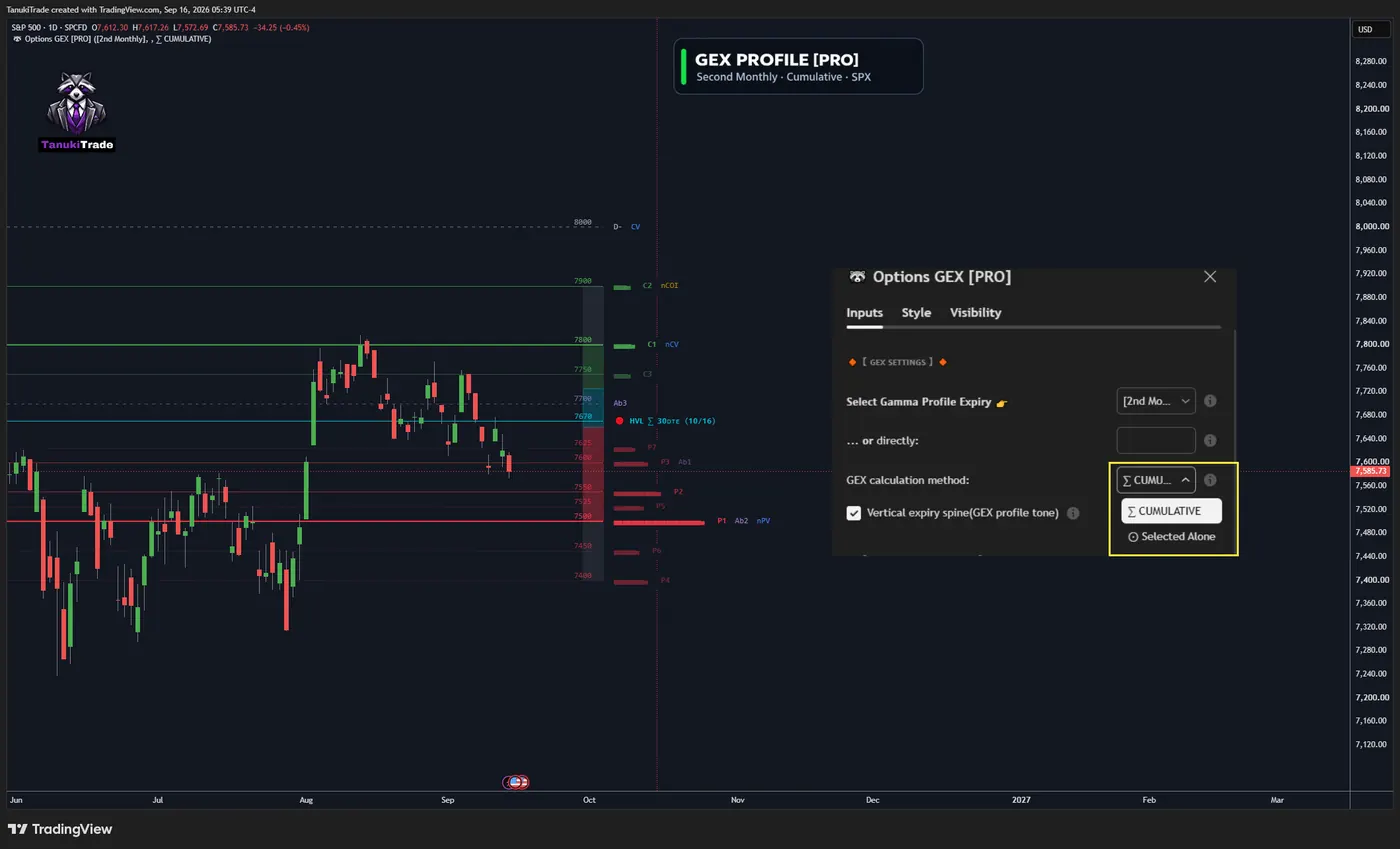
HVL on the left belong to the Second Monthly cumulative profile.Open this chart on TradingView ↗🔶 EXPIRY SELECTION
- First Expiry: shortest available profile, normally 0DTE when a valid same-day expiration exists
- First Weekly: nearest supported weekly profile
- First Monthly: nearest standard monthly profile
- Second Monthly: following standard monthly profile
- Every Expiry: broad aggregate across all included expirations
Practical starting points:
- Intraday / 0DTE context: First Expiry
- Weekly or swing context: First Weekly or First Monthly
- Broad structural context: Every Expiry
These two settings sit at the top of the indicator inputs. Choose the expiration first, then the calculation mode. Together they define the entire map—not a cosmetic label.
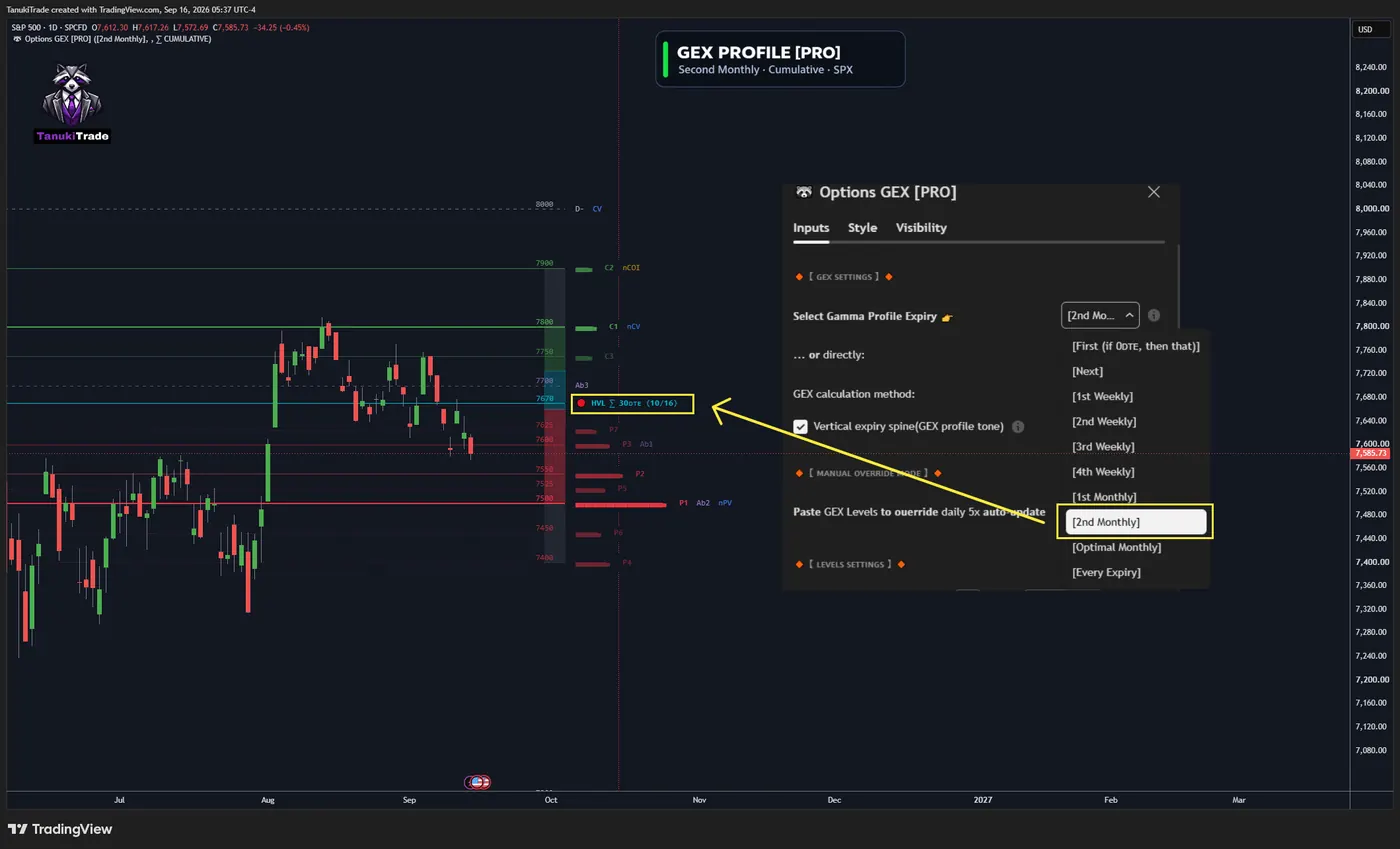
HVL label on the chart, which shows the matching expiration.Open this chart on TradingView ↗Example settings panel only. It shows where to select the expiration profile and Cumulative (⅀) versus Selected Alone (⊙). It is not a recommended setup for every symbol or session.
🔹 0DTE snapshot handling
When First Expiry resolves to a same-day expiration, its profile can refresh with the scheduled market-day snapshots described below. This includes intraday 0DTE updates, but it is not a continuously recalculated or tick-by-tick option chain. If no valid same-day profile is available, the script leaves that view unavailable instead of estimating one.
🔶 SECONDARY STRIKES
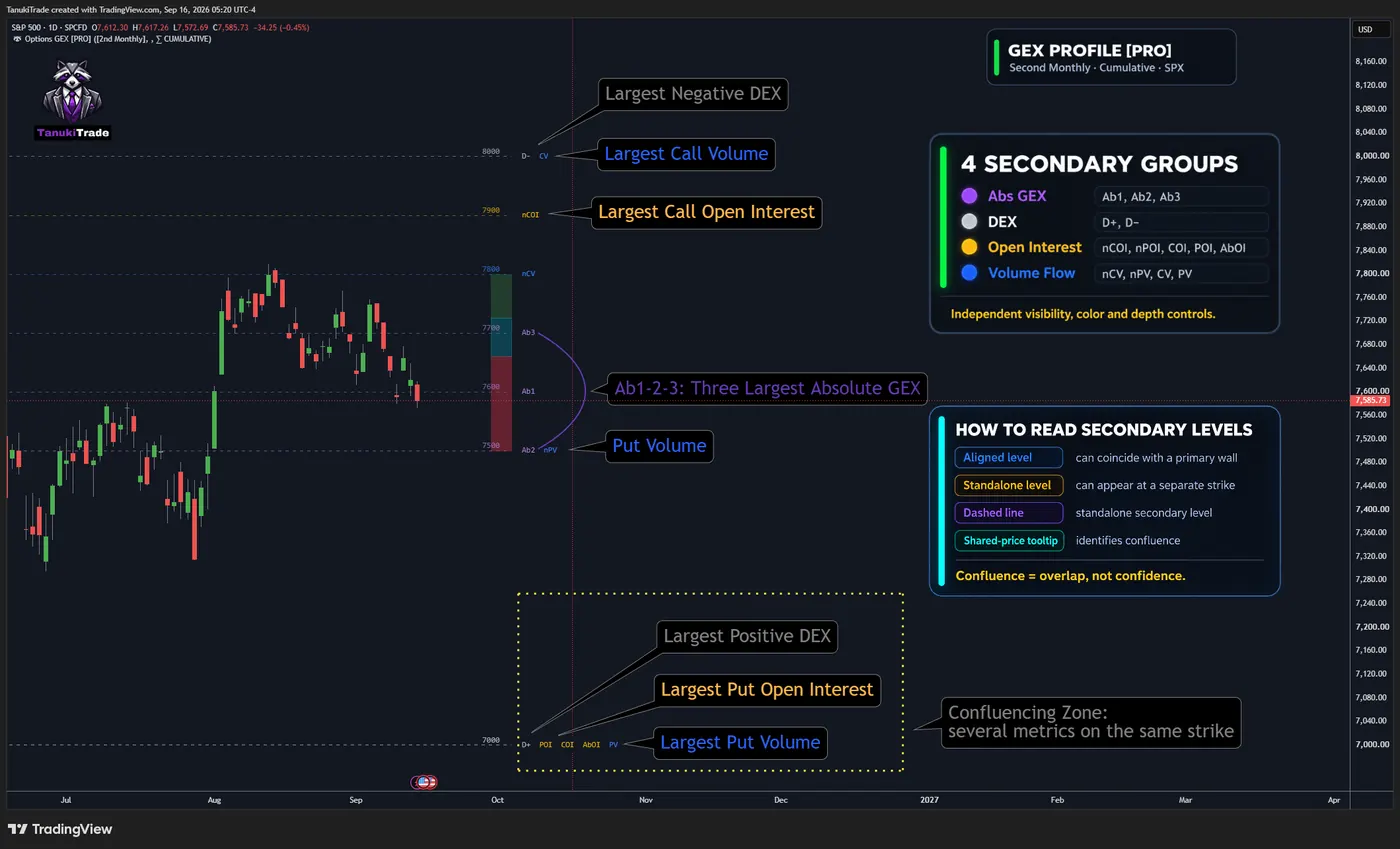
Secondary strikes add another layer of options structure beyond the C/P wall family. Each group has independent visibility, color and depth controls.
- Abs GEX — Ab1, Ab2, Ab3: leading absolute-gamma concentrations, irrespective of net sign
- DEX — D+, D−: leading positive and negative delta-exposure concentrations
- Open Interest — nCOI, nPOI, COI, POI, AbOI: ranked open-interest concentrations from the available profile
- Volume Flow — nCV, nPV, CV, PV: ranked call- and put-volume concentrations for the applicable session; premarket data refers to the prior completed session
Secondary levels can coincide with a primary wall or appear at a separate strike. Dashed rendering distinguishes a standalone secondary level; shared-price tooltips identify confluence. Confluence means overlap among model outputs—it is not a confidence score and does not guarantee that price will react. See Secondary level badges for how each badge (such as raw COI / CV versus net nCOI / nCV and combined AbOI) is defined.
🔶 HOW TO READ THE CHART
Read the chart in four passes:
- Location: identify the active state relative to
P1,pTrans,HVL,cTransandC1 - Proximity: note which primary and extended C/P walls sit nearest to spot
- Confluence: check whether Abs GEX, DEX, OI or volume-flow strikes share or cluster around those prices
- Horizon: confirm the selected expiration and whether the profile is isolated or cumulative
Then combine that structure with price action, liquidity, volume, volatility and a defined risk process. A level is context first; interaction with price determines whether it becomes relevant.
Hover a marker for expiration, DTE, calculation method, distance from spot, location context and source freshness. Display Fine-Tuning can hide tooltip sections that are not needed.
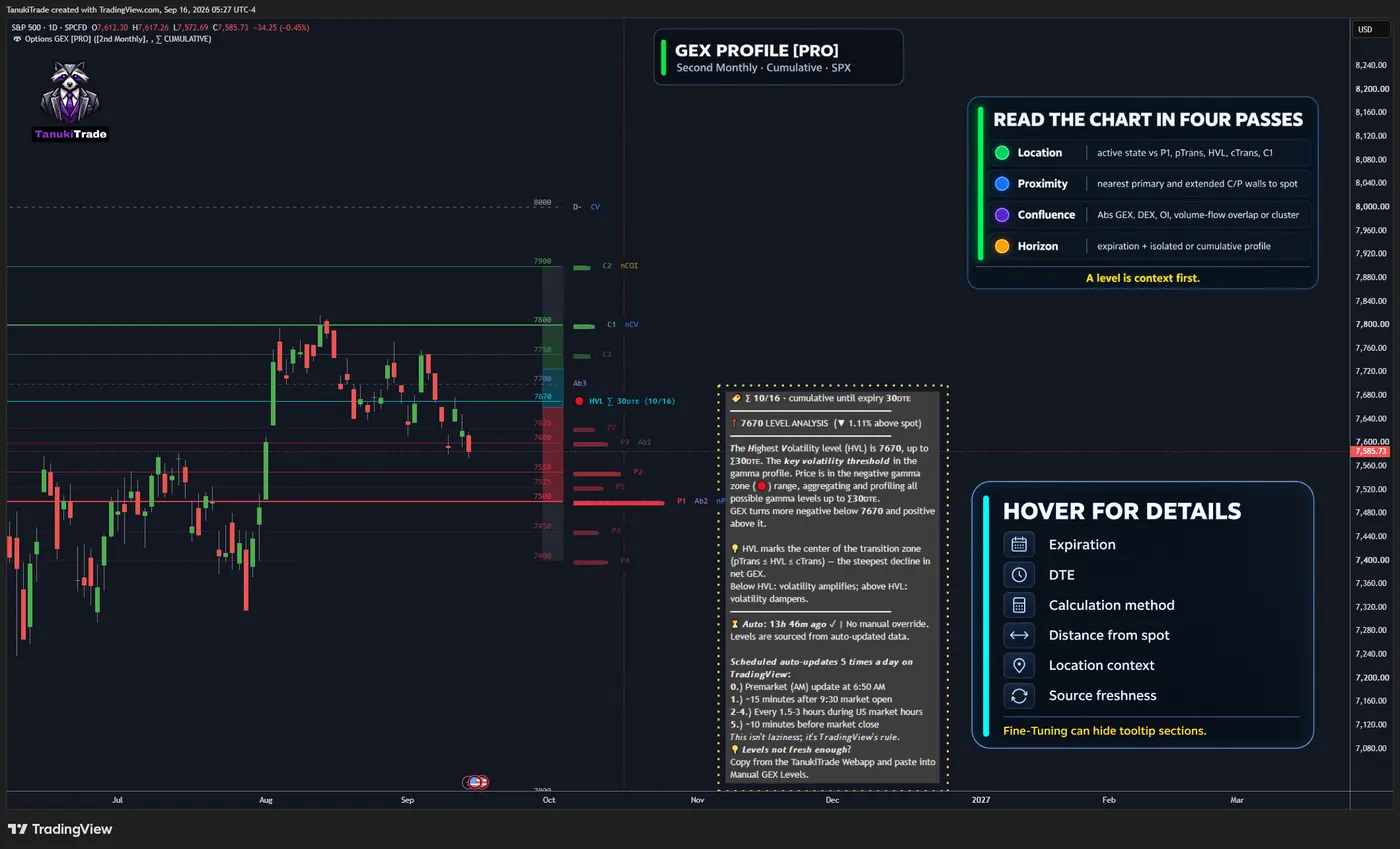
HVL hover tooltipA daily SPX chart with the HVL tooltip open. It shows the cumulative expiry horizon, the 7670 level about 1.11% above spot, a short explanation of HVL, and the data source and update schedule. The panels on the right list the four reading passes and the hover fields.Open this chart on TradingView ↗🔶 MANUAL OVERRIDE
Scheduled TradingView delivery is not tick-by-tick. If a newer compatible profile is available, paste it into Manual Override from the TanukiTrade WebApp. The script compares the pasted timestamp with scheduled data and uses the newer matching record.
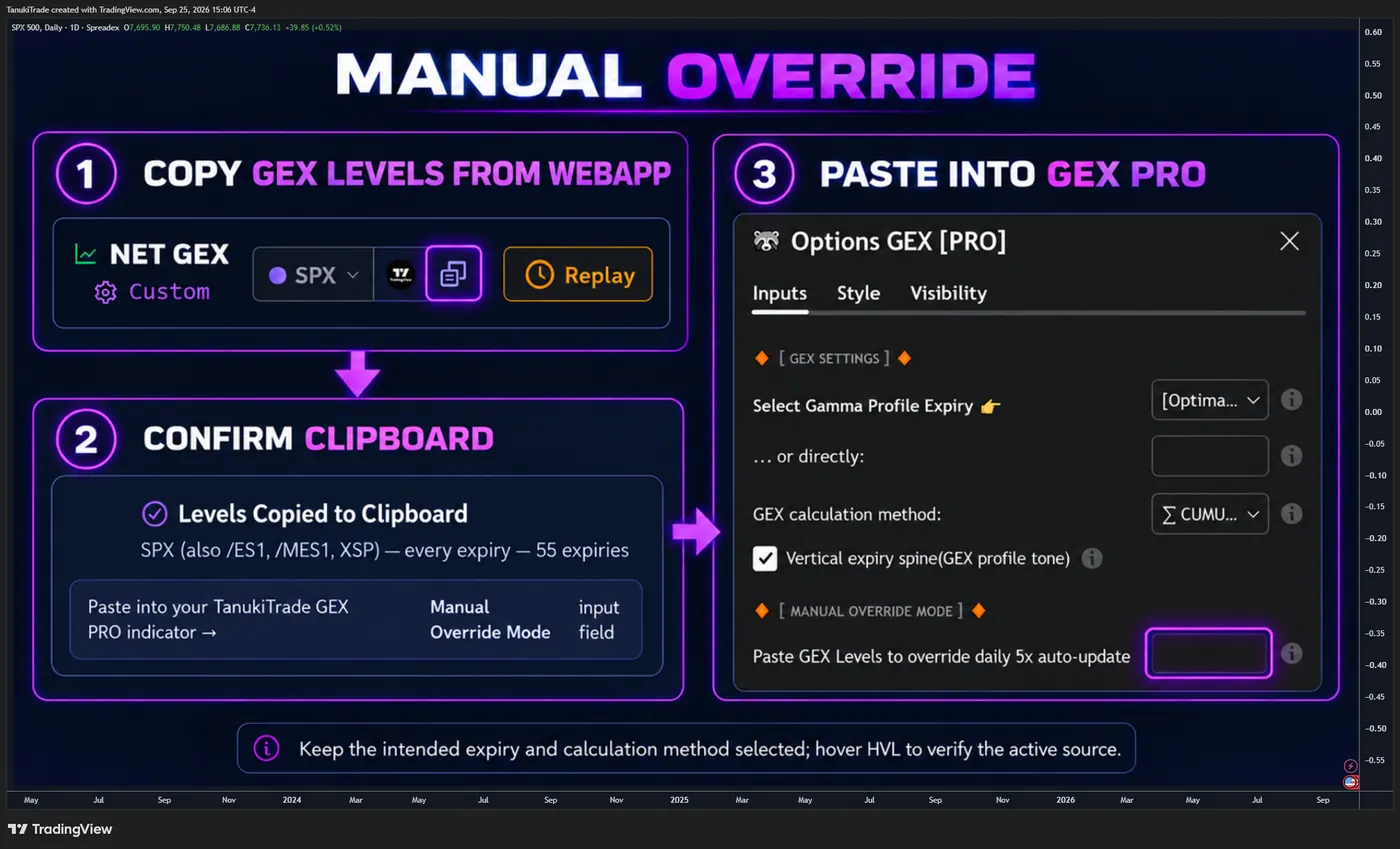
Hover status identifies whether the override is active, outdated or incompatible. A manual paste must match the symbol, expiration and calculation type. Only the matching profile can become active; unrelated profiles are unchanged. Manual Override does not turn the indicator into a live option chain.
🔶 SCHEDULED DATA DELIVERY
No manual chart refresh is normally required. TradingView receives five scheduled external-data packages on U.S. market days; see the update schedule for the delivery windows and active hours.
These windows reflect TradingView’s external-data schedule and are not tick-by-tick option-chain updates. Same-day profiles can change at these scheduled snapshots. Last refreshed reports the most recent package received by the script.
🔶 SYMBOL COVERAGE
The feed supports more than 250 liquid U.S. indices, ETFs and equities when a valid profile exists for the requested scope, including SPX, NDX, RUT, SPY, QQQ, IWM, AAPL, AMZN, META, MSFT, NVDA, TSLA, DIA, GLD, SLV, IBIT and ETHA. Check the TanukiTrade supported-symbol watchlist for the full list.
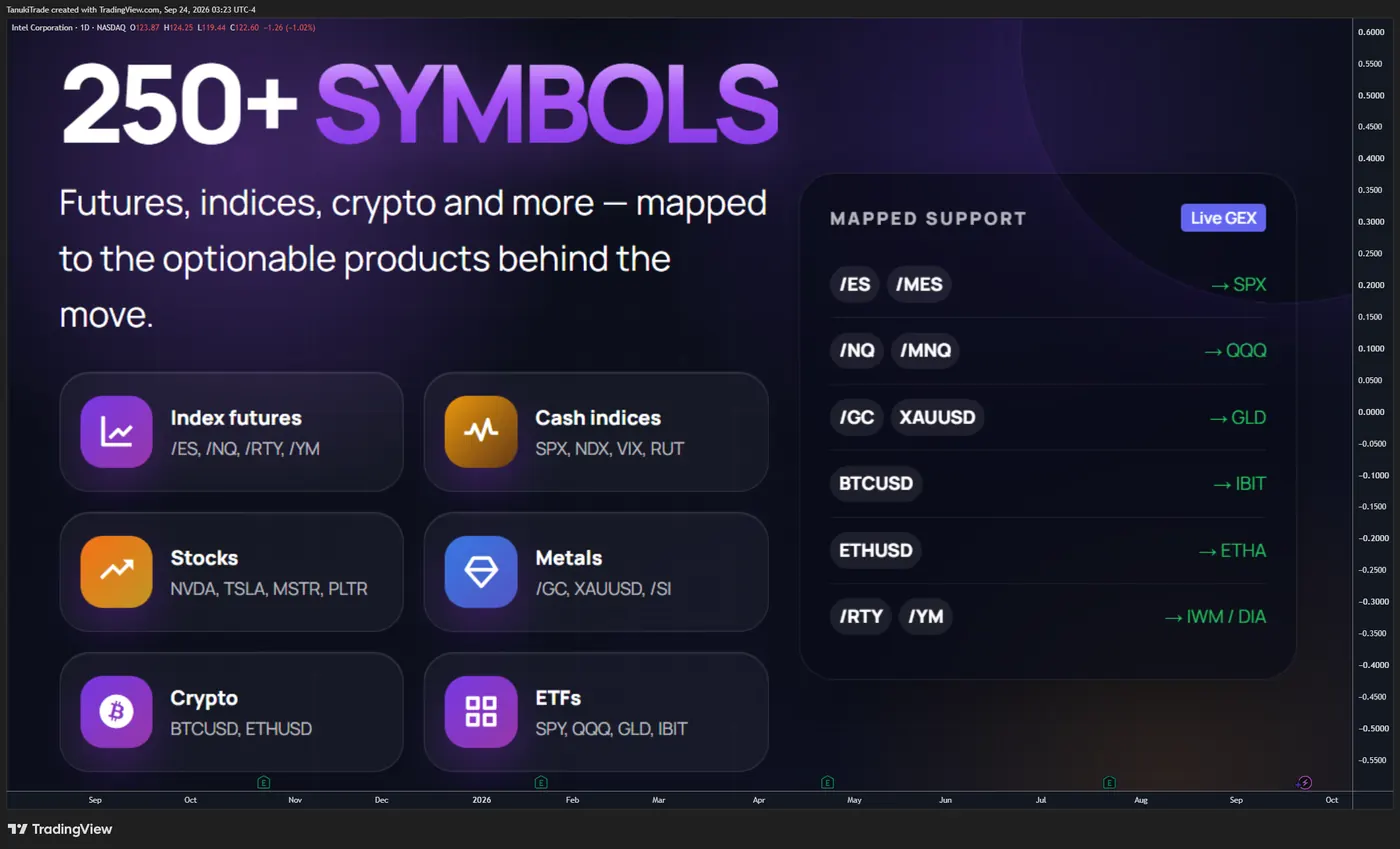
Coverage does not mean every expiration is available for every symbol on every day. In particular, not every supported underlying has a valid same-day expiration each session. Missing or invalid source data remains unavailable rather than being replaced with an estimated profile.
🔶 FUTURES, CFD, METALS AND CRYPTO MAPPING
Supported futures, CFD, metals, and crypto charts display a related liquid U.S. options profile through a daily conversion factor. See Futures mapping for the supported pairs and conversion rules.
Mapped levels are converted into the chart instrument’s price scale and rounded to the configured tick size for that instrument class. Basis differences and conversion changes can cause mapped levels to diverge from levels calculated from a native derivative options chain. The source profile remains the listed U.S. options underlying; mapping does not create native futures, CFD, metal or crypto option-chain data.
🔶 SETTINGS
🔹 Expiration & calculation
- Profile: First Expiry, First Weekly, First Monthly, Second Monthly or Every Expiry
- Method: Cumulative (⅀) or Selected Alone (⊙), where applicable
🔹 Design
- Show or hide call-side and put-side walls
- Set wall depth, colors and line presentation
- Show or hide
HVLand customize its color - Customize gamma-zone colors
🔹 Levels
- Extended walls #4–#7
- Abs GEX, DEX, Open Interest and Volume Flow, each with independent toggle, color and depth
🔹 Display Fine-Tuning
- Show or hide strike values, names, lines and bars
- Adjust font size, spacing, line width and extension direction
- Choose which tooltip sections are displayed
🔹 Manual Override (Pro)
Paste a newer matching profile snapshot when one is available.
🔶 PRACTICAL WORKFLOWS
🔹 Intraday / 0DTE
Use First Expiry and confirm that a valid same-day profile is loaded. Start with the five structural levels, then note whether price is in transition, in a POS/NEG region or beyond C1/P1. A state change is an observation—not an entry trigger.
🔹 Weekly / swing
Use First Weekly or First Monthly. Cumulative mode shows the structure carried through that horizon; Selected Alone isolates the chosen expiration. Choose the mode that matches the question being asked rather than treating one as universally superior.
🔹 Mapped futures
Keep the chart on the instrument being traded, such as /ES or /NQ, and verify the mapped options underlying. Interpret converted levels with basis risk in mind.
🔹 Cluster checks
When a C/P wall overlaps Abs GEX, DEX or an open-interest concentration, record the overlap as confluence. Then evaluate how price behaves there; do not convert the number of labels into an unsupported confidence score.
🔶 TIMEFRAME COMPATIBILITY
Use standard time-based intraday or 1D charts. The recommended working range is 15m–1D. Weekly and higher timeframes compress the daily profile context and are not the intended presentation.
If the chart is empty or appears stale, check symbol support, expiration availability, calculation mode, mapping status and Last refreshed before drawing a market conclusion.
🔶 IMPORTANT LIMITATIONS
- The profile is a recorded options-derived snapshot, not a live reconstruction of the full option chain.
- A zone classifies price location relative to model boundaries; it does not predict direction, magnitude or timing.
- POS and NEG are model-region names, not verified dealer inventory or bullish/bearish sentiment.
- Positive-side structure does not guarantee damping or mean reversion; negative-side structure does not guarantee expansion or continuation.
- C/P walls and extension states are structural references—not automatic support, resistance, breakout or reversal signals.
- Wall rank and secondary-level confluence do not represent confidence, probability or expected return.
- Scheduled data can be delayed, unavailable or stale and is not tick-by-tick.
- Same-day First Expiry profiles can update at the scheduled snapshot windows, but they are not rebuilt continuously from intraday volume.
- Values can differ across providers because data sources, timestamps, filters and GEX methodologies differ.
- Mapped instruments inherit basis, conversion and rounding risk relative to the source options profile.
- Missing or invalid data produces no valid profile rather than an estimated substitute.
- Example charts demonstrate rendering and interpretation; they are not backtests or evidence of predictive performance.
🔶 QUICK START
- Open a supported symbol on a standard intraday or 1D chart.
- Choose an expiration scope that matches your horizon.
- Use Cumulative for combined structure through that expiration, or Selected Alone to isolate it.
- Read
P1,pTrans,HVL,cTransandC1before enabling extended or secondary levels. - Identify the current location state and the nearest wall cluster.
- Hover markers to verify DTE, method, distance and data freshness.
- On mapped charts such as /ES, confirm the source options underlying.
- Validate every observation with price action, volume, volatility, liquidity and your own risk framework.
🔶 DISCLAIMER
This indicator is intended for informational, educational and decision-support purposes only.
It is not investment advice, a trade recommendation, a solicitation, a guarantee of accuracy or a promise of future performance. Options, futures, leveraged products and crypto assets involve substantial risk and are not suitable for every trader.
The indicator displays derived metrics built from delayed and scheduled options-market snapshots. It does not display exact real-time option-contract prices or independently confirm the positions and hedging activity of market participants.
Users are responsible for validating the information, understanding the instruments they trade and making their own informed decisions. TanukiTrade and the script authors accept no liability for trading losses, data interruptions, mapping differences, calculation errors or decisions made using this indicator.
Related
TanukiTrade documentation. Levels are context, not a recommendation. tanukitrade.com