
TradingView
Options Screener PRO
IVR, IVx, skew, and the gamma regime for many symbols in one table.
Lite is live on DIA, AAPL, AMZN, TSLA, and ORCL. Open the Lite script.
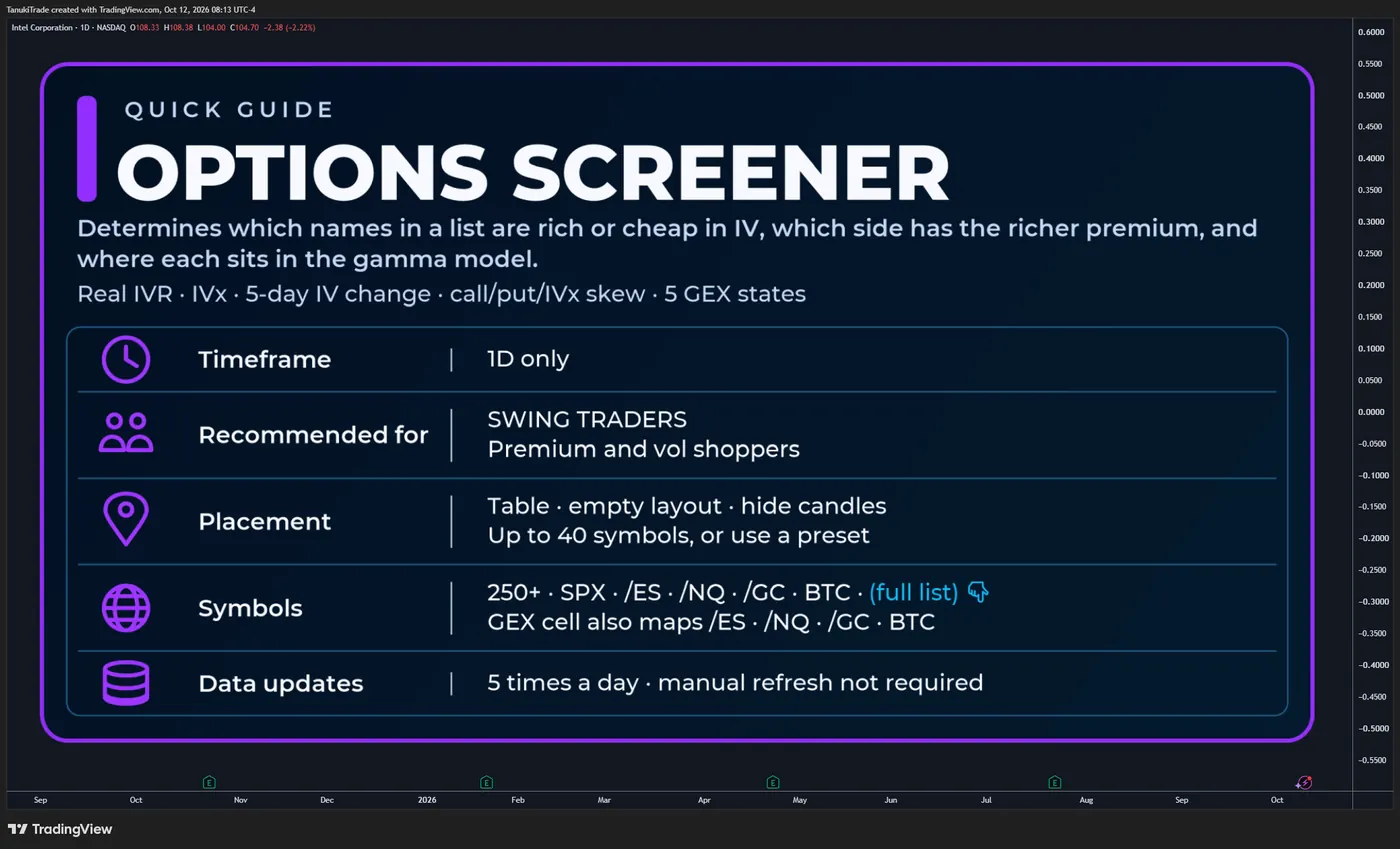
Scan IVR, IVx, call/put pricing skew, horizontal IVx skew, and the gamma regime across many underlyings in one table.
Options Screener prints those readings for each symbol in the selected list. The constructions are the same ones Options Overlay and Options Oscillator use: IV rank against the 52-week range, the IVx average for the 35–70 DTE monthly cycle, the five-day change in that average, call versus put premium at Binary Expected Move distance, and an IVx decrease between consecutive expirations. A GEX Profile cell adds the same six location states as GEX Profile, across five expiry horizons.
The screener is designed to answer:
- Which names in this list have high or low IVR relative to their own 52-week range?
- Where is the 35–70 DTE IVx average, and did it expand or contract over five sessions?
- Is call or put premium richer at equal Binary Expected Move distance?
- Does IVx decrease between consecutive weekly or monthly expirations?
- Where does each name sit in the gamma model on First Expiry, W1, M1, M2, and the cumulative ALL profile?
Options Screener does not generate entries, exits, stops, or price targets. A cell is decision-support context. It does not verify dealer inventory, forecast direction, or select a spread.
Available for 250+ liquid U.S. market symbols on the TanukiTrade supported-symbol watchlist.
🔶 WHY THIS SCREENER IS DIFFERENT
A single-symbol chart shows one options profile. This table keeps the same IVR, IVx, skew and GEX readings side by side for a list, so a name can be compared with the rest of that list before it is opened in Options Overlay.
Core functionality includes:
- IVR on a 0–100 scale against the trailing 52-week IV range
- IVx average across the 35–70 DTE monthly cycle
- Five-trading-day change in that IVx average
- Call/put pricing skew at Binary Expected Move distance for the optimal monthly expiration
- Horizontal IVx skew between consecutive weekly or monthly expirations
- GEX Profile states for First Expiry, W1, M1, M2, and ALL
- A manual list of up to 40 symbols, or a preset list
- Scheduled external-data refresh — no manual chart reload is normally required
The cells come from externally prepared options snapshots. The Pine script does not rebuild a live option chain from TradingView OHLC and does not display individual contract prices.
🔶 THE TABLE
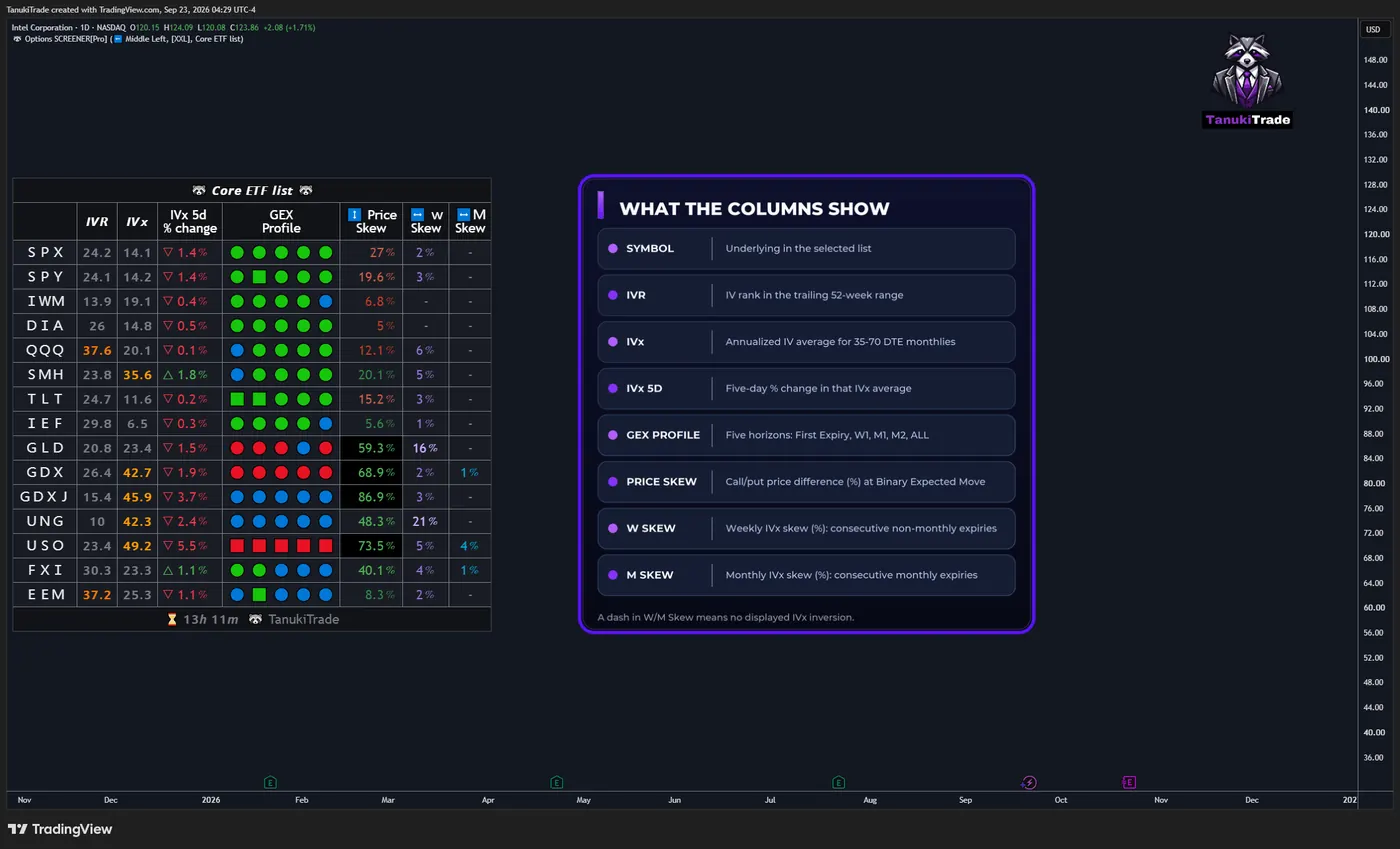
The panel is a symbol table. In the published layout the columns are:
- IVR
- IVx
- IVx 5d % change
- GEX Profile, five regime slots in one cell
- Vertical pricing skew, shown as a color-coded percentage
- Weekly and monthly horizontal IVx skew, shown as percentages in separate W Skew and M Skew columns
🔹 Hover
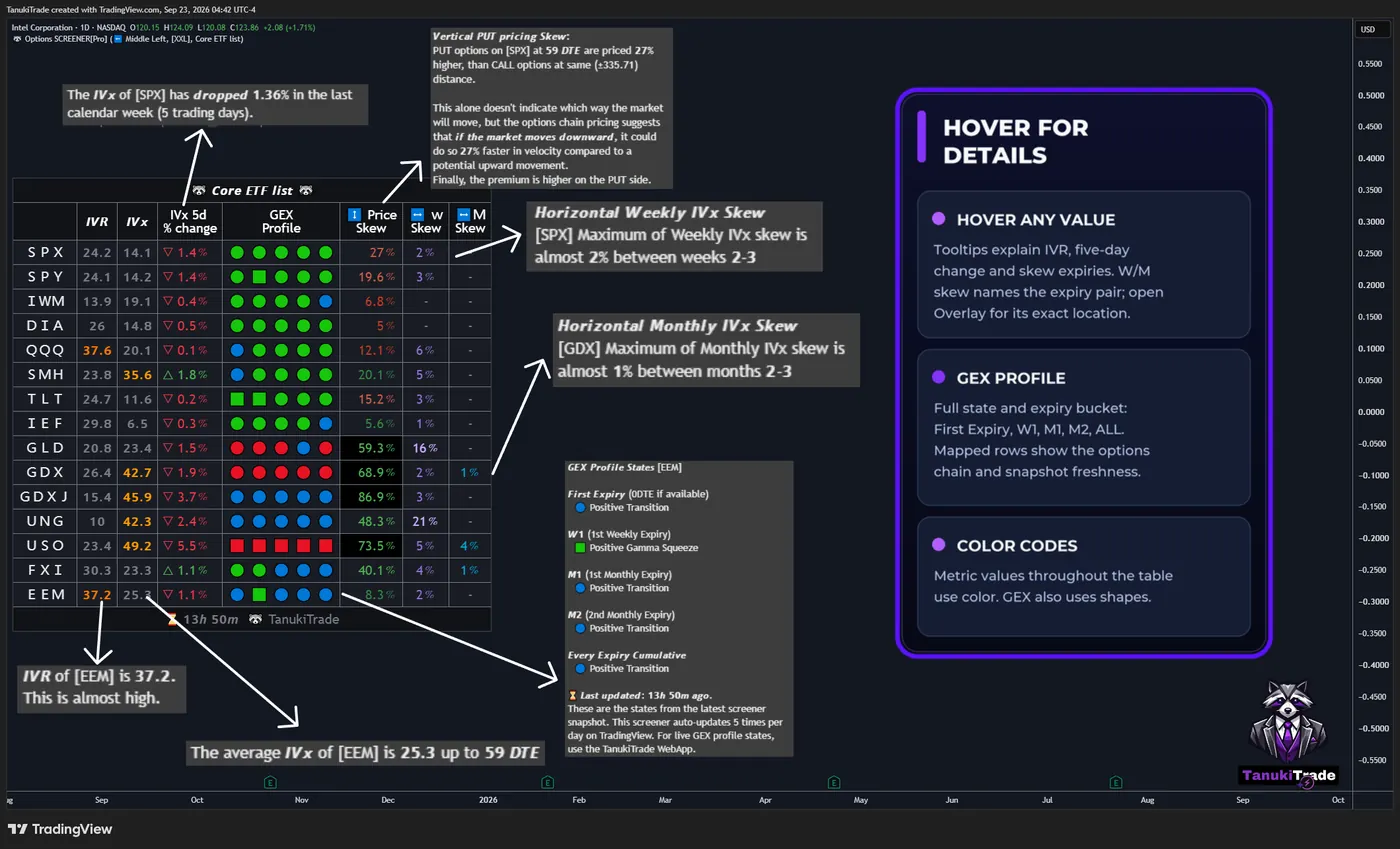
Hover a cell to read the description for that symbol: the IVR reading, the five-day change, the expiration used for a skew, or which weekly pair produced the horizontal print. The precise location of a horizontal pair is on Options Overlay, not in the table cell.
Hover a GEX Profile slot for the full state name and the expiry bucket behind it: First Expiry, W1, M1, M2, or ALL. On a mapped symbol the tooltip also names the options chain that powers that cell, and the freshness of the snapshot.
🔶 IVR
IVR is the current implied volatility’s position within its trailing 52-week range.
iv_rank = 100 * (current_iv - fifty_two_week_iv_low) / (fifty_two_week_iv_high - fifty_two_week_iv_low)IVR is a relative rank on a 0–100 scale, not implied volatility itself and not IV percentile. Cell colors mark rank buckets for reading speed. They are display coding. A low IVR does not by itself make options attractive to buy, and a high IVR does not mean premium must be sold.
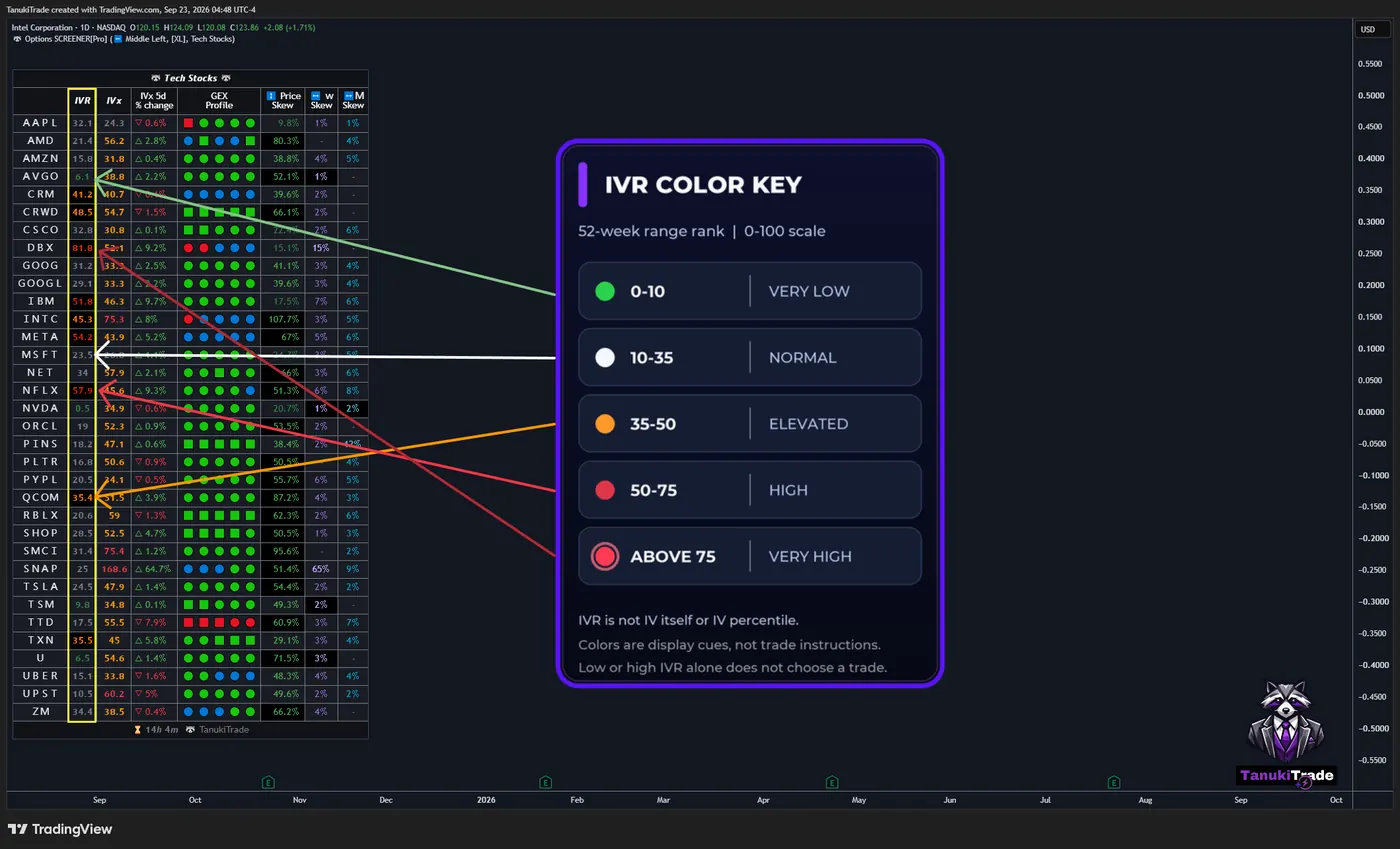
🔹 IVR color key
- 0–10 — green: very low IVR
- 10–35 — white: normal IVR
- 35–50 — orange: elevated IVR
- 50–75 — red: high IVR
- Above 75 — highlighted red: very high IVR
🔹 Darker background when IVx is above 30
If IVx is also above 30, the IVR cell background is darkened. A high IVR with a modest IVx stays on the ordinary background. The darker cell is a joint display of the two readings. It is not a separate signal.
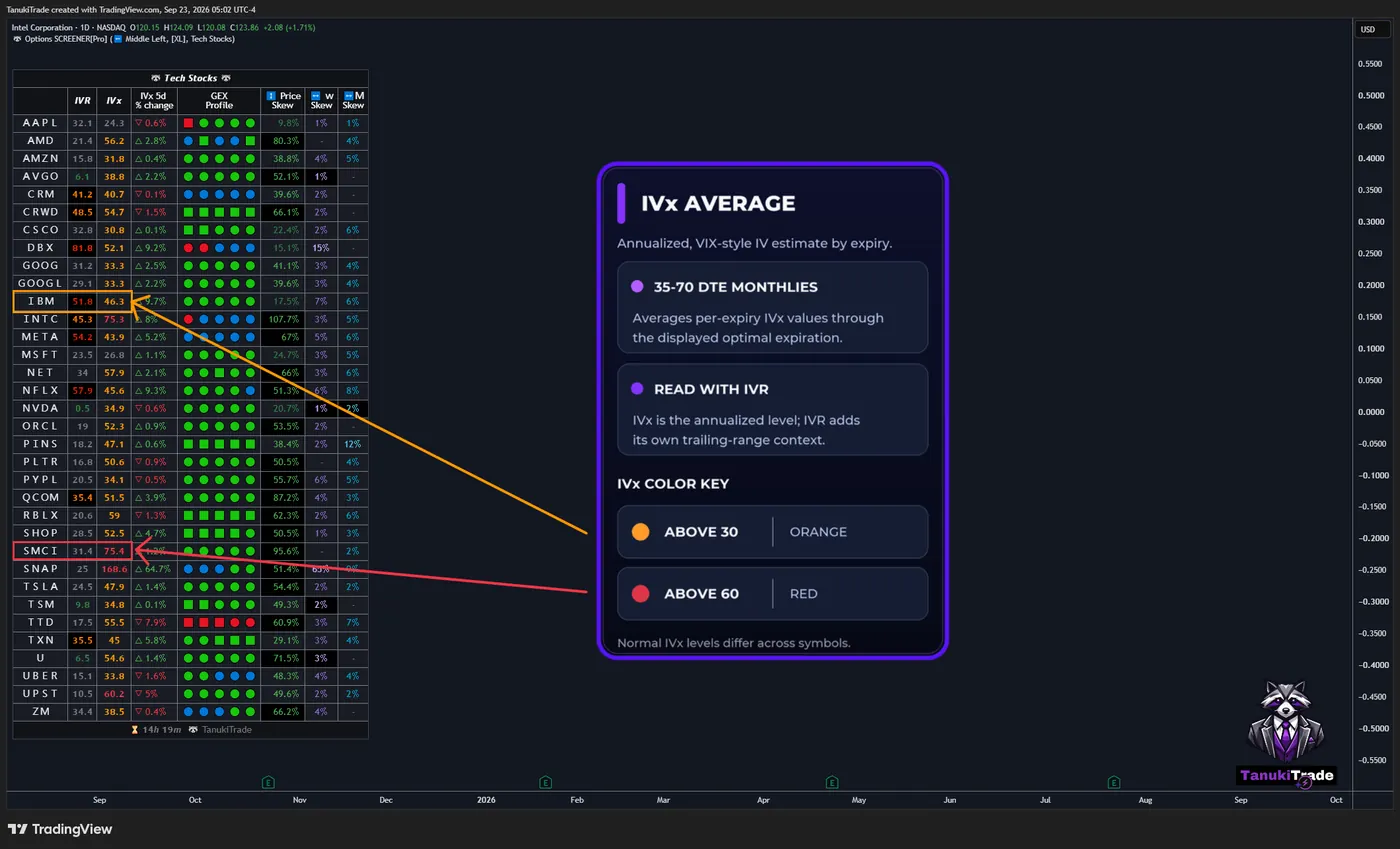
🔶 IVX AVERAGE
🔹 IVx is an expiration-level implied-volatility estimate constructed in a VIX-style framework. The screener aggregates those per-expiration values across the 35–70 DTE monthly cycle, through the displayed optimal expiration.
IVx is annualized volatility. IVR describes where current IV sits within its own trailing range. Some underlyings normally carry higher IVx than others, so the average should be read with IVR.
🔹 IVx color key
- Above 30 — orange
- Above 60 — red
These are display thresholds, not forecasts.
🔶 IVX 5-DAY CHANGE
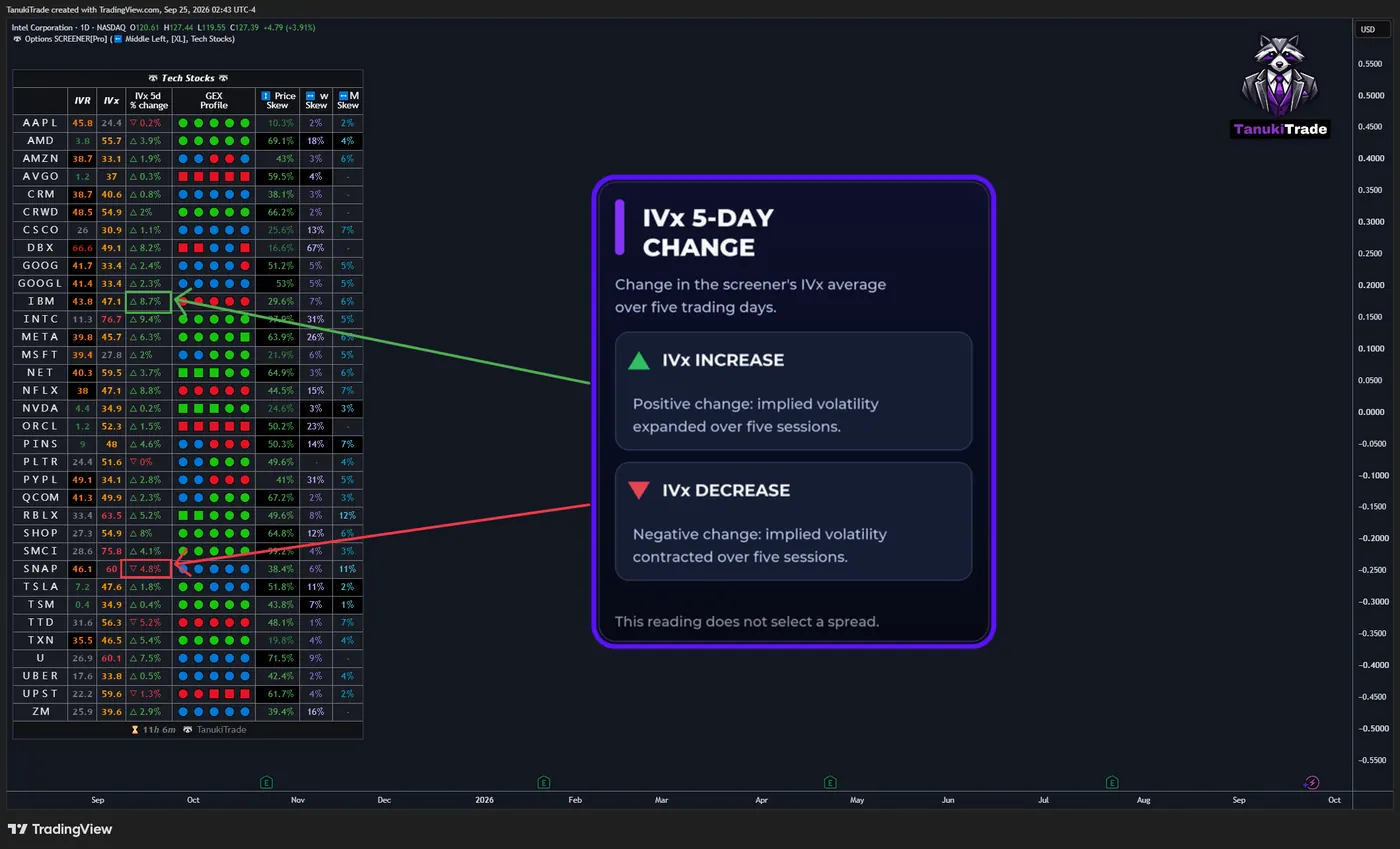
🔹 IVx 5-day change is the five-trading-day change in that IVx average. The column shows whether implied volatility has expanded or contracted over those five sessions. It does not select a spread.
🔶 VERTICAL PRICING SKEW
🔹 Vertical / call–put pricing skew
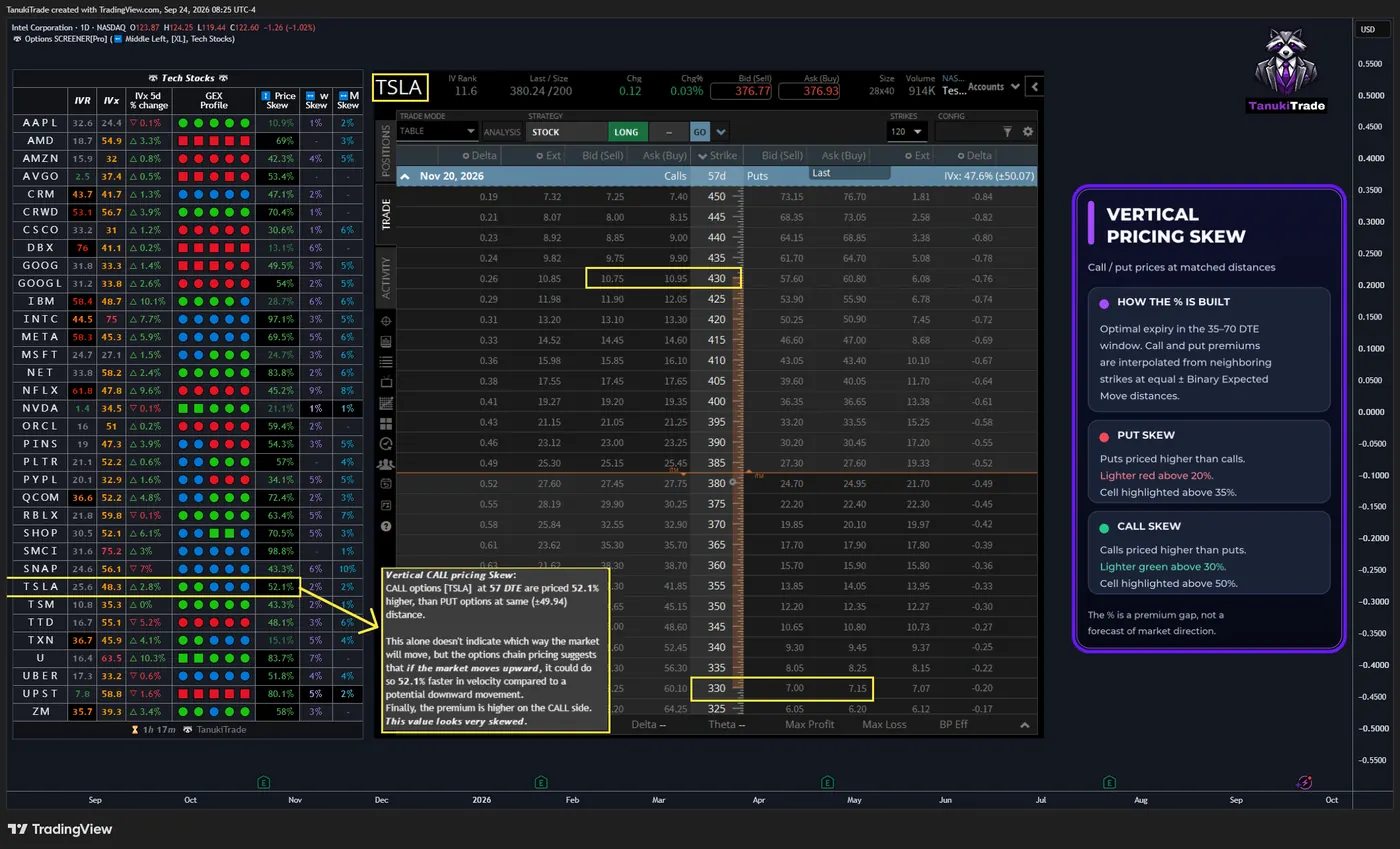
The cell is the call/put vertical pricing skew of the optimal expiration inside the 35–70 DTE window. It compares interpolated call and put premiums at equal positive and negative Binary Expected Move distances. The script interpolates each side from the neighboring strikes, then prints the percentage difference.
The percentage is a premium gap. It does not say which way the underlying must move.
🔹 Vertical skew color key
- Put skew — red. Puts are priced higher than calls at that matched distance. The red shade becomes lighter when the difference exceeds 20%.
- Call skew — green. Calls are priced higher than puts at that matched distance. The green shade becomes lighter when the difference exceeds 30%.
- The cell is highlighted when call skew is above 50% or put skew is above 35%.
🔶 BINARY EXPECTED MOVE AND STD1
Vertical pricing skew uses Binary Expected Move to select equal call- and put-side distances. STD1 is a separate range measure; it is not used to calculate the vertical skew.
🔹 Binary Expected Move
This is the options-premium-based distance for an expiration:
binary_expected_move = (atm_straddle_price * 0.6) + (first_otm_strangle_price * 0.3) + (second_otm_strangle_price * 0.1)Worked arithmetic from an example: ATM straddle 4.40, first OTM strangle 3.46, second OTM strangle 2.66.
4.40 * 0.60 = 2.640
3.46 * 0.30 = 1.038
2.66 * 0.10 = 0.266
binary_expected_move = 2.640 + 1.038 + 0.266 = 3.944 ≈ 3.94
The result is a market-pricing distance. It is not a probability guarantee that price finishes inside the band.
🔹 STD1
STD1 estimates a one-standard-deviation distance from the snapshot’s underlying price, that expiration’s IVx, and calendar time to expiration:
standard_expected_move = closing_price * implied_volatility * math.sqrt(days_to_expiration / 365.0)Under the conventional lognormal interpretation, ±1σ corresponds to roughly 68% of modeled outcomes. This is a model assumption, not an empirical guarantee for the selected symbol or expiration.
BEM uses weighted option premiums. STD1 uses IVx and time. In the product model, BEM is the narrower inner distance and STD1 the wider one. The gap between them is the difference of those two constructions. It is not a third expected-move metric.
🔶 HORIZONTAL IVX SKEW
🔹 Horizontal IVx skew
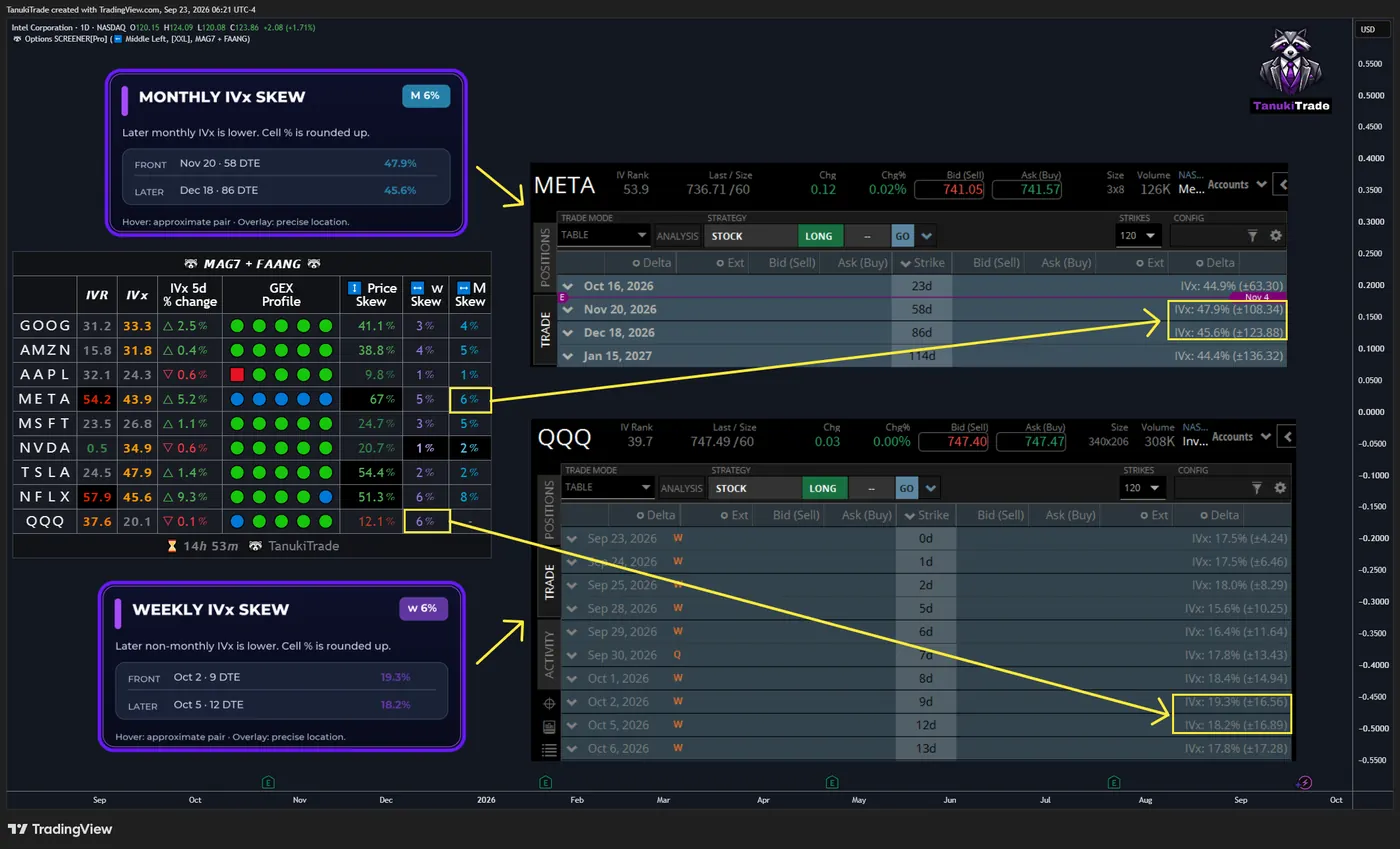
The IVx term structure compares implied volatility across expirations. It slopes upward when the later expiration has higher IVx (contango), is flat when the readings are equal, and slopes downward when the later expiration has lower IVx (backwardation). In this indicator, “horizontal IVx skew” is the name of the displayed measure: it reports the IVx decrease between two consecutive listed expirations, not every difference in the term structure.
back_expiry_ivx < front_expiry_ivxThe displayed value is the percentage difference, rounded up. Hover shows the approximate location of that pair. The precise location is on Options Overlay. If the later expiration’s IVx is equal to or higher than the front expiration’s IVx—flat or upward-sloping term structure—the cell stays empty.
🔹 Weekly horizontal IVx skew
Weekly skew is an IVx decrease between two consecutive non-monthly expirations. The cell marks it w.
Weekly horizontal skew may carry little information on symbols that are not in the Weeklies & Volume Masters preset.
🔹 Monthly horizontal IVx skew
Monthly skew is an IVx decrease between two consecutive monthly expirations. The cell marks it M.
Check bid–ask spreads, volume and open interest for the actual expiration pair; monthly expirations are not automatically liquid on every symbol.
🔹 Horizontal display rules
- When IVR is in the green, very-low bucket, the horizontal-skew background turns black.
- When the skew percentage is greater than 10, the font turns lighter.
🔶 GEX PROFILE
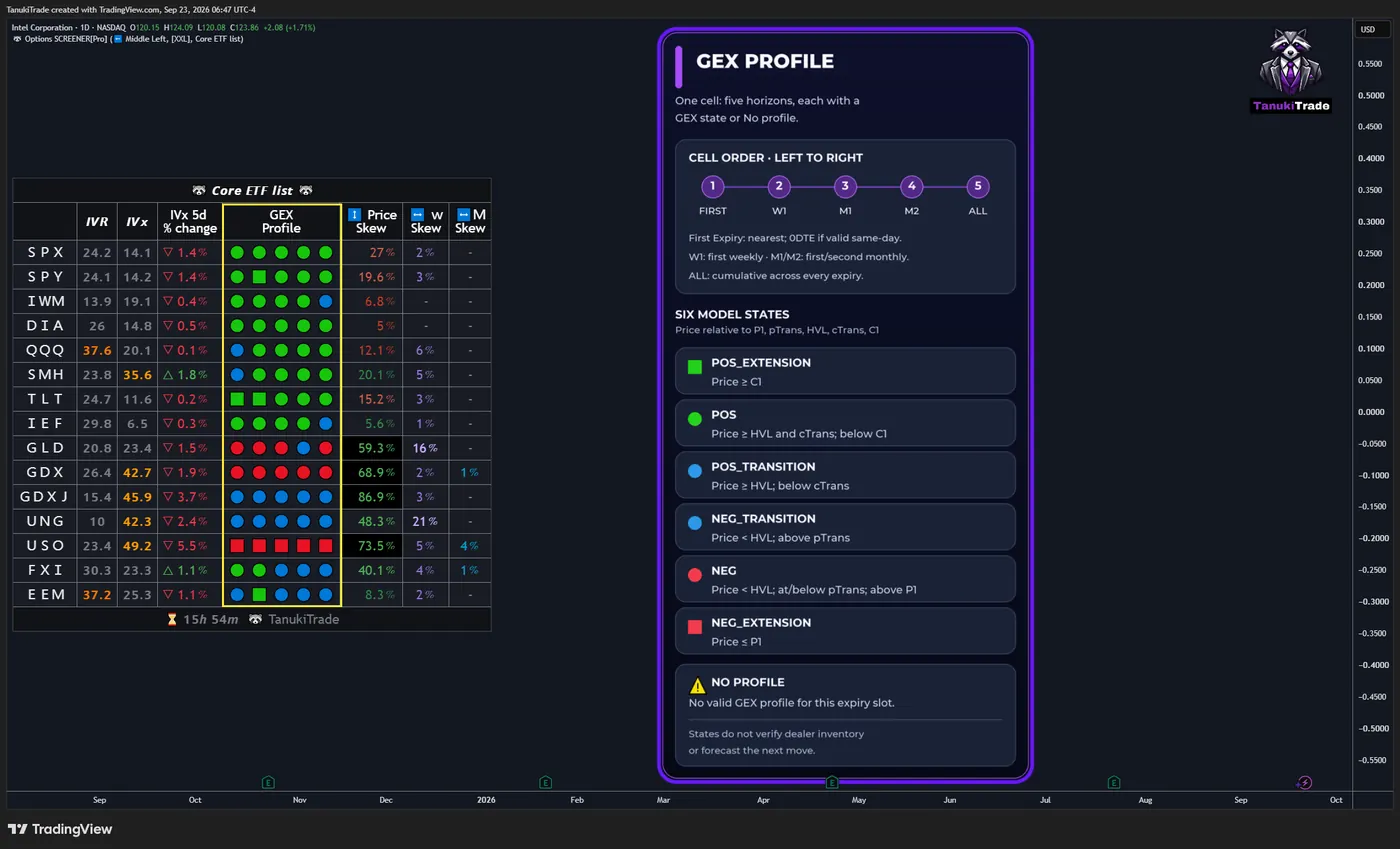
The GEX Profile cell is the gamma regime for that row, using the same location states as GEX Profile. One cell holds five slots, in this order:
- First Expiry — nearest expiry, 0DTE when a valid same-day profile exists
- W1 — first weekly expiry
- M1 — first monthly expiry
- M2 — second monthly expiry
- ALL — every-expiry cumulative profile
🔹 GEX Profile states
Each slot shows one of the six model states, or ⚠️ No profile when that horizon has no valid profile. The state describes where price sits relative to P1, pTrans, HVL, cTrans, and C1. It does not verify dealer inventory or forecast the next move.
- 🟩 POS_EXTENSION — price is at or above
C1 - 🟢 POS — price is at or above
HVLandcTrans, and belowC1 - 🔵 POS_TRANSITION — price is at or above
HVLand belowcTrans - 🔵 NEG_TRANSITION — price is below
HVLand abovepTrans - 🔴 NEG — price is below
HVLand at or belowpTrans, and aboveP1 - 🟥 NEG_EXTENSION — price is at or below
P1 - ⚠️ No profile — no valid GEX profile was available for that expiry slot.
🔹 Mapped charts
On supported mapped futures, metal, CFD, or crypto charts, the GEX Profile cell uses a related liquid U.S. options chain and a conversion into that chart’s price scale. The cell does not build a profile from the futures or spot option chain itself. See Futures mapping for the supported pairs and screener scope.
IVR, IVx, and skew stay on the listed U.S. options underlyings. The mapped reading is the GEX Profile cell.
🔶 LAYOUT
The table is easier to read on a layout that is not competing with candles, events, and the default grid.
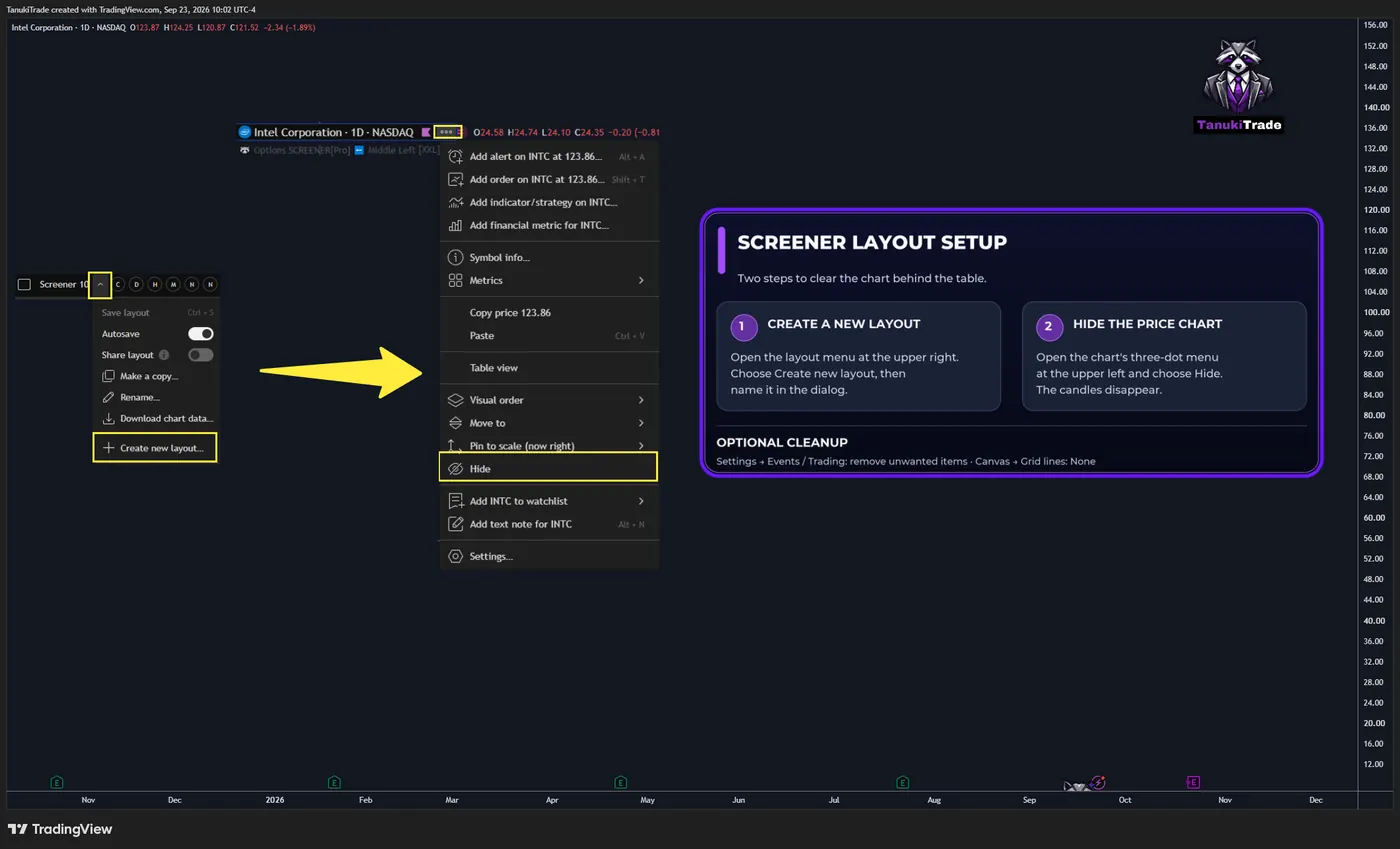
🔹 New empty layout
Open the layout menu in the upper right and create a new layout. Name it in that window. Open the three-dot menu at the upper left of the chart and choose Hide, so the price series is not drawn behind the table.
🔶 SETTINGS
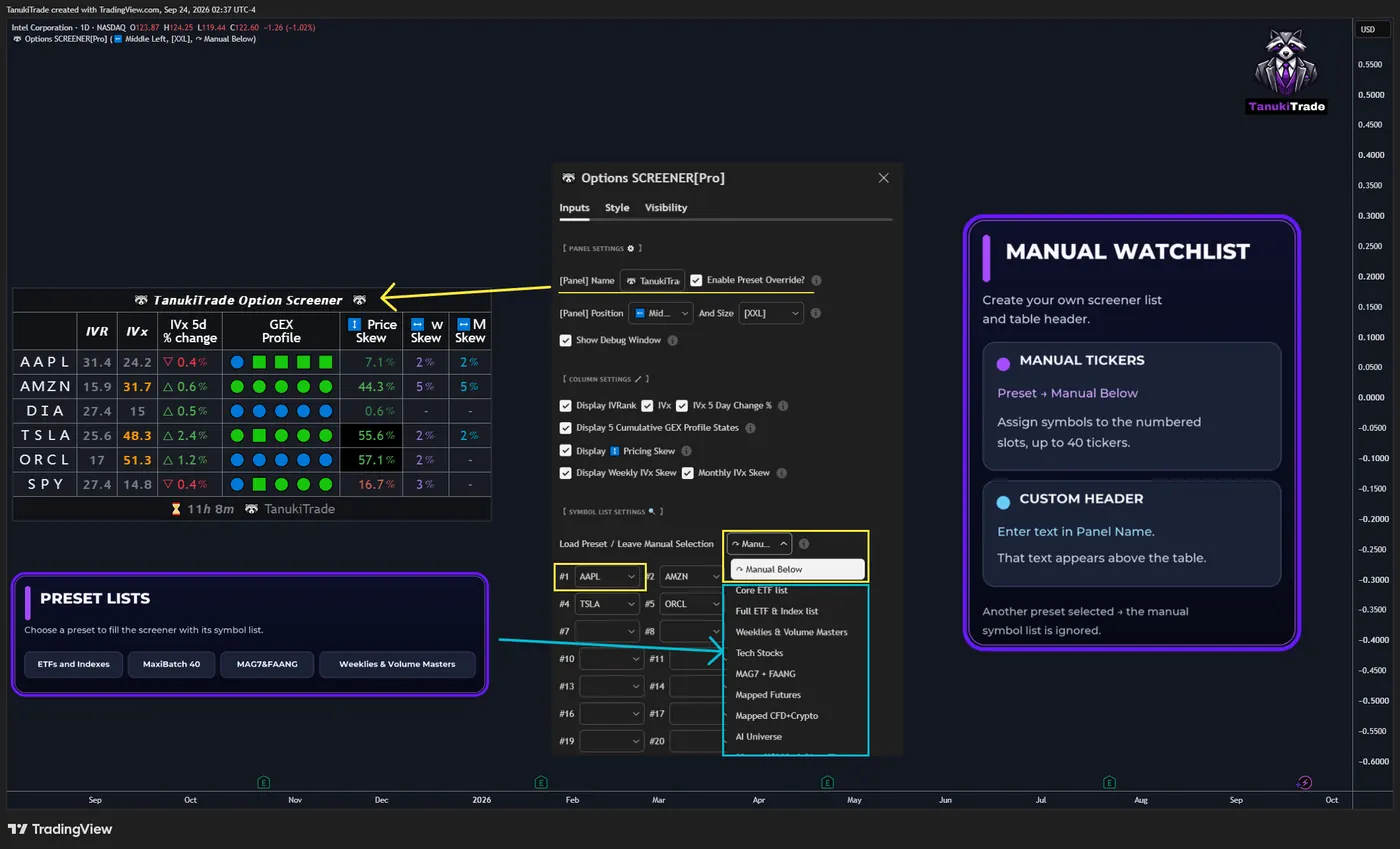
Font size, including XXL, table position, and the panel header text are settings. The symbol list has two modes.
🔹 Manual Watchlist
Choose Manual Below in the Preset dropdown. The table then uses the symbols you assign to the numbered slots, up to 40. The panel header is the header text you enter. The manual list is ignored whenever another preset is selected.
🔹 Preset list
Any preset other than Manual Below replaces the manual slots with that preset’s symbols. Presets named in the published dialog include ETFs and Indexes, the MaxiBatch 40 groups, and MAG7&FAANG (AAPL, AMZN, GOOG, META, MSFT, NVDA, TSLA, NFLX, and QQQ). Weeklies & Volume Masters is the preset named in the weekly horizontal-skew note.
🔶 BEST PRACTICES
🔹 Every preset on a new layout
After the layout steps above, put each preset on its own layout. That layout is one window with one split.
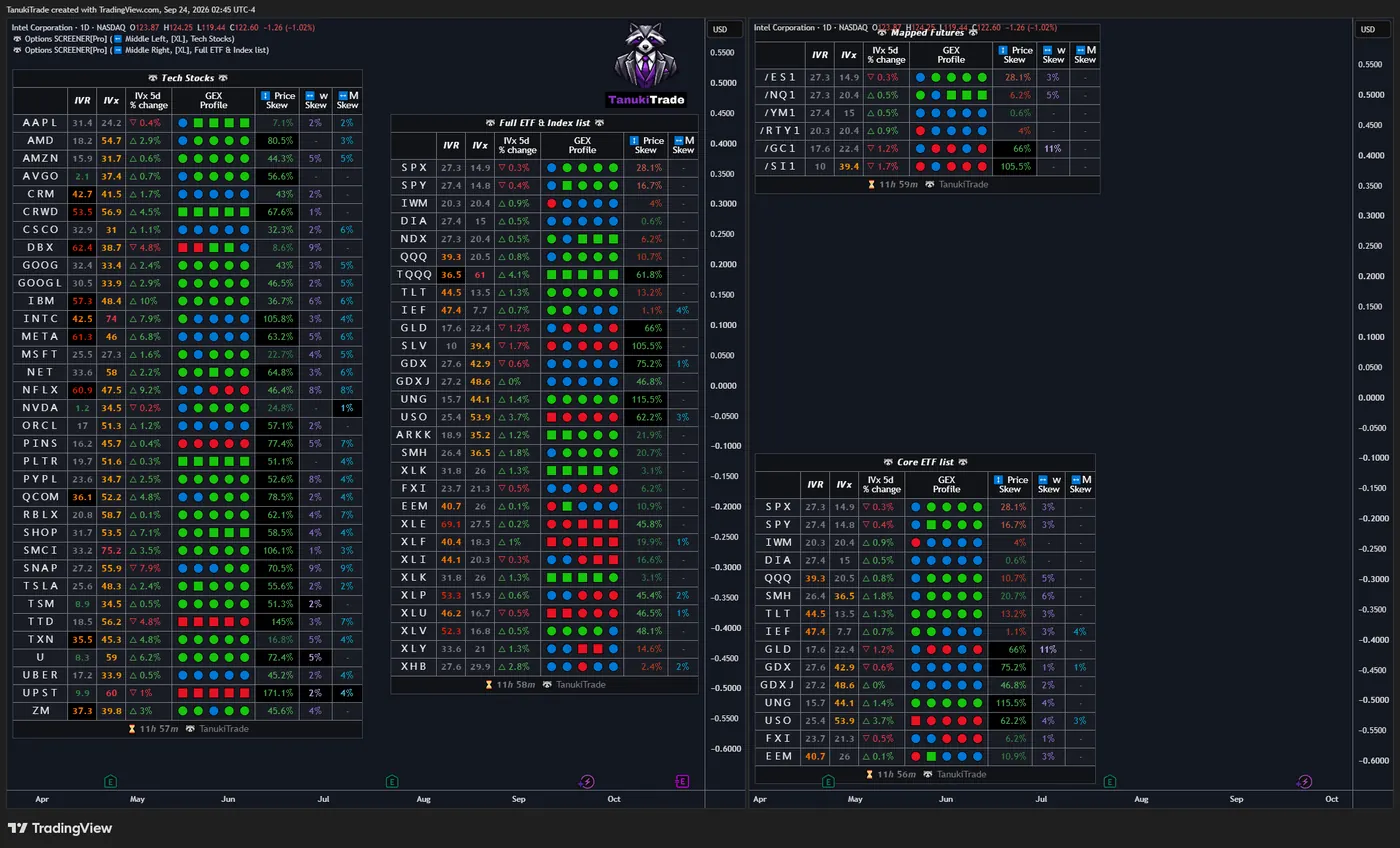
🔹 Split layout
The left side is the underlying with Options Overlay: IVR, deltas, expected move, STD1, and skew, plus the Murrey Math lines and the expiry lines. The right side is the screener.
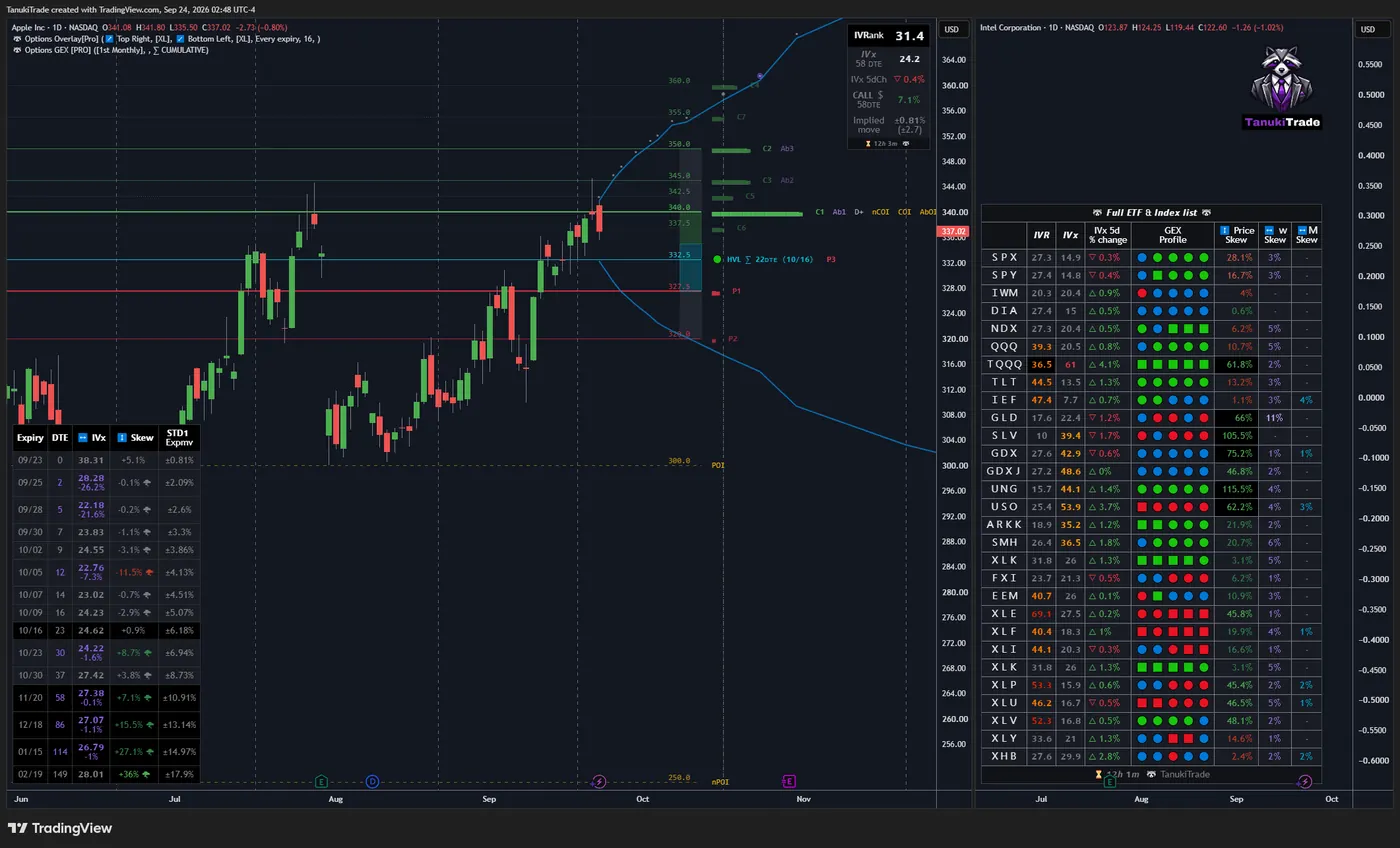
🔶 SCHEDULED DATA DELIVERY
No manual chart refresh is normally required. The screener reads five scheduled snapshots on a U.S. market day; see the update schedule for the delivery windows and active hours.
These windows reflect TradingView external-data scheduling, not tick-by-tick option-chain updates. The time elapsed since the last update is shown at the bottom of the indicator.
Broker IV and IVx can differ from these snapshots because platforms may use different inputs, rates, dividend assumptions, interpolation, and timestamps. The screener follows the IVR, IVx, Binary Expected Move, and STD1 constructions above.
🔶 SYMBOL COVERAGE
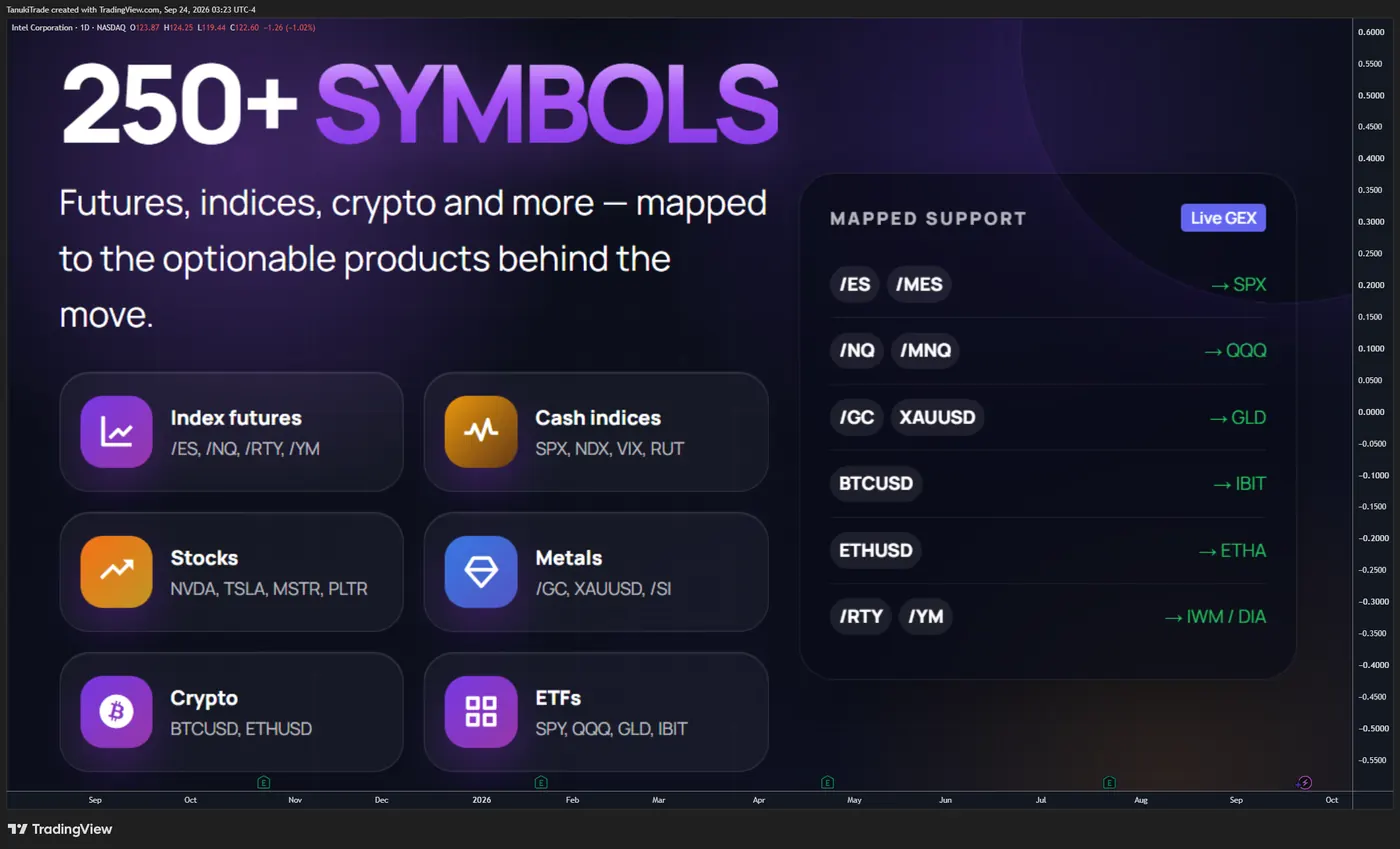
The feed covers more than 250 liquid U.S. indices, ETFs, and equities when valid options-derived data exists, including SPX, SPY, QQQ, TLT, and GLD. Those standard rows use their listed U.S. options roots. On selected futures, metals, CFD, and crypto-proxy chart symbols, mapping applies to the GEX Profile cell as described above (Futures mapping); it does not create native IVR, IVx, or skew readings from the displayed derivative’s own options chain. Full list: TanukiTrade supported-symbol watchlist.
A symbol with no valid options-derived snapshot stays blank rather than being replaced with an estimated row.
🔶 TIMEFRAME COMPATIBILITY
Use a 1D chart. That is the resolution these daily snapshots are built for. If a cell or the time-since-update looks wrong, switch the chart to 1D before treating the print as a data fault.
🔶 IMPORTANT LIMITATIONS
- The cells are derived snapshots, not a live option chain and not contract prices.
- IVR is a range rank, not IV percentile, and the color buckets are not a buy-premium or sell-premium instruction.
- IVx, including a darkened IVR cell when IVx is above 30, does not forecast the next move in volatility.
- The five-day change does not select a spread.
- Call/put skew is the premium difference at equal Binary Expected Move distance. The percentage is not a forecast of direction.
- Horizontal skew is an IVx decrease into the later expiration. When valid data for the expiration pair is available, an empty horizontal-skew cell means no inversion was detected. An empty cell can also result from missing or invalid source data; check the tooltip and snapshot freshness before interpreting it. A black background or a lighter font is a display rule, not a calendar entry.
- Weekly horizontal skew can be thin on names outside the Weeklies & Volume Masters preset.
- A GEX Profile slot classifies price against that horizon’s model boundaries. It does not predict direction or magnitude.
- Monthly and Friday expirations follow the U.S. holiday calendar. The June monthly expiry accounts for Juneteenth.
- Scheduled external data is not tick-by-tick and can be delayed or temporarily unavailable.
- A missing or invalid source snapshot produces no print rather than an estimated substitute.
- A mapped GEX Profile cell uses the source options chain and the conversion into the chart’s price scale.
- Example tables demonstrate the cells. They are not evidence of how often a reading is followed by a particular move.
🔶 QUICK START
- Create an empty layout, hide the candles, and clear the events, trading marks, and default grid if they crowd the table.
- Open a supported symbol on a 1D chart and add the screener.
- Choose Manual Below and fill up to 40 symbols, or choose a preset and leave the manual slots unused.
- Read IVR together with IVx and the five-day change. A darkened IVR cell means IVx is also above 30.
- Read vertical skew as the monthly premium gap at Binary Expected Move distance.
- Read a w or M in the horizontal column as an IVx decrease between those expirations. Hover for the approximate pair; open Overlay for the precise location.
- Read the GEX Profile cell from First Expiry through ALL. Hover a slot for the state name and, on a mapped symbol, the source chain.
- Check the time since the last package before treating a row as stale.
- Validate every observation with price, liquidity, and your own risk framework.
🔶 DISCLAIMER
This indicator is intended for informational, educational, and decision-support purposes only.
It is not investment advice, a trade recommendation, a solicitation, a guarantee of accuracy, or a promise of future performance. Options, futures, leveraged products, and crypto assets involve substantial risk and are not suitable for every trader.
The indicator displays derived IV, skew, expected-move, and GEX-profile metrics from delayed and scheduled options-market snapshots. Exact real-time option-contract prices are not displayed.
Users are responsible for independently validating the information, understanding the instrument they trade, and making their own informed decisions. TanukiTrade and the script authors accept no liability for trading losses, data interruptions, calculation errors, or decisions made using this indicator.
Related
TanukiTrade documentation. Levels are context, not a recommendation. tanukitrade.com