
TradingView
Chart layouts you can copy.
These optional TradingView layouts provide ready-made starting setups in dark and light themes. Open a template, save a copy to your TradingView account, and customize which indicators or panels stay visible.
Available templates
Each style is available in a dark and a light theme. The original TradingView layout names are shown for reference.
1D and multi-day · First Monthly

- GEX Profile PRO
- Options Overlay PRO
- Options Oscillator PRO
- GEX History PRO
5m / 15m · Nearest expiry & 0DTE

- GEX Profile PRO
- Options Overlay PRO
- 0DTE Expected Move Box PRO
How to copy a layout
- Complete Access and setup first so your TradingView account has access to the Invite-only PRO indicators.
- Open one of the layout links above in TradingView and use TradingView's Make a copy option to save your own version.
- Confirm that Scale price chart only is enabled on the right-hand price scale so distant levels do not compress the candles.
Swing layout
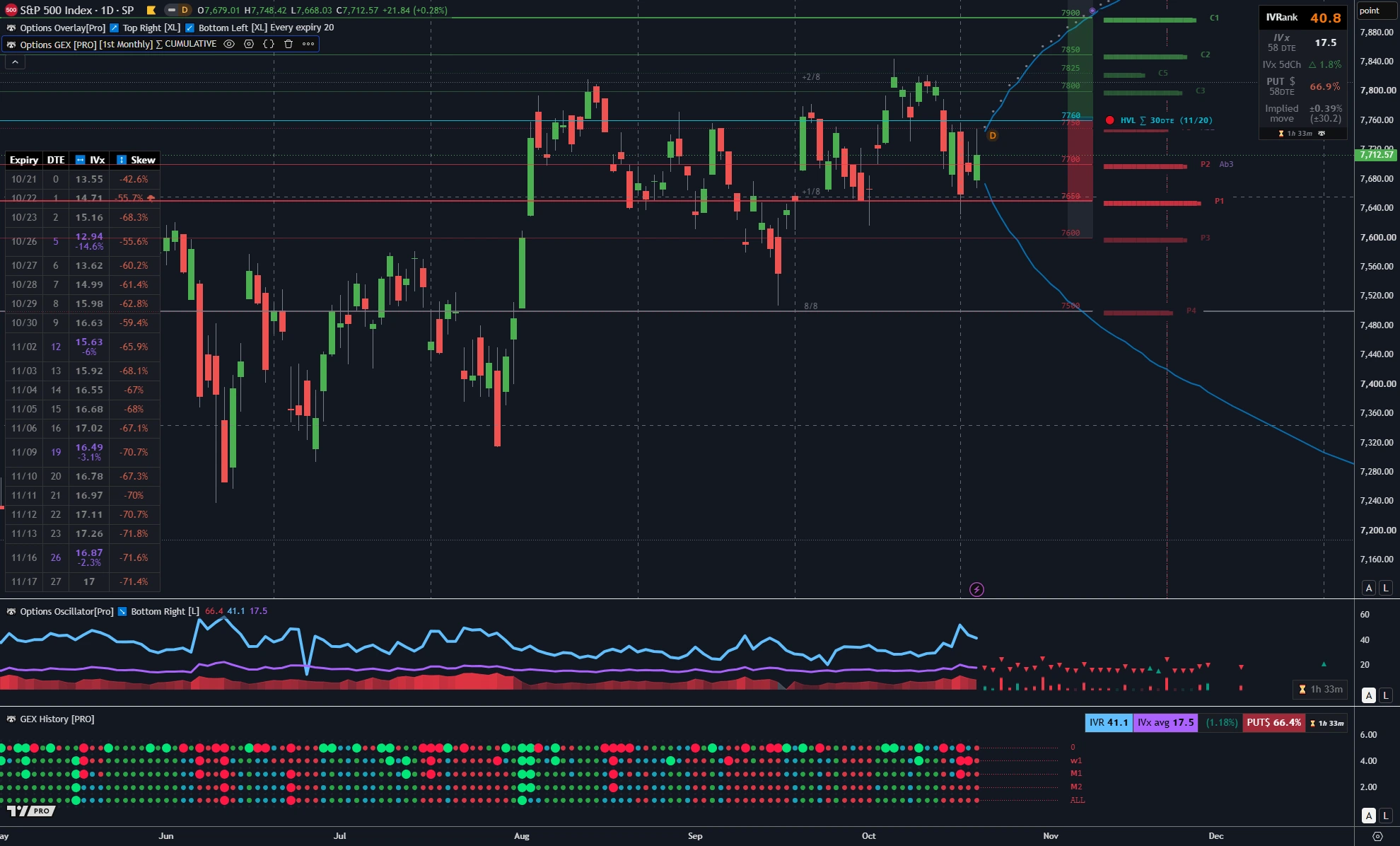
What it is for. Built for daily (1D) and multi-day analysis, where you want to compare monthly gamma structure, forward volatility curves, and multi-expiry tables alongside historical volatility and multi-expiry gamma-state timelines.
What it includes
- GEX Profile PRO set to a monthly horizon (such as First Monthly) to display wider gamma walls,
HVL, and transition zones. - Options Overlay PRO with the forward delta / expected-move curves, the Murrey grid, the top-right volatility summary (
IVRank,IVx,Skew,Implied move), and the bottom-left Expiry table across upcoming expirations. - Options Oscillator PRO in the first lower pane to track
IVR,IVx, and call/put skew over time. - GEX History PRO in the bottom pane to show how the gamma state evolved across five expiry horizons (
0,W1,M1,M2,ALL).
What it leaves out and why
- 0DTE Expected Move Box PRO is omitted because it measures same-day session ranges rather than multi-week swing structure.
- Options Screener PRO is left off the single-symbol chart template so the table does not cover the daily candles and expiry table. You can open it on a separate scanning tab or use the WebApp Options Screener.
Day-trading layout
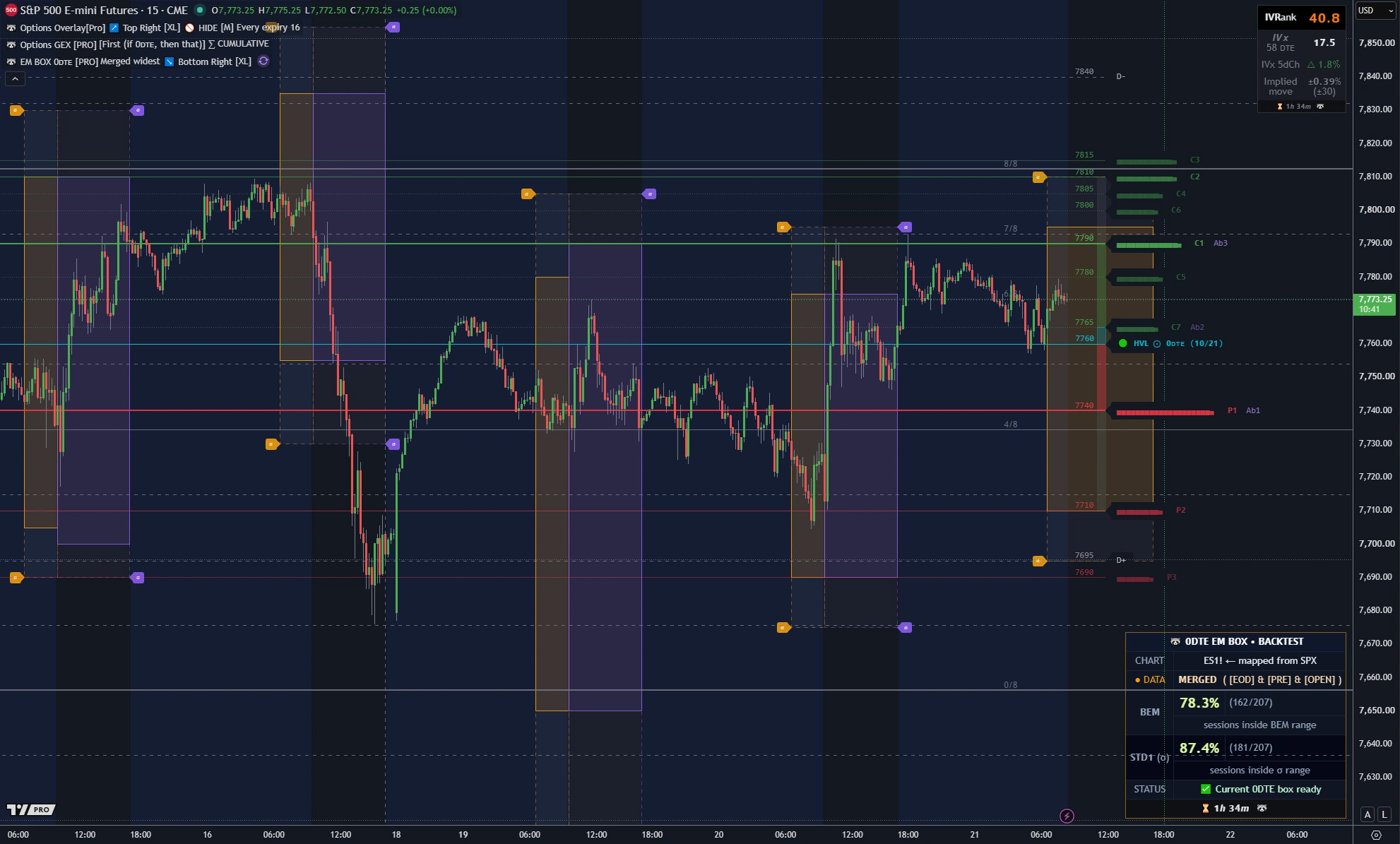
What it is for. Built for intraday timeframes (such as 5m or 15m), combining nearest-expiry gamma levels, a compact volatility overlay, and same-day 0DTE expected-move boxes.
What it includes
- GEX Profile PRO set to First expiry so the chart focuses on the nearest expiration's
HVL, call wall, and put wall. - Options Overlay PRO configured for a clean intraday view: the compact top-right summary box (
IVRank,IVx,Implied move, and countdown) and the Murrey grid stay visible, while the multi-expiry table and long-dated curves are hidden so they do not cover intraday candles. - 0DTE Expected Move Box PRO to plot the options-implied session range (EOD, premarket, and cash-open snapshots, plus STD1) and the bottom-right backtest summary table.
What it leaves out and why
- Options Oscillator PRO and GEX History PRO are omitted because their multi-month lower panes are designed for swing analysis and would take vertical space away from intraday candles.
- The multi-expiry table and forward curves in Options Overlay PRO are turned off to keep the canvas focused on the current session.
- Options Screener PRO is omitted so the intraday price action and 0DTE boxes remain unobstructed.
TanukiTrade documentation. Levels are context, not a recommendation. tanukitrade.com